Dreamy Room Level 239 Walkthrough
Welcome to the Dreamy Room Level 239 walkthrough. This guide will assist you in achieving the perfect arrangement needed to complete the level, focusing on detail and symmetry.
Step-by-Step Guide
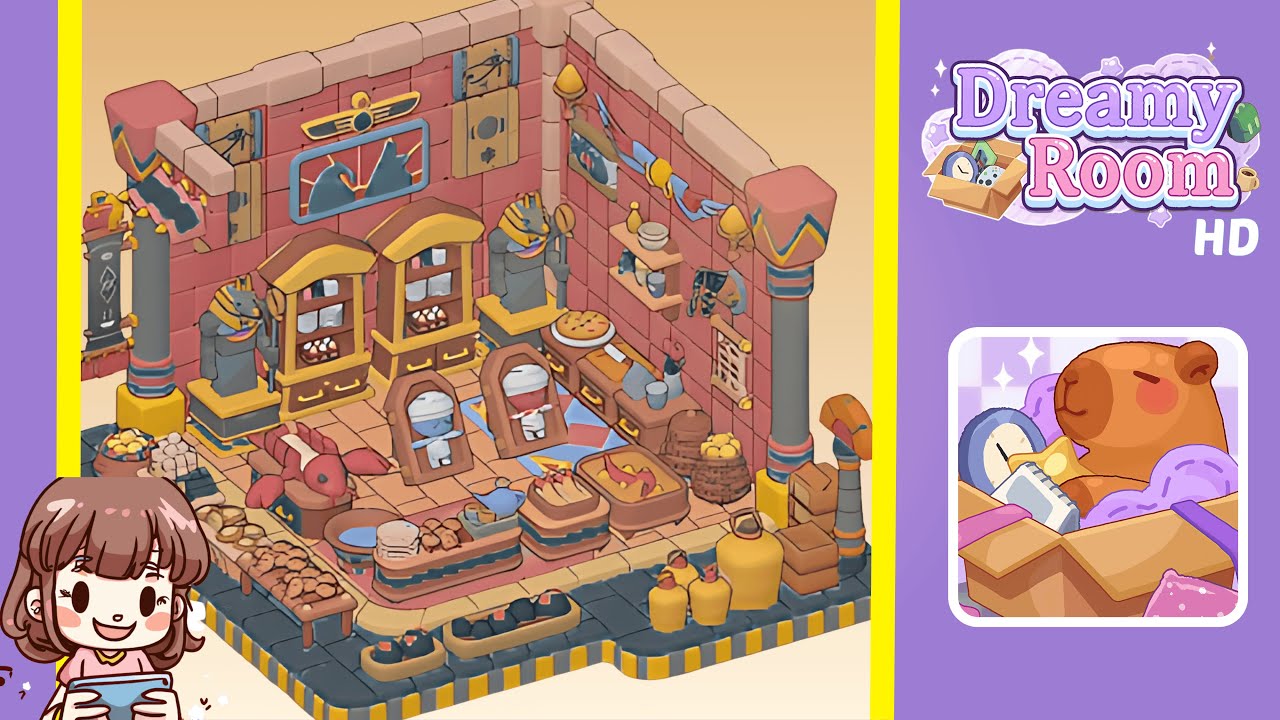
- Hang the central picture frame and motif panels on the back wall. Begin by aligning the large sky-blue picture frame between the corner columns and securing the smaller sandy-gold motif panels on either side.
- Position the display cabinets and Anubis statues. Place the cabinets with yellow roofs flush against the back wall and position the Anubis statues on each side to enhance symmetry.
- Lay the triangular rug and open the mummy sarcophagi, ensuring precise alignment to maintain floor balance.
- Attach floating shelves, pottery, vine, and winged disc emblem on the right back wall cluster.
- Install wall sconces and the tasseled scroll banner on the side walls for lighting and visual interest.
- Mount the green awning and decorative picture boards on the left column, ensuring tassel symmetry.
- Arrange front-left produce, eggs, and baked goods, paying close attention to spacing and alignment.
- Place front-right crates, jars, and vintage handset, making sure each item occupies its correct tile for a harmonious finish.
Notes & Precautions
- Alignment Matters: Ensure all items snap precisely into their intended tiles.
- Symmetry is Key: Decorations like statues and sconces must mirror each other.
- Layering Order: Some objects overlap if placed out of sequence.
- Snap Feedback: Listen for the “click” that confirms correct placement.
- Rotate with Care: Use the rotation tool to maintain the intended orientation.
Tips & Tricks
- Use Grid Outlines: Enable tile overlays for precise placement.
- Pre-sort Props: Group similar items in your inventory beforehand.
- Work Clockwise: Follow a clockwise pattern for systematic placement.
- Zoom and Pan: Zoom in for detailed inspections of small props.
- Quick Reset: Use the reset button if you misplace more than two items.
- Audio Confirmation: Trust the snap sound for placement correctness.