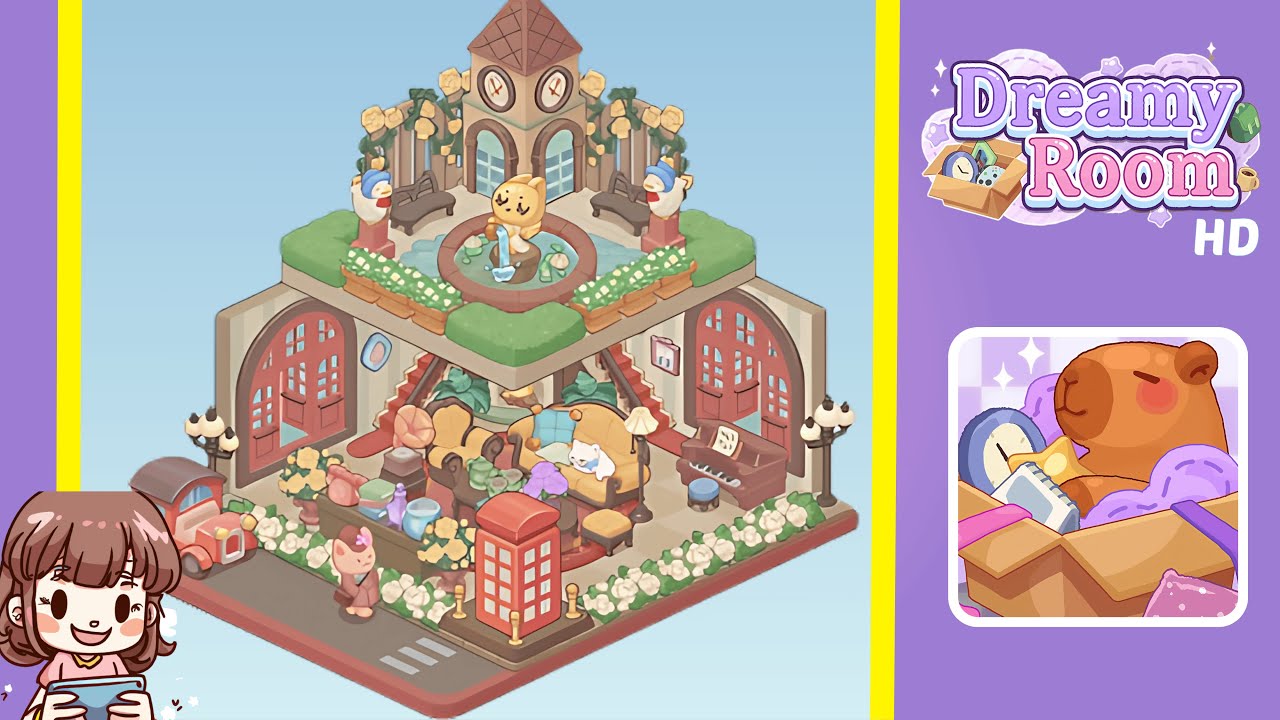
Dreamy Room Level 242 Walkthrough & Guide
Welcome to this comprehensive walkthrough for Dreamy Room Level 242. This level presents a charming two-tiered empty space where your mission is to meticulously place each object to recreate the whimsical completed design. As described in the Dreamy Room instructions, this game is more than a puzzle; it’s a heartfelt journey that celebrates the quiet beauty of everyday objects. The main challenge in Level 242 is determining the correct placement for each item to unlock the final cozy diorama.
Step-by-Step Guide
- Place the yellow tufted loveseat in the center of the lower level. When you load the level, you’ll notice a checkerboard-patterned floor. Tap and drag the loveseat from the inventory and align it perfectly with the central tile, ensuring it sits equidistant from both side walls. Use the grid snapping feature to lock it into place.
- Place the upright piano on the right side of the lower level. After centering the loveseat, add the polished wooden upright piano to the right wall, leaving exactly one tile of walking space between it and the sofa. Align the piano so its bass section lines up with the second tile from the back wall. Place the matching round piano stool directly in front, making sure it sits symmetrically.
- Place the red British phone booth in the front right of the lower level. Locate the phone booth icon in your items tray and drag it to the front right corner, just behind where the crosswalk lines will appear. Ensure the phone booth base sits flush with the front edge, aligning parallel to the loveseat. Rotate slightly if needed for a straight orientation.
- Place the vintage car in the front left corner of the lower level. Complement the phone booth by adding the vintage car. Drag it to the front left corner, ensuring its bumper just touches the platform’s edge, maintaining a one-tile gap for the decorative crosswalk stripes. The car should face inward at a slight angle echoing the rooftop elements above. Use the undo button to adjust rotations.
- Place the assortment of decorative accessories around the lower level living area. With major furniture and vehicles in place, adorn the lower level with finer details. Select the pastel-colored rotary telephone, teapot set, glass jars, and books. Arrange them around the console table, aligning each accessory with precision.
- Place the clock tower and garden elements on the upper platform. On the upper terrace, begin with the clock tower, dragging it to the back center. Add benches symmetrically on either side, leave space for the vine-covered fence, and complete the garden with a water fountain and animal statues.
Notes & Precautions
- Pay close attention to object alignment within the invisible grid; misalignments can derail the diorama.
- Enable grid snapping and check alignment lines before placing furniture.
- Objects should never overlap by even a pixel, or the level will reject your arrangement.
- Familiarize yourself with the inventory order to quickly locate items.
- Undo steps are limited, so plan carefully to avoid resets.
- Use zoom controls to refine small details and check placements, especially for delicate garden elements.
Tips & Tricks
- Use the grid toggle to see exact tile boundaries, preventing alignment issues.
- Group related décor by dragging them in quick succession to maintain consistent spacing.
- Memorize inventory icon order to skip scrolling and quickly find items.
- Plan complex moves ahead of time due to limited undo actions.
- Alternate zooming to ensure perfect alignment from different perspectives.
- Take a screenshot if stuck to compare your layout with the final reference.