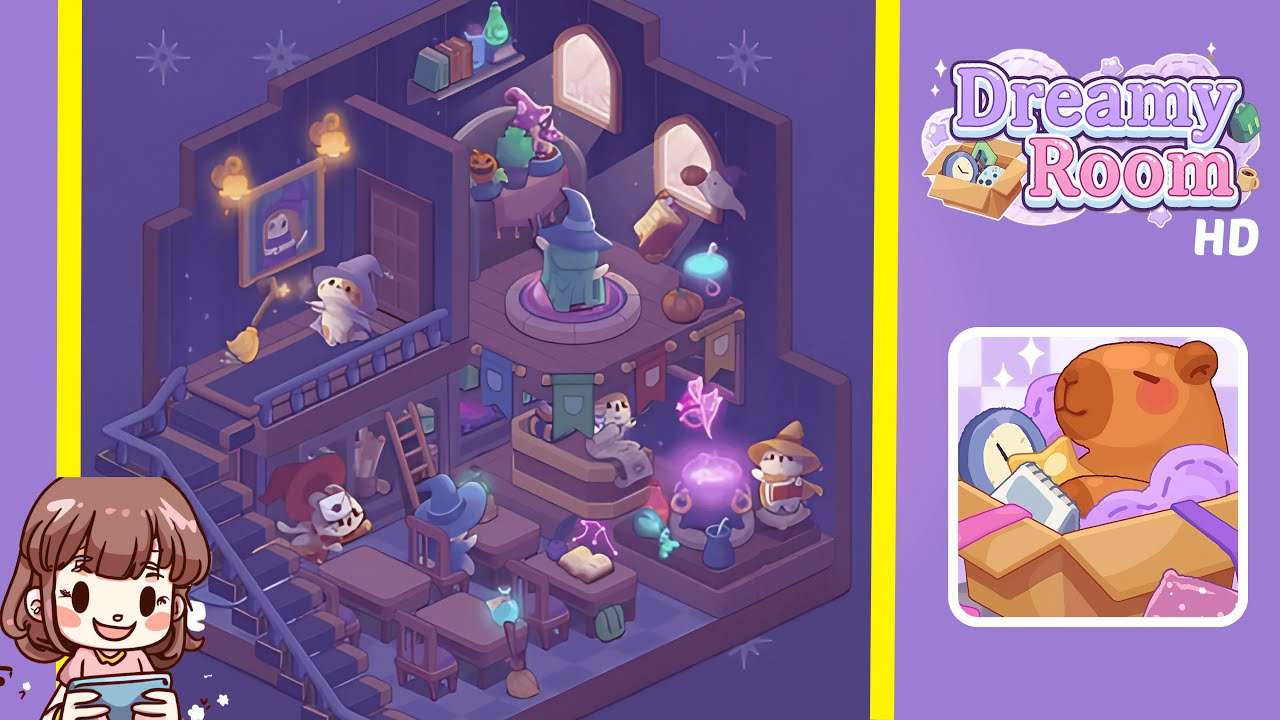
Dreamy Room Level 240 Walkthrough
Explore the enchanting design challenge of Dreamy Room Level 240 with this detailed guide. Transform the space by strategically placing objects to create a layered and immersive magical environment.
Step-by-Step Guide
- Place two ornate, golden wall sconces on the left wall, ensuring they cast magical light symmetrically across the hexagonal floor. Center a whimsical gilded portrait between the sconces, slightly above the midpoint.
- Install two arched windows on the back wall, evenly spaced from the corners. Position a simple wooden wall shelf below mezzanine height, populating it with three vibrant books and two magical potions.
- Add a wooden staircase on the left, aligning its base at the front-left junction of the checkered floor. Attach a wooden railing along the mezzanine edge.
- Position a charming cat figurine and its broom on the mezzanine. Furnish the under-stair nook with a small ladder, scroll bundles, and logs, centering a robed character within.
- Arrange three sturdy wooden desks and matching chairs in the main classroom area, adding desktop accessories like potions and books.
- Place a wooden counter in the center, adorned with three colorful banners and a merchant cat figurine on top.
- Position a large cauldron and floating runes in the magical corner. Arrange a reading cat beside the cauldron, adjusting elements for visual alignment.
- Transform the upper right corner with a sorceress pedestal, a plant-laden table, pumpkins, mushrooms, a ghost, and a tomato scroll, ensuring thematic consistency.
Notes & Precautions
- Ensure objects snap to the grid to avoid overlaps and clipping issues.
- Be cautious of unwanted shadow reflections when placing wall sconces.
- Maintain realistic depth by avoiding improper object layering.
- Be mindful of performance impact when filling spaces with animations.
- Regularly save your progress to prevent data loss.
Tips & Tricks
- Use mirror symmetry for balanced object placement.
- Utilize inventory hotkeys for quick prop selection.
- Activate precision mode for pixel-perfect alignment.
- Employ batch placement for efficient object arrangement.