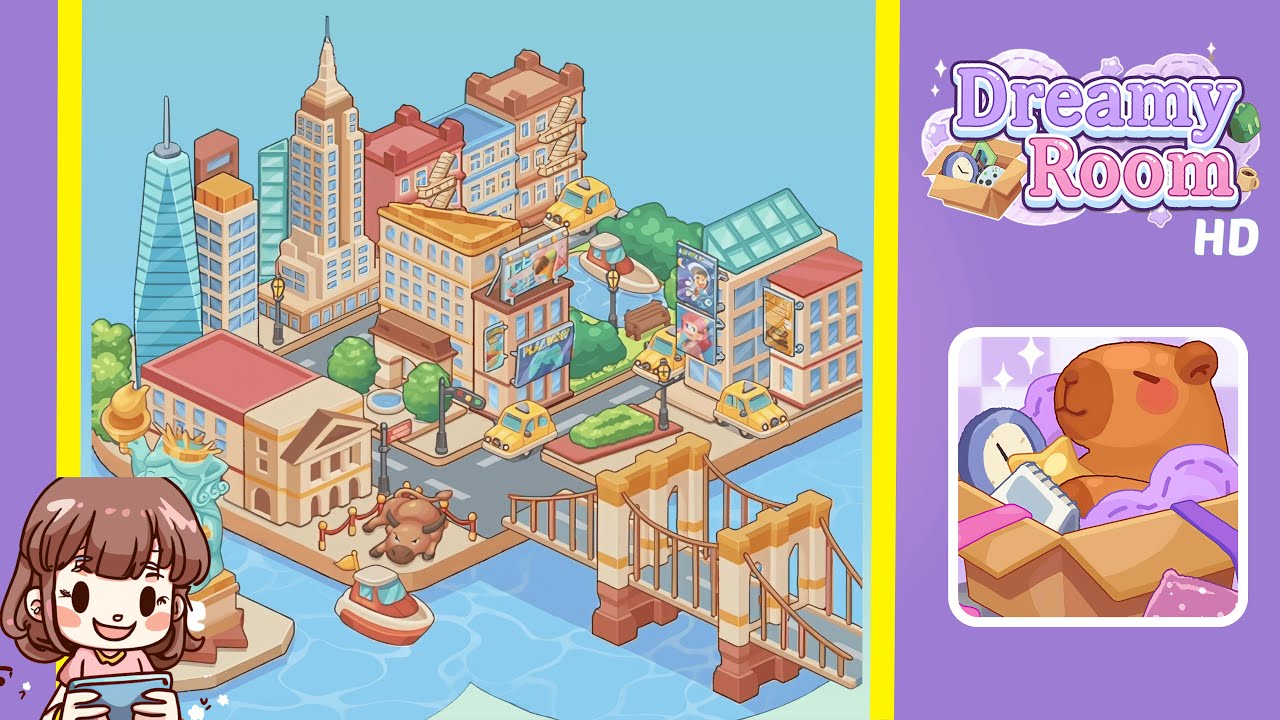
Dreamy Room Level 238 Walkthrough & Guide
Welcome to the detailed walkthrough of Dreamy Room Level 238. Follow these steps meticulously for a seamless experience in assembling this vibrant, floating miniature city.
Step-by-Step Guide
- Begin by placing the Glass Spire Tower in the back-left corner. Ensure the tower's edges align perfectly with the platform lines for precision.
- Next, place the Rectangular Office Building next to the Glass Spire. Rotate it to face forward and ensure it aligns seamlessly without overlap.
- Now place the Empire State-Style Skyscraper to the right of the office, aligning it snugly against its side without gaps.
- Switch focus to the Red Brick Residential Building, positioning it in the center-back with precise alignment to avoid overlap.
- Add the Beige Corner Building with Fire Escapes to the right of the red brick building, snapping their bases together smoothly.
- Select the Ice Cream Shop with its corner billboard, aligning it perfectly at the road junction.
- Place the Digital “Play Now” Billboard on the shop's side wall, ensuring it juts out correctly without misalignment.
- Move on to placing four Yellow Taxi Cabs on the road, ensuring each aligns perfectly with the grid to prevent clipping.
- Select Green Trees and a Wooden Bench for the park area, placing them in a realistic triangular formation.
- Retrieve Black Lamp Posts and position them at each major road intersection for consistent alignment.
- Attach the “Adventure” and “Super Pet” Billboards to the juice bar's east wall, ensuring no collision occurs.
- Place the Juice Bar Building at the far-right, aligning it to the edge with no gaps for a tight fit.
- Finally, add the Classical Bank Building, Wall Street Sign, and Charging Bull Statue to complete the front left district.
- Position the Statue of Liberty Sculpture centrally on the front island for optimal viewing angles.
- Conclude with placing Boats and a Wooden Suspension Bridge, finalizing their positions for a cohesive visual.
Notes & Precautions
- Ensure your device is charged and background apps are closed to maintain performance and avoid glitches.
- Pay attention to the visual alignment cues: green highlights confirm correct placement, while red indicates necessary adjustments.
- Limit the use of the undo function as you proceed carefully, maximizing your two-undo allowance effectively.
- Utilize zoom to check alignment on the grid, particularly for subtle placements that might be missed at a normal view.
- Listen for snap sounds to confirm placements; these are essential in solidifying object positions.
Tips & Tricks
- Gain a holistic view and plan your skyline before moving pieces, which helps in preventing last-minute adjustments.
- Utilize snap rotation for precise alignment in 90° or 180° angles, streamlining your building processes.
- Pre-select similar items for a streamlined placement procedure, minimizing repeated inventory navigation.
- Anchor placements from the platform's edges for reference, then fill in the interior to maintain order.
- Memorize the building sequence to facilitate swift placements without constant scene references.