Dreamy Room Level 312 Walkthrough
Welcome to the walkthrough for Dreamy Room Level 312. Follow these steps to successfully design this cozy, pastel-toned electronics boutique with precise isometric detail.
Step-by-Step Guide
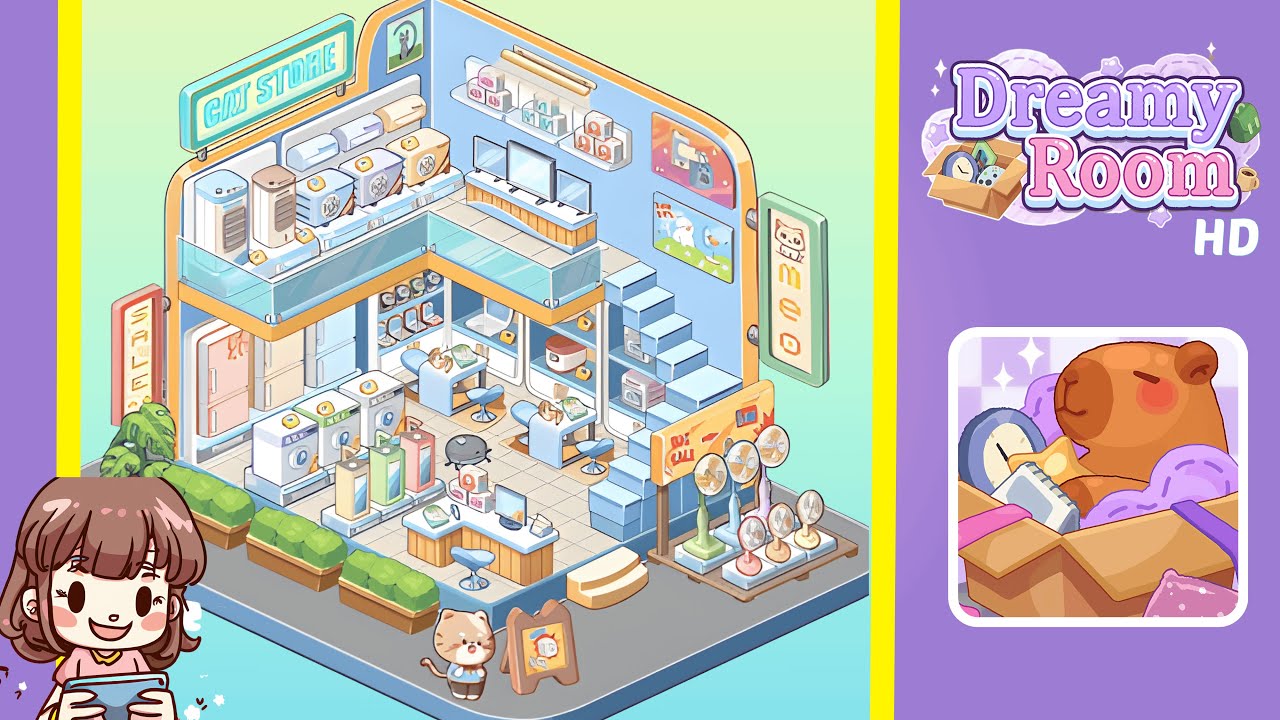
- Place the back-wall fixtures and mezzanine elements in the room. Begin by defining the room’s backbone — the back wall, the left wall, and the mezzanine railing. Position the glass-railed mezzanine flush against the back corner so the front edge aligns with the central tiled floor grid. Center a glowing “CAT STORE” sign above the left side of the mezzanine. Arrange boxed air-conditioner units and two tall standing air conditioners in a neat row behind the glass railing, each box one tile apart. Add framed art on the back and left walls above the mezzanine. Ensure spacing is even and that the sign comfortably overhangs the mezzanine without touching the roof edge.
- Place floor displays, checkout counter, and central appliances. Arrange four central display tables in a square near the middle of the tiled area for phones, small speakers, and boxed accessories. Position the main checkout counter with twin monitors center-front, aligned two tiles from the front edge. Form a row of washing machines and pastel refrigerators against the left wall where it meets the floor. Add an A-frame sale board and small mascot cat figure on the front platform near the entrance. Keep aisles two tiles wide for clear circulation paths.
- Place the right-side platform, fans, stairs, and wall art. At the rear-right corner, place a stepped stair unit leading up to the mezzanine. Position a boxed fan display and four pedestal fans on a small riser along the right-side platform, with a “BIG SALE” sign at the front-right. Add visual layers like posters, product boxes, and a framed poster of a cat on the right wall above the fans. Ensure the stair edge and fan platform have at least one tile separation from central floor displays.
- Place exterior planters, entrance props, and finishing touches. Position three rectangular planters with shrubs along the front-left edge of the exterior base platform. Add a curved outer baseboard trim and rounded platform corner. Place small podiums with demo boxes, phone display stands, and promotional cubes near the center-left aisle without blocking the main aisle. Add a cheerful cat mascot near the front-center beside the A-frame sign. Finalize reflections on glass, ensure shadows match the light source, and verify readability of each sticker and price tag.
Notes & Precautions
- Be cautious about overlapping hitboxes and occlusion. Check upper-level placements from floor-level and overhead camera angles to catch collisions early.
- Avoid placing tall objects directly in front of signage or portrait frames to maintain clear sightlines.
- Keep walkways at least two tiles wide for animating customers and mascot to prevent pathfinding errors.
- Back up your layout before heavy edits; the undo stack is limited in some modes.
- Maintain color balance; over-saturating one zone can disrupt the overall composition.
Tips & Tricks
- Start with fixed architecture, then add large appliances, followed by medium fixtures, and finish with small props.
- Use grid snapping in single-tile increments to maintain symmetry. Mirror-place planters and countertop displays for pleasing sightlines.
- Create a "prop palette" of frequently used items for quick duplication to save time without sacrificing precision.
- If stuck, toggle the collision overlay (if available) to identify hidden overlaps blocking placement.
- Save incremental layout versions as checkpoints to facilitate easy adjustments.