Dreamy Room Level 181 Walkthrough & Guide
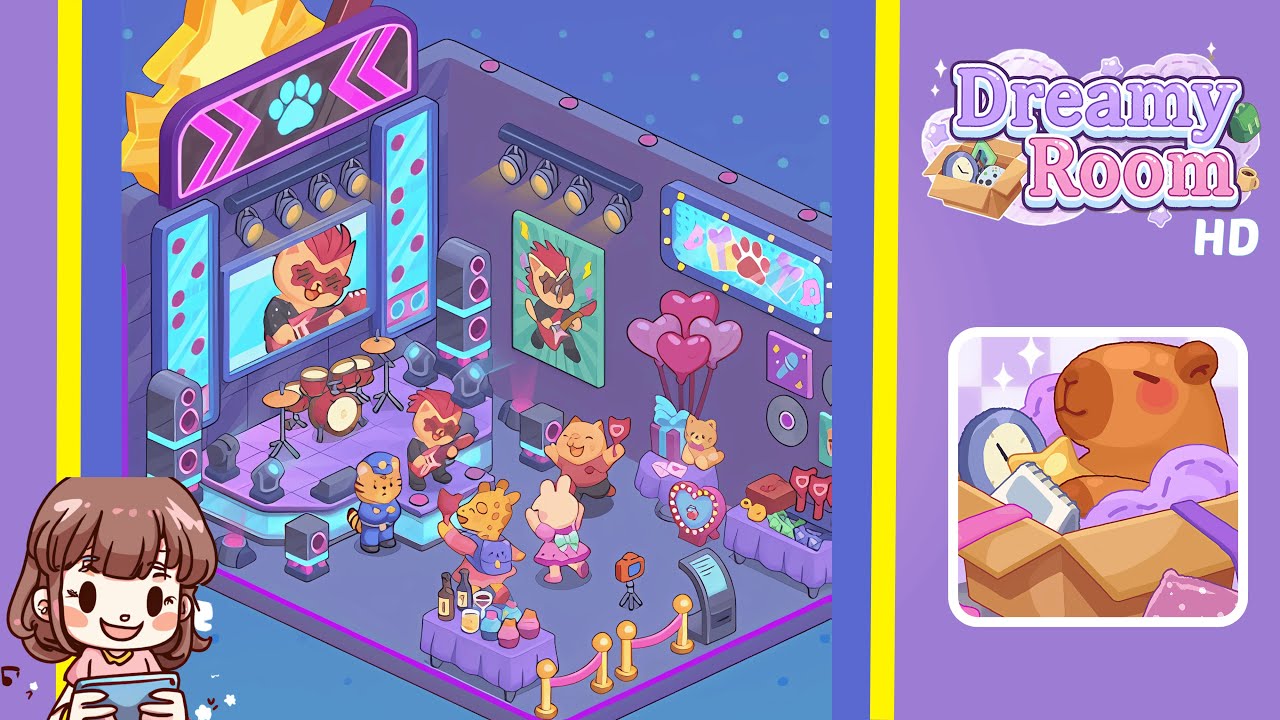
Welcome to this comprehensive walkthrough for Dreamy Room Level 181. In this level, transform a bare two-walled corner space into a lively music stage and party lounge. Each instruction pinpoints precise placement of objects, lighting, characters, and signage to perfectly replicate the scene. Follow these step-by-step directions to conquer the main challenge: deciphering the ideal arrangement spot by spot. This walkthrough references both the empty room layout and the completed reveal of Level 181.
Step-by-Step Guide
- Place the Star and Guitar Marquee above the back-left wall corner. Select the bright yellow star marquee, ensuring that its top touches the uppermost grid line and is centered two grid columns from the left edge. Attach the pink guitar silhouette directly behind the star’s top-left tip and ensure every neon bulb on the guitar outline is active.
- Install the Central LED Screen, Side Panels, and Overhead Spotlights by placing the oversized central LED screen on the back-left wall, below the marquee. Center it three grid squares from the left wall panel. Place the vertical LED side panels flanking the central screen, aligning perfectly with the screen’s midpoint. Mount a three-bar spotlight rig above the display.
- Position the Drum Kit and Microphone Stands on stage. Drag the red drum kit onto the center-left area of the stage, aligning the bass wheel two tiles from the front edge. Place two chrome microphone stands, one on each side of the drum kit, ensuring each base touches the stage floor grid.
- Place the Guitar-Playing Cat Figurine front and center on the front-right edge of the stage. Ensure the figurine faces the audience and sits one grid tile from the right corner, with the guitar neck pointing diagonally upward at a 45-degree angle.
- Arrange the Stage Speakers and Floor Spotlights with the tall speaker stacks on the left and right front corners of the stage, aligning the bottom black cabinets at the stage edge. Add two floor spotlights at the front-center, spaced evenly around the drum kit.
- Decorate the Right Wall with Posters, Neon Signage, and Records by mounting a framed poster of the guitar-playing cat at eye level, installing a three-bar spotlight rig above it, and affixing a rectangular neon marquee with themed icons centered above.
- Set Up the Gift Table with Balloons and Plush Cat. Place a pastel purple table against the right-wall base, arranging pink heart-shaped balloons above, a turquoise ribbon-tied gift box to the left, and a plush cat to the right.
- Position the Treat Table with Cupcakes and Glassware. Place a small purple rectangular table two tiles from the front stage, arranging four pastel cupcakes, two wine bottles, and glasses neatly on its surface.
- Add Dancing Giraffe, Bunny, and Security Cat to the Dance Floor. Position the giraffe character two tiles to the left of the treat table, the bunny in a pink tutu one tile to the right, and the police cat near the front-left corner of the stage.
- Install the Rope Barrier, Photo Kiosk, and Reward Table. Place red velvet ropes and gold stanchions forming a semi-circle around the stage. Set a photo kiosk inside the barrier and arrange a reward table with keys, tokens, and gift cards on it.
Notes & Precautions
- Precision and patience are vital—any misalignment can disrupt harmony.
- Pay close attention to the grid overlay when placing objects.
- Be cautious with overlapping elements to avoid obscuring lighting cues.
- Save progress after every two steps to revert to earlier configurations if needed.
Tips & Tricks
- Start with fixed overhead elements before mobile objects for better alignment.
- Use the design grid’s snap-to feature to avoid pixel drift with marquee and panels.
- Group similar items into temporary bundles to speed up placement.
- Save frequently and utilize preview toggle to check lighting effects.