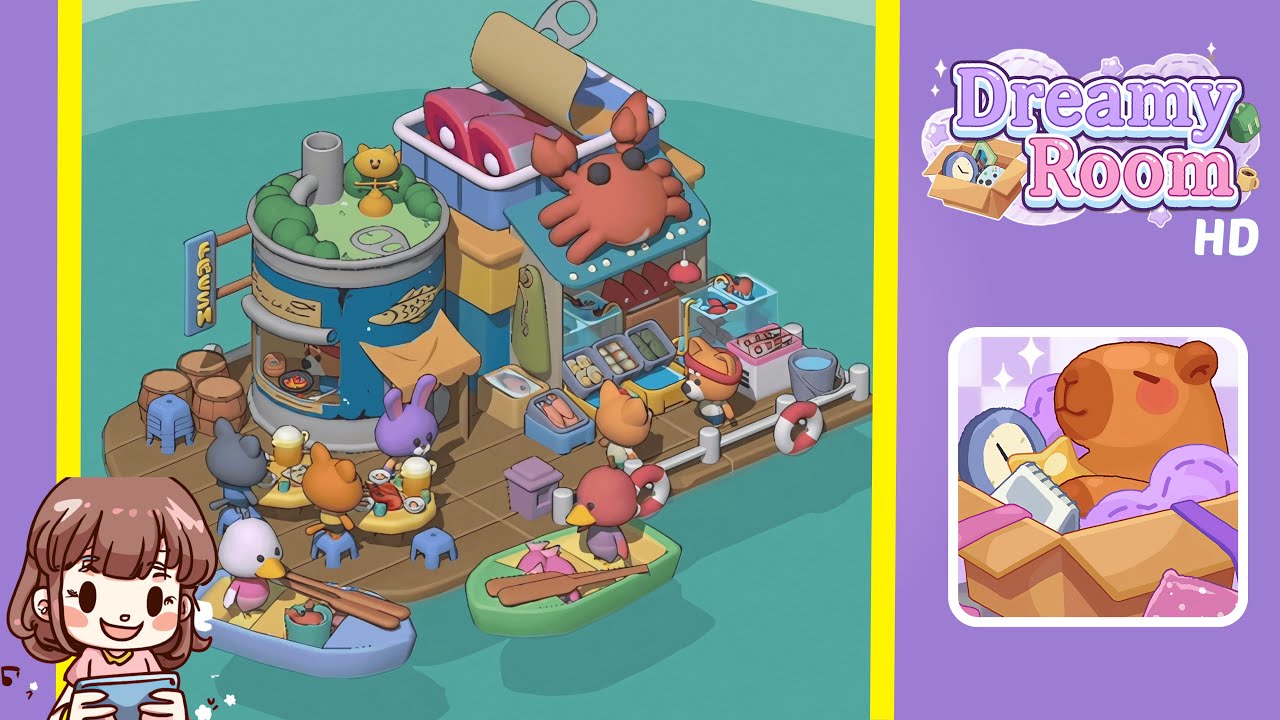
Dreamy Room Level 192 Walkthrough
Welcome to Dreamy Room Level 192! This guide will walk you through the steps necessary to create a charming seaside market atmosphere.
Step-by-Step Guide
- Place the Wooden Dock at the Center of the Room. Begin by selecting the rectangular brown dock asset and orienting it so that its curved edge faces the viewer. Accurate placement ensures all maritime elements align perfectly around this base.
- Place the Cylindrical Fish Shop in the Back-Left Corner. Position the charming cylindrical fish shop at this location, ensuring the curved wall aligns with the fish graphic facing forward.
- Add the “FRESH” Sign, Pipe Assembly, and Barrel Cluster to the Fish Shop. Embellish the fish shop’s exterior with these items, ensuring proper alignment to avoid collision with passing characters.
- Place the Cat Figurine and Pea Mound on the Fish Shop Roof. Add whimsical details by placing these items precisely to transform the shop into a charming landmark.
- Position the Seafood Stall and Crab Sign in the Back-Right Corner. Mirror the fish shop by placing the seafood stall here, with the open side facing forward.
- Arrange Cans, Display Bins, Lamp, and Towel on the Seafood Stall. Style the front counter of the stall, spacing items evenly and ensuring they are securely positioned.
- Set Up Dining Tables, Stools, and Seated Guests. Create a lively dining area on the dock’s left side by placing tables, stools, and seated guests, enhancing natural interactions.
- Place Boats, Life Rings, and Auxiliary Crates Alongside the Dock. Finish the scene by adding watercraft and safety gear, bringing cohesion to your seaside scenario.
Notes & Precautions
- Lock the main dock foundation before adding props to prevent misalignments.
- Enable grid snapping to ensure accurate placement and avoid visible small offsets.
- Be careful when stacking items to prevent them from floating or sinking due to misjudged verticals.
- Consider performance adjustments if experiencing slowdowns, such as disabling dynamic shadows.
- Create incremental backups of your project to safeguard against unintended edits.
Tips & Tricks
- Import custom snap presets to quickly align common assets.
- Group related objects into folders to manage visibility and positions efficiently.
- Use lighting presets to preview how direct light interacts with colored surfaces.
- Use the mirror tool for symmetrical designs to ensure perfect balance.
- Switch to an overhead orthographic view for precise alignment of floor tiles and dock planks.
- Leverage keyboard shortcuts to maintain momentum during setup sessions.