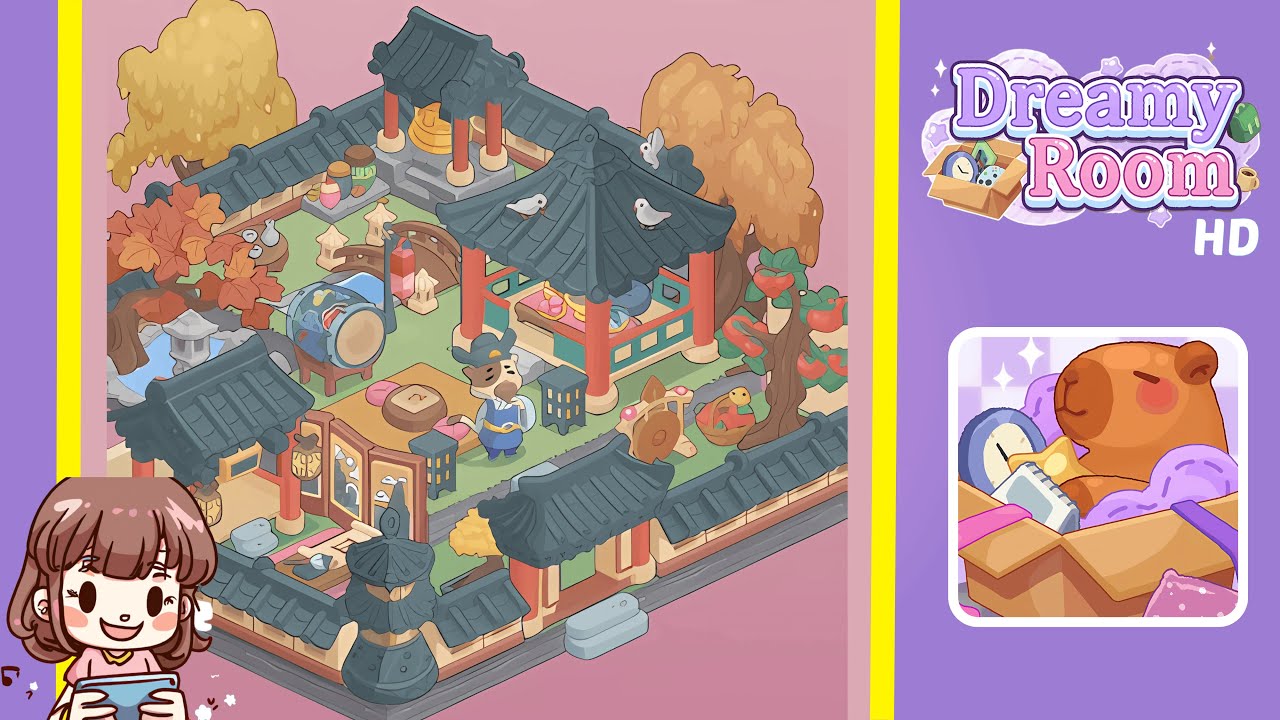
Dreamy Room Level 210 Walkthrough & Guide
Transform a bare grass platform into a serene Korean courtyard in Dreamy Room Level 210 by following this detailed guide. Navigate through various placement puzzles to create a harmonious setting filled with autumnal beauty.
Step-by-Step Guide
- Place perimeter walls around the grass platform by snapping grey brick walls with black-tiled roofs flush to the edges. Ensure a seamless frame that follows the U-shaped outline.
- Install the main entrance gate in the southwest corner, aligning it against the southern and western walls. Rotate the gate to position the lanterns symmetrically.
- Set up the calligraphy desk and place a stone wash basin directly to the right, ensuring it doesn't overlap the gate's footprint.
- Create a pond, waterfall, and stone lantern feature on the western edge, taking care to align the components correctly and plant a maple tree with red leaves behind the pond.
- Install a folding screen against the upper wall to form a tea corner. Scatter sake bottles and a cup set in front of it, ensuring they sit on the grass without clipping.
- Arrange a low tea table with cushions, placing a decorative pastry on the table and a wooden stool to the left. Adjust spacing for symmetry.
- Position a decorative drum and three ceramic jars, ensuring proper orientation and spacing on their respective placements.
- Build a pavilion shrine on the upper east platform, ensuring correct alignment of the roof and positioning of offerings and pigeons.
- Add decorative trees, persimmon tree, turtle statue, and player character, taking care to adjust each for perfect placement and aesthetic balance.
Notes & Precautions
- There is no undo button for large items; removing adjacent objects may be necessary for repositioning.
- Utilize zoom controls to accurately place small items and avoid misplacement.
- If objects refuse to snap, try rotating them by 45 degrees for better alignment.
- Lag may occur on lower-end devices due to active particles. Consider pausing animations if experiencing stutter.
Tips & Tricks
- Begin with large structures like walls and pavilion to minimize repositioning of smaller décor items.
- Utilize the "ghost preview" mode to check object placement and save time.
- Group identical objects in your quick-select bar for consecutive placements without reopening menus.
- Pre-rotate trees and statues to ensure correct snapping upon placement.