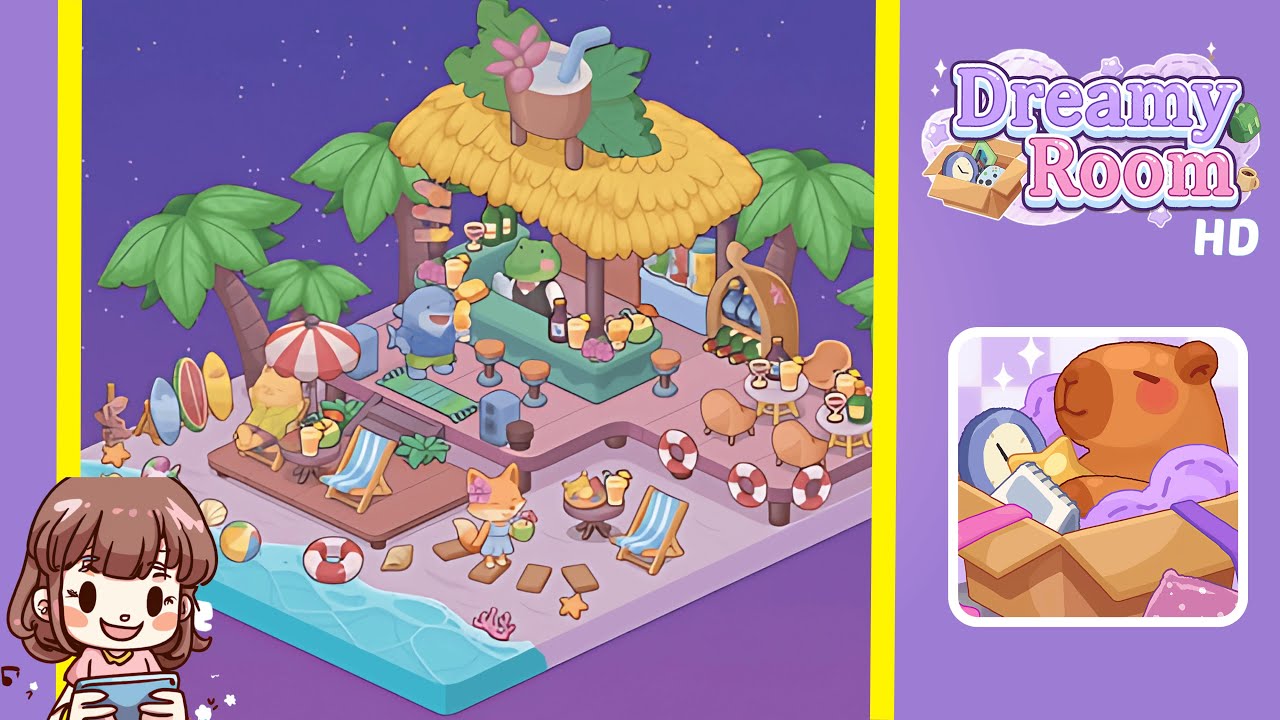
Dreamy Room Level 205 Walkthrough
Welcome to Dreamy Room Level 205, where you'll transform an empty pastel tile into a vibrant beachfront scene. Follow these steps carefully to create your dreamy oasis.
Step-by-Step Guide
- Place the Coastal Base Platform: Establish your foundation by selecting the square panel with gentle wave crests at its edge. Drag it to snap into the bottom-left corner, aligning sand and sea precisely.
- Add the Tiki Bar Structure: Position the thatched roof over the center-back of the platform, with the mint-green bar counter beneath it. Add the wooden bar floor and evenly spaced barstools in front.
- Position the Palm Trees: Place two large palm trees on the left, behind the surfboards, and two medium palms framing the tiki bar. Add a smaller palm near the right-side dining table.
- Arrange the Deck Chairs and Loungers: Place blue-striped deck chairs on the wooden deck, a sun lounger under the umbrella, and a side table with a drink between the loungers.
- Scatter Beach Accessories: Position a unicorn float, beach ball, seashells, life ring, and coral piece naturally across the sand and water.
- Set Up the Central Bar Seating: Arrange mint-green barstools, drink trays, and a flower garland around the bar counter for a welcoming scene.
- Add Decorative Signage and Props: Place a signpost, surfboards, a potted plant, and a cooler to enhance the setting.
- Position the Character Figures: Place a fox figure, dolphin-like friend, and frog bartender to bring life to the scene.
- Arrange Tables and Dining Area: Snap dining tables and peach chairs into place, adding drinking glasses and fruit for a cozy café vibe.
- Final Touches: Dot the scene with coral clusters, seashells, succulents, and cocktail glasses for vibrant accents.
Notes & Precautions
- Alignment Sensitivity: Zoom in for pixel-perfect placement of thin objects like surfboards and signposts.
- Undo and Nudge: Use the undo button and arrow keys to correct placement overlaps.
- Layer Order: Ensure background elements are placed first to avoid hidden items.
- Rotation Limits: Rotate objects within permitted angles to maintain snap guides.
- Resource Loading: Wait for assets to fully load to prevent glitches.
Tips & Tricks
- Grid Snap Hack: Toggle the grid view to reveal invisible snap points.
- Layer Locking: Lock the base platform after placing it to avoid accidental moves.
- Quick Rotate: Use Shift + mouse wheel to rotate objects faster.
- Asset Palette Bookmark: Save frequently used props to your favorites for quick access.
- Checkpoint Saves: Use level snapshot feature to save progress after every three steps.