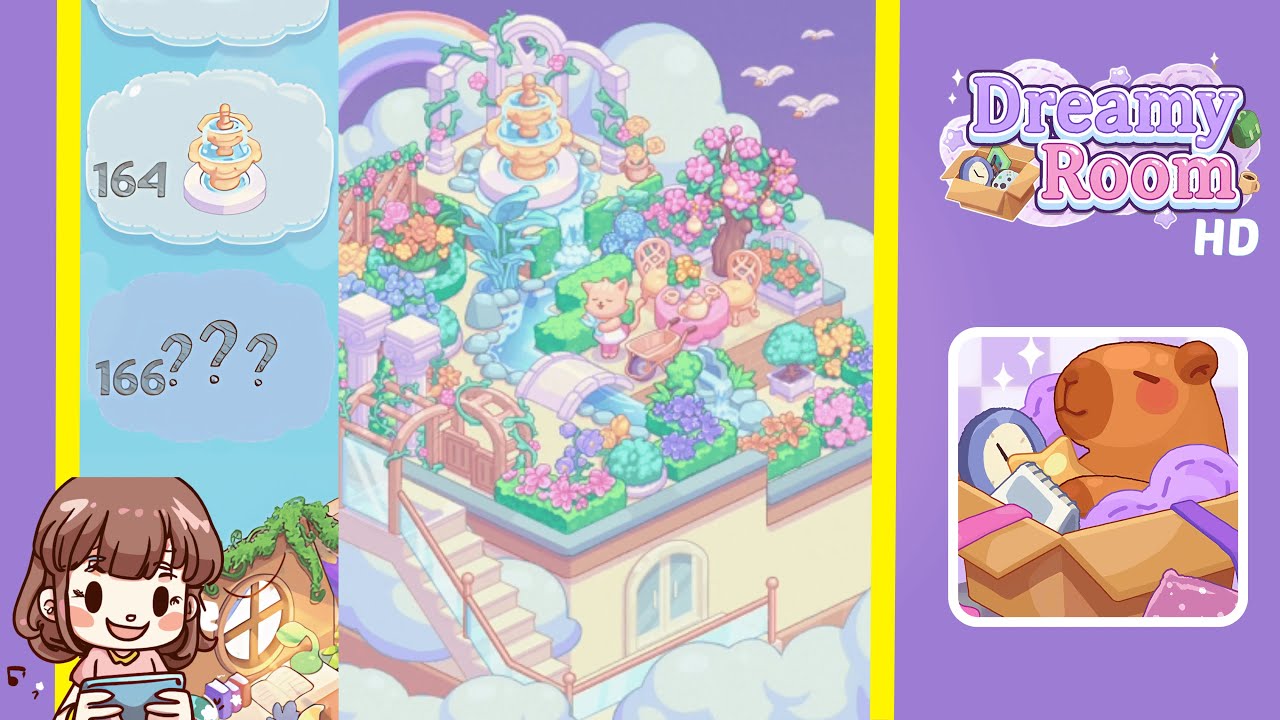
Dreamy Room Level 164 Walkthrough & Guide
Welcome to Dreamy Room Level 164, a tranquil rooftop garden among soft clouds and a pastel purple sky. Follow these steps to create your serene sanctuary.
Step-by-Step Guide
- Place the Rainbow Arch in the back left corner. Ensure it aligns flush with the left terrace edge and hovers about 20 pixels above the back wall.
- Add the trio of Ionic Cloud Pillars at the front left. Position them side by side with even spacing of about 30 pixels, ensuring the bases overlap the terrace floor by roughly 5%.
- Set the White Arbor Arch with Climbing Vines behind the center. Align it directly behind the fountain area so its topmost rose peeks over the rainbow arch.
- Install the Three-Tier Gold Fountain at the center back. Align its base with the center seam of the arbor arch, ensuring the top tier is just below the arbor's crossbeam.
- Lay the Mini Pond and Waterfall under the fountain. Overlap the pond edge by at least 10% with the fountain base and arrange riverbed tiles in a gentle S-curve.
- Position the Curved Stone Bridge across the stream. Ensure its support pillars rest on the terrace floor and adjust until it clears the water.
- Arrange the Wooden Lattice Trellis and Pergola at the front left. Ensure the pergola aligns with the Ionic pillars and add vines to the lattice.
- Set down the Flower Beds and Topiary Boxes in the corners. Space them evenly, 10 pixels from adjacent walls, and align the topiary box with the tea table area.
- Position the Tea Table, Chairs, Cat Figurine, Wheelbarrow, and Potted Vase. Flank the tea table with chairs at a 30° angle and balance other items around the terrace.
- Add entrance features, the Lamppost, stairs, and seagulls overhead. Ensure each element is correctly aligned to create a complete oasis.
Notes & Precautions
- Snap-to-Grid Overuse: Briefly disable grid snapping for more organic placements of curved items.
- Layer Order: Confirm taller decorations are in the back layer before finalizing.
- Animation Clipping: Leave a 5-pixel buffer around animated assets to prevent clipping.
- Object Rotation: Slight angle changes can enhance realism; try rotating floral boxes and chairs by 5–10°.
Tips & Tricks
- Memory Grid Technique: Use a 10×10 invisible grid to replicate layouts quickly.
- Preset Groups: Save frequently used clusters in the "Favorites" panel for ease.
- Symmetry Mode: Utilize symmetry for perfectly balanced placements.
- Z-Order Hotkeys: Learn hotkeys to adjust object layering swiftly.
- Visual Reference: Keep the hint button on for precise placement zones.