Dreamy Room Level 145 Walkthrough
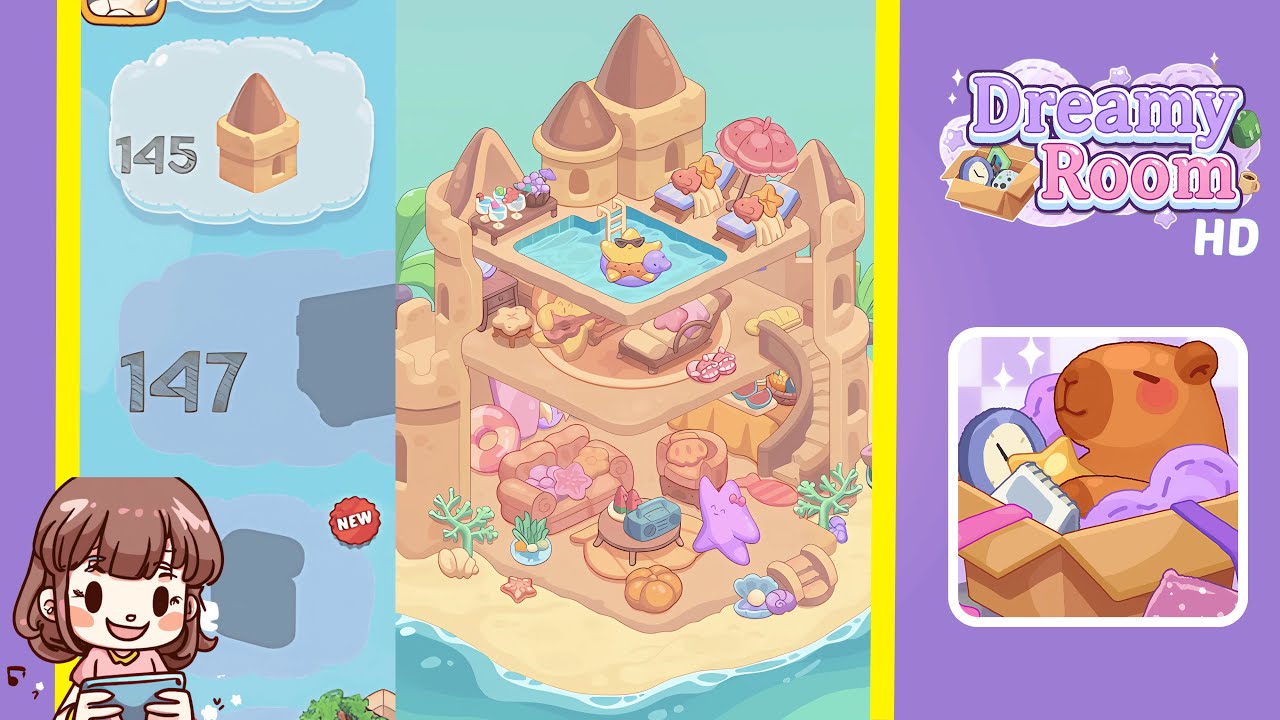
Welcome to Dreamy Room Level 145, where your goal is to transform a sandcastle into a vibrant seaside sanctuary. Follow this guide to place each item with precision and ensure a flawless, high-scoring completion.
Step-by-Step Guide
- Place the metal bucket just to the right of the central archway on the sandy floor. Lean the bent shovel against the bucket handle at a 30° angle. Nestle the coral cluster and turquoise plant foliage into the left wall's alcove. This setup will balance the base decor and prevent future collision glitches.
- Arrange a cozy lounge in the lower chamber by placing the plush pink couch against the back wall, centered between pillars. Tuck the pastel star cushion into the couch’s left corner and lean the inflatable pink donut float on the right. Position the small wooden side table in front of the couch and place a retro radio on it.
- Add accents to the lower floor by positioning the tiny starfish stool left of the entrance archway. Place the ceramic seagrass planter snugly in the left corner, scatter three small seashell pieces in front for a cozy feel, and position the purple coral twig next to them. Place the miniature silver pail near the entry.
- Create a rooftop pool center by aligning the rectangular pool basin with the castle walls, attaching the ladder securely, and filling it with water. Place the starfish float in the center to enhance the serene atmosphere.
- Setup a poolside lounge area by placing two blue-and-white striped chairs adjacent to the pool’s right edge, leaving a gap between them. Place a pink beach umbrella in between and add decorative fish pillows on each chair. Position a wooden side table with cocktail glasses between the chairs.
- Establish a refreshment station on the level below the pool by sliding a narrow wooden console table against the back wall above the entrance, and arranging colorful fruit cocktails alternately. Anchor the display with a grape cluster and punctuate each glass with a purple drink stirrer.
- Add final touches by capping the three tall towers with tan turret roof elements and placing palm trees on each side of the castle. Tuck a coconut cluster into the left tree’s fronds to complete the external look.
- Conclude your decor by placing a wicker fruit basket with watermelon slices beside the entrance archway and adding a small orange pumpkin. Place a purple starfish plush on the sofa, a pastel coral bush near the bucket, and scatter pink seashells and sea urchin decals on the sand.
Notes & Precautions
- Leave small gaps between items to avoid collision glitches that return objects to your inventory.
- Enable grid-snapping for pixel-perfect alignment, especially useful for pool edges and castle tiles.
- Use preview mode to check for floating or clipping items from multiple angles.
- Remember that undo history only stores the last five actions, so plan carefully.
- Organize your inventory by category for faster scene assembly.
Tips & Tricks
- Create a blueprint by using placeholders to visualize spacing and reduce micromanagement.
- Utilize the mirror-duplicate function for symmetrical arrangements to save time.
- Maintain a pastel palette by grouping soft-toned accessories with muted backgrounds.
- Use layer ordering to ensure background elements stay behind foreground items.
- Save checkpoints using photo mode to revert to a previous layout if needed.