Dreamy Room Level 148 Walkthrough & Guide
In Dreamy Room Level 148, your objective is to transform the space into a dream room using various elements harmoniously. Follow the steps carefully to achieve a beautiful, functional design.
Step-by-Step Guide
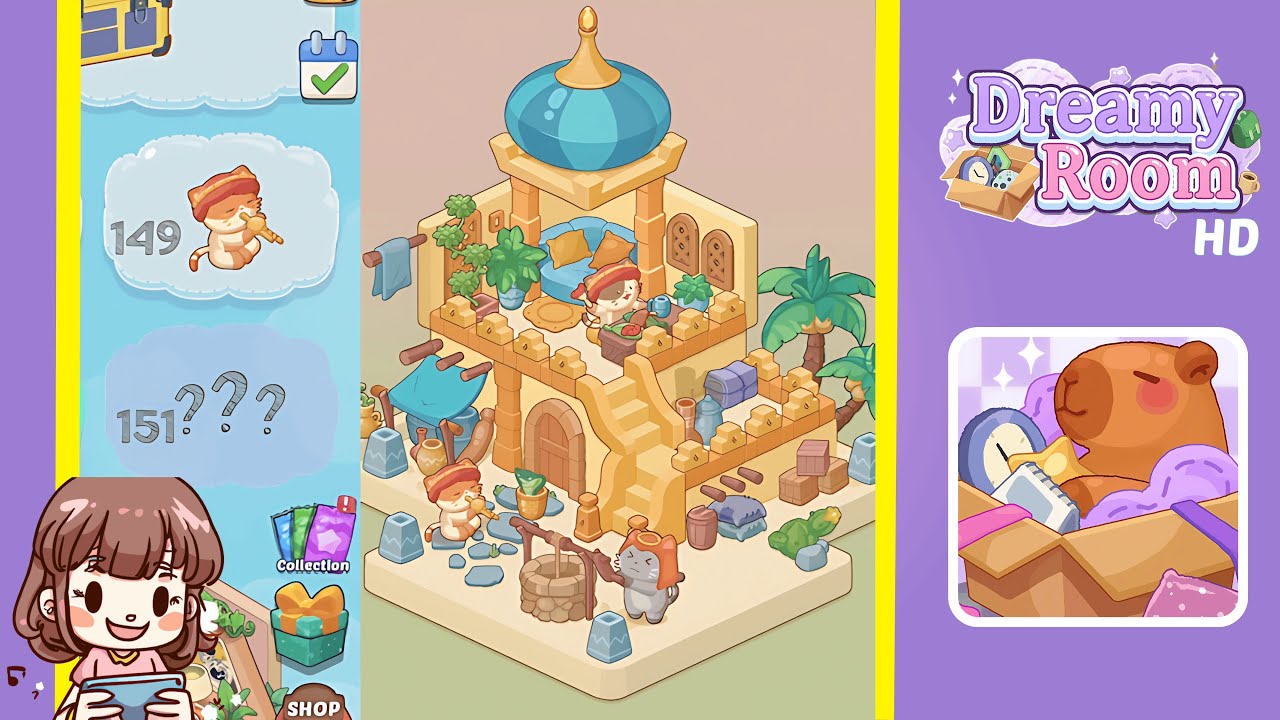
- Place the stone foundation and add the stairs. Select the light beige stone block and place it in the lower center of the room. Then, add the matching stone stairs on the lower left side of the foundation. Ensure proper alignment to see a confirmation glow.
- Add the small palm trees on the right. Position the small palm tree assets on the right side of the platform, aligning them symmetrically to avoid overlap.
- Set the blue domed roof and place the golden spire. From the assets, choose the large blue dome and center it on the stone base. Follow with the golden spire placed on top of the dome.
- Add the window arches and the door frame. Choose the ornate window frame and place it on the left wall above the stairs, then position the door frame on the lower right corner at a slight angle.
- Furnish the upper level with cushions and plants. Place colorful cushions on the upper platform and add potted plants near the dome, keeping them clear of window arches.
- Decorate the lower level with baskets and pottery. Position large woven baskets symmetrically around the well and distribute clay pottery across the stone platform.
- Place the well and add the surrounding rocks. Position the well centrally on the platform and scatter rocks around it to form a natural circle.
- Place the character figurines and complete the scene. Add the musician figurine near the well and the cat with a red scarf on the upper platform.
Notes & Precautions
- Mind the spacing to avoid overlapping objects that can cause placement errors.
- Maintain symmetry, especially with palm trees and structural elements, for balance.
- If items do not fit initially, try rotating them slightly.
- Check the alignment of crucial components like stairs and the roof.
- Ensure characters face outward or interact with scene elements for dynamism.
Tips & Tricks
- Start with larger items like the palm trees and domed roof to visualize the space.
- Utilize the rotate tool to fit objects perfectly in place.
- Take your time placing smaller decorative items for best results.
- Check different camera angles for potential alignment issues.
- Lock placements early after confirmation to avoid accidental changes.