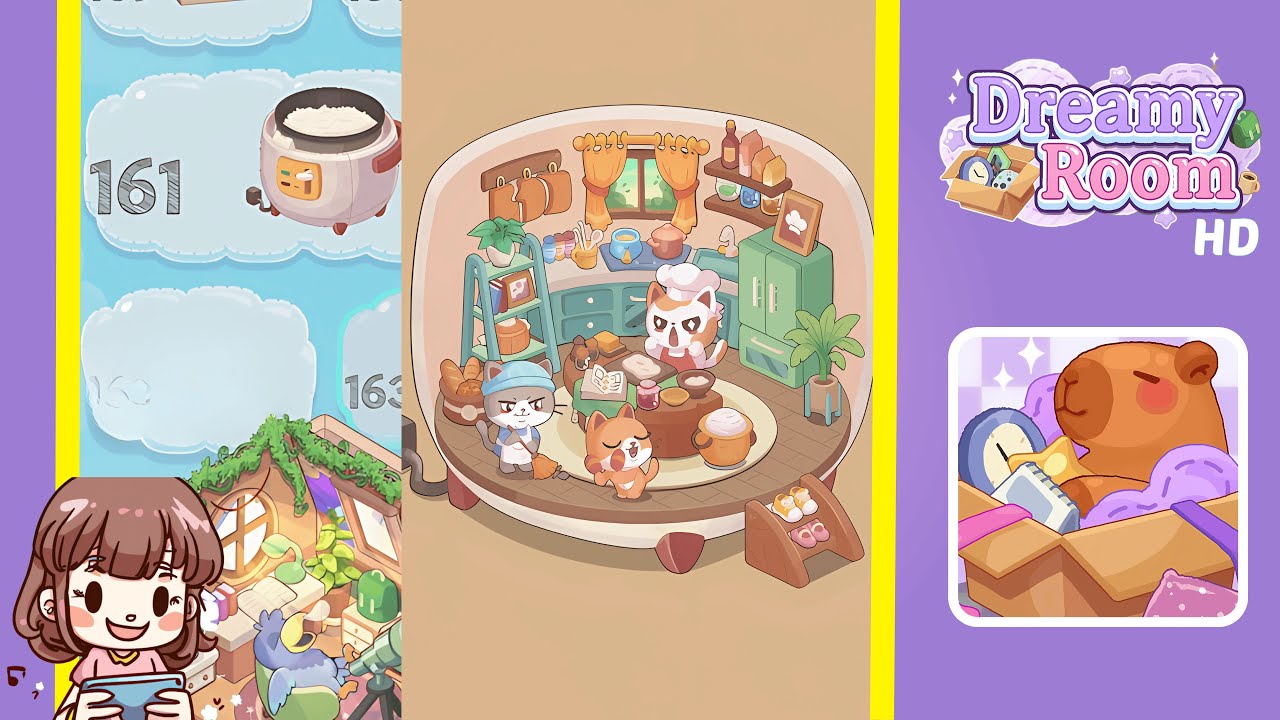
Dreamy Room Level 161 Walkthrough & Guide
This guide provides a detailed walkthrough for Dreamy Room Level 161, focusing on precise object placements and achieving decorative harmony within the game's challenging dome environment.
Step-by-Step Guide
- Place the curved green cabinet and sink unit against the right dome wall. Ensure the cabinet aligns perfectly with the wooden platform edge, faces inward, and allows doors to open smoothly within the dome boundary.
- Install the stove area, pots, and spice jars along the back counter. Place the sky-blue pan on the left burner and the rosy-red stock pot on the right burner, aligning handles properly. Arrange spice jars in descending pastel colors evenly along the back ledge and position ingredients on the corner shelf.
- Position the wooden ladder shelf, potted plant, and basket of bread on the left side. Ensure each tier of the ladder shelf is stable, arrange the potted plant on the top rung, and position recipe books and a ceramic bowl on the middle shelf. Nestle the bread basket at the base without overlapping cabinet space.
- Add the central table and arrange kitchen accessories at the room’s core. Center the round wooden table on the platform, open the cookbook with pages facing the entrance, and organize the rising dough, strawberry jam, bowl of flour, and cheese slices with uniform spacing.
- Place the three cats, broom, and mini shoe rack for the finishing touches. Position the calico chef cat on the central table, the gray cat with a broom near the ladder, and the orange cat in front of the table. Snap the mini shoe rack on the right floor area with yellow sneakers and pink slippers in place.
Notes & Precautions
- Focus on precise object placement and avoid double-clicking to prevent clipping through the dome boundary.
- If an item won’t snap into place, try rotating or clearing nearby objects that might interfere.
- Observe the platform’s herringbone pattern for subtle placement guides.
- Avoid stacking too many items without grid alignment to prevent game lag.
- Autosave frequently to prevent losing progress if you exit prematurely.
Tips & Tricks
- Start from the back of the dome and work forward to create a stable base for adding decorations.
- Use the undo button to correct misplaced objects without disrupting the entire layout.
- Adjust zoom levels for precise alignment against the curved wall.
- Experiment with snapping toggles to reveal hidden placement guides for tighter spots.