Dreamy Room Level 158 Walkthrough
Welcome to the Dreamy Room Level 158 walkthrough. Follow this guide to perfectly arrange the elements and solve the level's charming puzzles.
Step-by-Step Guide
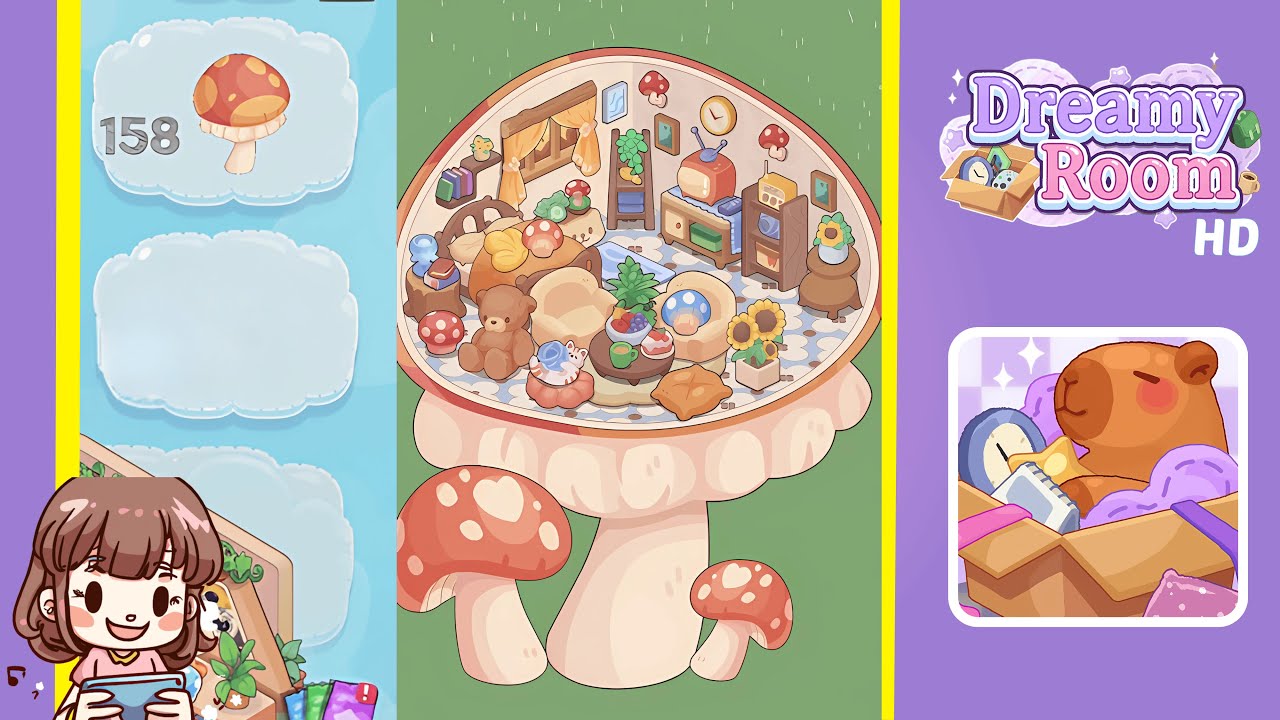
- Lay the floral patterned floor tile in the center of the room. This foundational step requires exact placement for symmetry and sets the tone for the level.
- Position the window and hang yellow curtains on the left wall. Ensure alignment for optimal light and aesthetic effect.
- Set up the ladder shelf with plants, towels, and pineapple accents against the back wall. Carefully place these items for a balanced visual appeal.
- Hang wall art, clock, and mushroom sconces around the back wall. Position them precisely to enhance the cozy atmosphere.
- Assemble the TV console and place electronics on the right side. Arrange items for a harmonious retro vibe.
- Position the wooden bed and dress it with bedding and pillows at center-left. Ensure symmetry for an inviting sleep nook.
- Add the stump nightstand with glass jug and book stack next to the bed. Fine-tune placement for a satisfying arrangement.
- Arrange armchairs and place the teddy bear in the seating nook on the right. Achieve perfect spacing for a playful conversation corner.
- Center the coffee table and decorate with a fruit bowl, mug, and cake. Ensure careful alignment for an inviting setting.
- Place the cat plush on its red stool, sunflower pot, and orange star cushion for final touches. Precision is key to completing the room's ambiance.
Notes & Precautions
- Alignment Sensitivity: Small offsets can prompt corrections. Pay attention to placement accuracy.
- Rotation Lock: Objects must be placed as displayed—no rotation is possible.
- Layer Order: Place background elements before foreground items to avoid overlap issues.
- No Timers: While untimed, regular saves prevent loss of progress.
Tips & Tricks
- Use the Grid Guides: Enable alignment grid to see boundaries before placing items.
- Sequential Placement: Follow steps in order to reduce overlap problems.
- Tap-and-Drag Nudges: Utilize this feature for pixel-perfect adjustments.
- Visual Checkpoints: Ensure no decorative pieces clip through other objects.