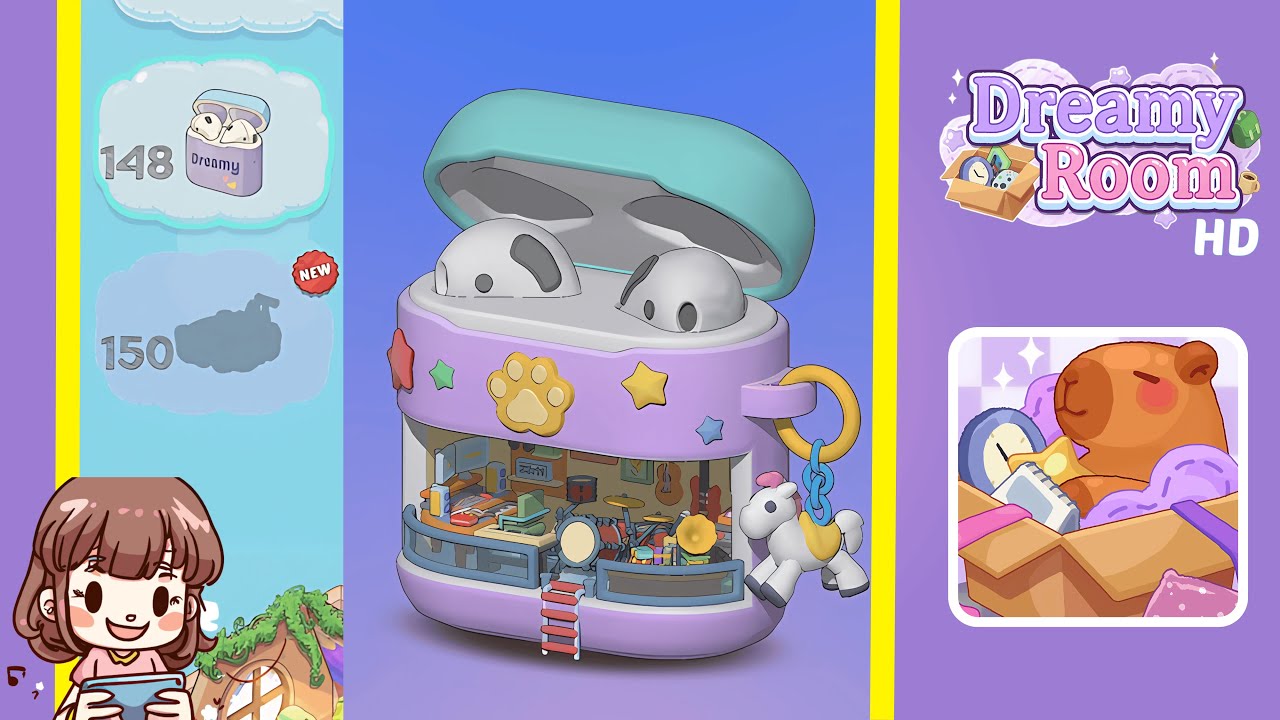
Dreamy Room Level 150 Walkthrough & Guide
Welcome to Dreamy Room Level 150, where you'll transform a bare lavender base into a captivating mini performance area. Your primary focus is on the precise placement of each item to create a structured and appealing scene.
Step-by-Step Guide
- Place the stage platform in the bottom compartment, ensuring the front lip aligns with the purple interior trim. This creates a stable base, essential for later additions.
- Position the red and white ladder at the center front of the stage, ensuring it is accurately aligned to avoid obstructing future props.
- Set the grey drum set in the middle of the stage, with the bass drum dead center. Ensure cymbal stands slot into designated holes, aligning according to the carved ridges for stability.
- Hang the orange acoustic and red electric guitars on the back wall, ensuring they are at the same height and angle for symmetry.
- Place the white keyboard and mixing console on the left side of the stage, aligning with the back supports and ensuring they fit snug in the cutouts.
- Position the microphone stand and gramophone in the right corner of the stage, ensuring both items are balanced visually.
- Apply the star and paw print decals on the exterior band, then attach the unicorn keychain, making sure it swings freely.
- Place the earbuds in the lid indentations and secure the mint green lid, ensuring a snug fit or an open angle for display.
Notes & Precautions
- Work methodically to double-check each placement for accuracy and stability.
- Avoid forcing pieces into place; this can warp or break edges. Apply decals gently to ensure a professional look.
- Ensure proper alignment of the hinge mechanism to prevent loosening or misalignment of the lid.
Tips & Tricks
- Before committing, layout all pieces to familiarize yourself with their positions.
- Use a thin tool to handle decals, avoiding fingerprints on visible areas.
- Align large pieces against a straight edge to keep them square.
- Tilt the case slightly back when seating smaller objects for easier visibility.
- Rotate the display under light to better spot placement grooves.