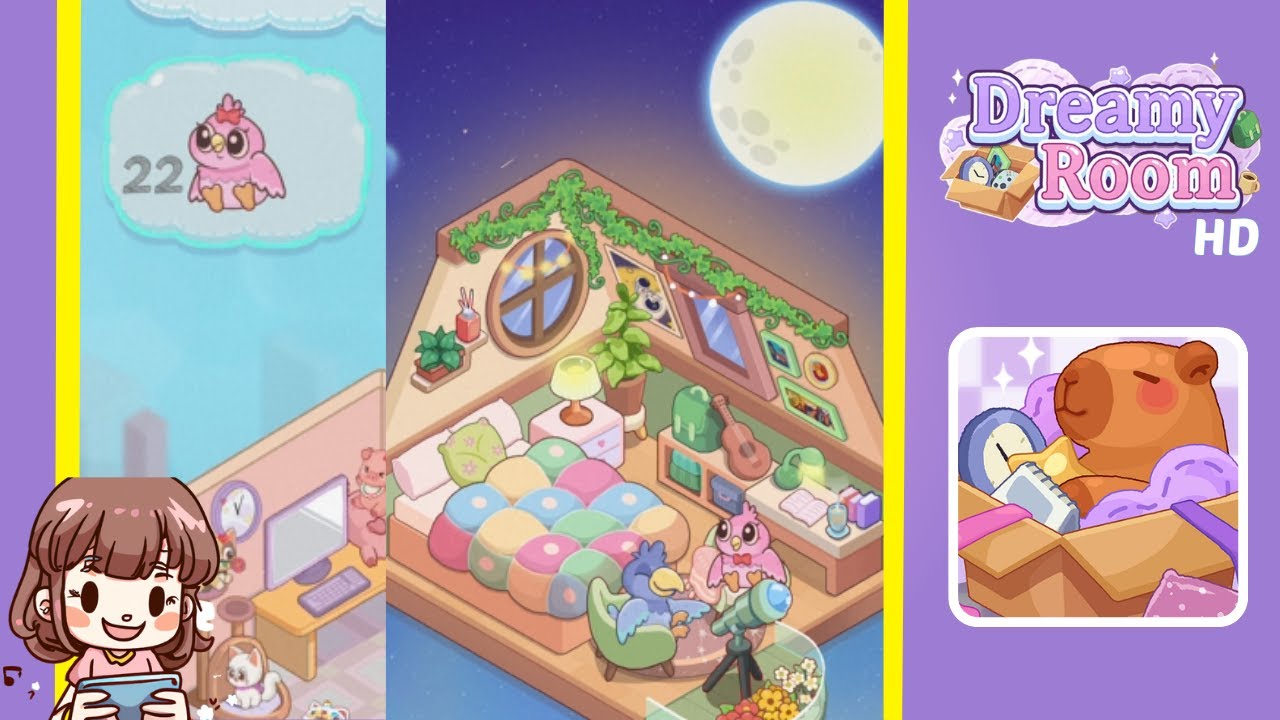
Dreamy Room Level 13 Walkthrough
Welcome to Dreamy Room Level 13, one of the most charming stages in the game. In this level, you’ll transform a simple attic-like space into a cozy haven filled with colorful pillows, musical instruments, and two friendly bird characters enjoying the night sky. The main challenge is determining the correct placement for each object to recreate the inviting scene. Below is a detailed step-by-step guide, complete with essential notes, precautions, and insider tips to help you decorate the room flawlessly.
Step-by-Step Guide
- Position the wooden bed frame in the leftmost corner of the room, snug against both walls to maximize space.
- Arrange the vibrant, round pillows neatly on top of the bed to add a cheerful, cozy feel.
- Place a small nightstand immediately to the right of the bed. Then, put the lamp on top for soft, ambient lighting.
- Behind the bed, position the green trunk against the back wall and lean the guitar casually against it.
- Move the plush, green armchair near the center of the floor space. Seat the friendly blue bird character on this armchair.
- In the lower right section of the room, place the telescope and stand the pink bird character beside it, placing a small pot of flowers in front.
- Attach the circular window high on the left wall, drape the vine along the attic roof beam, and hang framed pictures on the right wall.
- Place a small potted succulent and a few books on the window shelf as final touches to capture the room’s peaceful essence.
Notes & Precautions
- Space Management: Ensure items do not overlap and each has enough room without interference.
- Object Lock-In: Some items may lock in position once placed, so ensure their location is satisfactory before finalizing.
- Fragile Items: Keep delicate objects like the lamp or telescope separate to avoid placement errors.
Tips & Tricks
- Preview Mode: Use the preview feature to view the entire layout before confirming final placements.
- Rotating Objects: Experiment with rotating items like the guitar for a more natural arrangement.
- Use the Grid: Enable grid lines for easier object placement, ensuring every item has a clear spot.
- Rearrange Frequently: Feel free to move objects around until you achieve the perfect setup.