Dreamy Room Level 14 Walkthrough
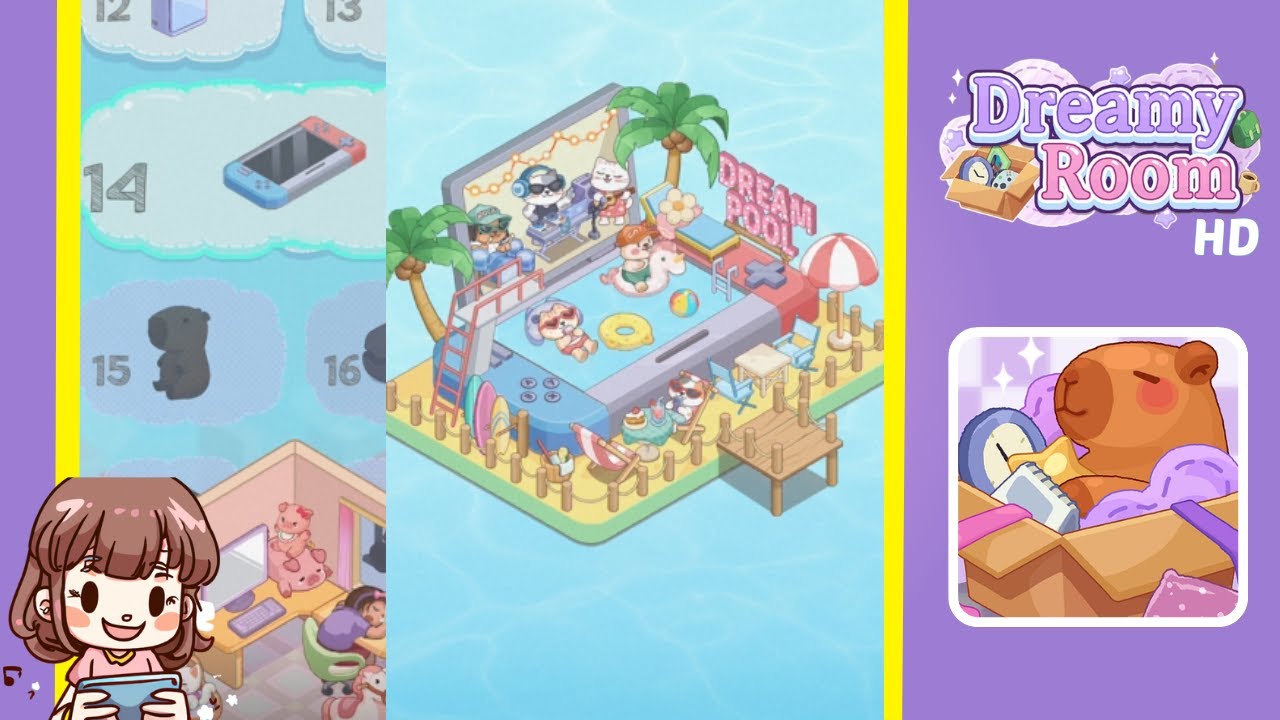
Below is a complete walkthrough for Dreamy Room Level 14, guiding you step by step through transforming the empty stage into the vibrant “Dream Pool” scene you see in the finished design. Follow each placement carefully, because the main challenge of Dreamy Room Level 14 is getting every object exactly where it belongs!
Step-by-Step Guide
- Place the Phone-Pool Base in the Center: Begin Dreamy Room Level 14 by placing the large, phone-shaped pool base right at the center of the platform. Make sure there’s enough space around it for additional decorations.
- Position the Wooden Fence Around the Perimeter: Next, drag and place the wooden fence pieces to form a border around the outer edge of the platform. Enclosing the space neatly ensures all other items will fit perfectly.
- Install the Dock at the Front: Attach the small wooden dock so it extends from the front center of the fenced area. This detail is crucial as it anchors the entire beach-like theme and helps with visual balance.
- Add Palm Trees to the Back Corners: Place one palm tree on each rear corner of the platform. These palm trees provide a tropical backdrop and frame the scene from both sides.
- Set Up the “Dream Pool” Sign at the Top Right: Position the neon “Dream Pool” sign on the top-right edge of the phone pool. Be sure it’s clearly visible and not blocked by other objects.
- Arrange the Slide and Ladder on the Left: Attach the slide or ladder structure to the left side of the phone pool. Characters will appear on this structure, so make sure it’s securely placed so they can climb or slide into the water.
- Place the Surfboards Along the Left Fence: Line up the colorful surfboards against the fence on the left side to complete the beach vibe.
- Add Lounge Chairs and Umbrella on the Right: On the right side, set up two lounge chairs and a small table beneath the beach umbrella. This cozy relaxation spot brings the seaside resort feel to life.
- Populate the Pool with Floats and Characters: Inside the phone pool, put a donut float near the center. Place the unicorn float with a character riding it in the front section. Add any extra floaties, like a duck ring, scattered around for variety. Above the pool, position the DJ cat character on the top platform, slightly left of center. Place the policeman-like cat to the left side, near the slide entrance. Put the snorkel-wearing cat near the water’s edge on the top-right side. Take care with spacing to achieve precise character and float placement.
- Final Touches and Decorative Details: Finish by adding small accessories like beach balls or tiny drinks wherever you see empty space. Check that every item is in its correct position, ensuring the “Dream Pool” scene is complete.
Notes & Precautions
- Check Object Overlaps: Some items can overlap if you’re not careful. Always confirm each object snaps into place.
- Mind the Fence: If the fence pieces aren’t perfectly aligned, you might have trouble placing the dock or surfboards correctly.
- Save Frequently: Although the game is relaxing, it’s wise to save your progress in case you need to revisit any placements.
Tips & Tricks
- Use the Grid: Activate the grid view if available. It makes object placement much easier.
- Rotate Objects: Don’t forget you can rotate items. Sometimes a slight rotation helps everything fit seamlessly.
- Preview Mode: Zoom out often to see if your layout matches the intended design before finalizing each step.
- Experiment Freely: There’s no penalty for trying new placements. Enjoy discovering how each piece brings the tropical theme to life.