Dreamy Room Level 19 Walkthroughs & Guide
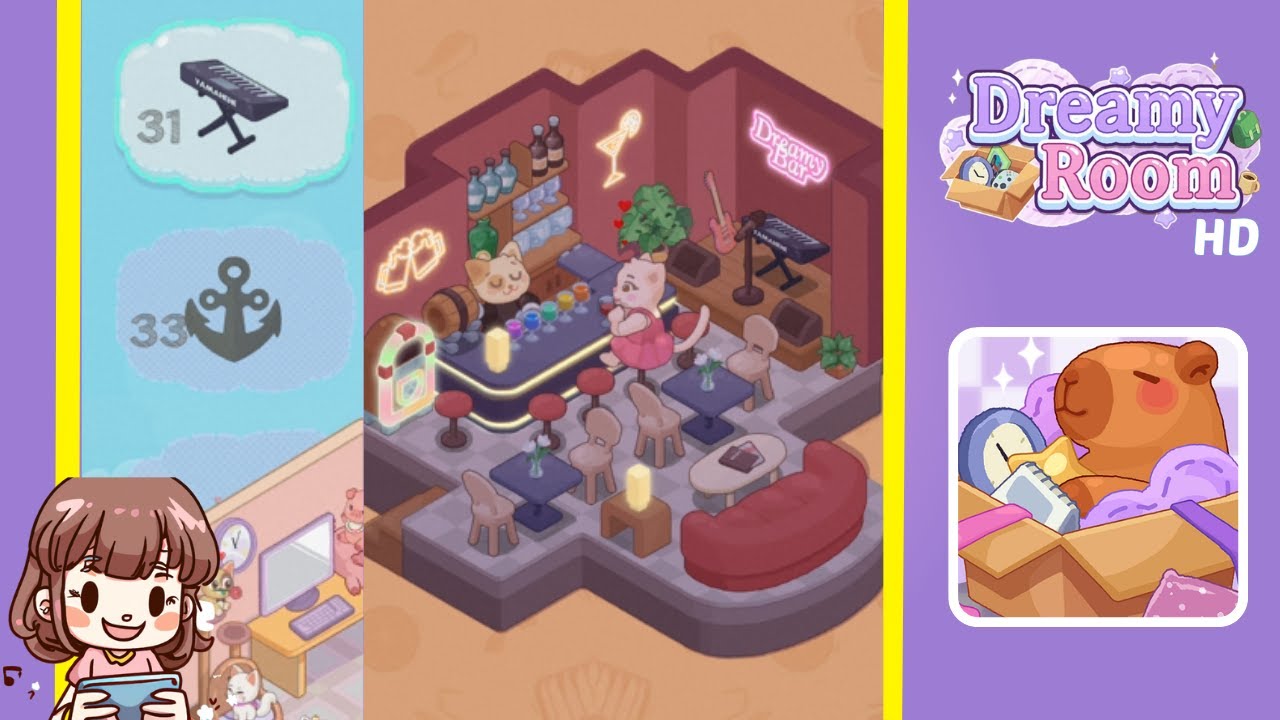
Below is a comprehensive walkthrough on how to decorate Dreamy Room Level 19 from its empty layout into the cozy, cat-themed bar seen in the final image. Follow each step carefully to place every item in the correct spot. Remember, the primary challenge in Dreamy Room Level 19 lies in determining the exact placement of each object, so be meticulous and enjoy the process!
Step-by-Step Guide
- Position the Main Bar Counter in the Center: Start Dreamy Room Level 19 by placing the large, rectangular bar counter in the center of the room. This bar counter serves as the focal point of your layout, so make sure it’s aligned with the room’s entrance for a welcoming feel.
- Arrange the Bar Stools Around the Bar: Next, take the four bar stools and space them evenly around the front and sides of the counter. In Dreamy Room Level 19, ensuring proper alignment of these stools is key to recreating the completed bar look. Leave enough room for the cat customer figure to be placed on one of the stools.
- Place the Cat Bartender Figure Behind the Bar: Now, grab the cat bartender figure and position it directly behind the bar counter. In Dreamy Room Level 19, this figure is essential for bringing the scene to life. The bartender should face outward, ready to serve the upcoming cat patron.
- Seat the Cat Customer at a Front Bar Stool: Take the cat customer figure and seat it at one of the front bar stools. This small detail in Dreamy Room Level 19 adds character to the bar setting, so make sure the figure faces the bartender for a realistic interaction.
- Install the Bottle Shelf Behind the Bar: Place the wall-mounted shelf with various bottles on the back wall, directly behind the bartender. In Dreamy Room Level 19, you want the bottles visible just above the cat bartender’s head. This positioning provides the perfect backdrop and highlights the bar’s function.
- Position the Barrel Next to the Bottle Shelf: Place the wooden barrel on the floor behind the bar, to the left or right of the bartender. This decorative piece in Dreamy Room Level 19 enhances the bar theme, suggesting a stock of beverages ready for patrons.
- Add the Potted Plant Behind the Bar: Include a green potted plant behind the bar, near the shelf or barrel. The plant adds a touch of freshness and color to Dreamy Room Level 19, breaking up the uniformity of bottles and bar equipment.
- Hang the “Dreamy Bar” Neon Sign on the Top Right Wall: Locate the neon sign that says “Dreamy Bar” and attach it to the top right wall. In Dreamy Room Level 19, this sign should be clearly visible above the keyboard stand you’ll place later, giving your bar a signature look.
- Mount the Cocktail Glass Neon Sign Above the Bar: On the center of the back wall, above the bartender and bottle shelf, place the neon sign shaped like a cocktail glass. Ensuring it’s well-centered is crucial in Dreamy Room Level 19, as this sign highlights the bar theme and draws attention to the bartender’s station.
- Place the Headphones Neon Sign on the Left Wall: On the left wall, hang the neon sign that resembles headphones. In Dreamy Room Level 19, this neon piece adds a musical vibe, tying in perfectly with the other instruments you’ll place in upcoming steps.
- Set the Jukebox Along the Left Wall: Position the jukebox below the headphones neon sign on the left side. This retro item is a must-have in Dreamy Room Level 19 for an authentic bar feel. Align it so that it doesn’t block the entrance or walkway.
- Place the Keyboard on the Top Right Side: Move to the top right corner of the room and set the keyboard on its stand. In Dreamy Room Level 19, this musical element helps complete the live-entertainment atmosphere. Ensure there’s enough space for a performer to stand behind it.
- Lean the Guitar Next to the Keyboard: Place the guitar just to the left or right of the keyboard stand, resting against the wall. Dreamy Room Level 19 emphasizes a relaxed, musical setting, and positioning the guitar close to the keyboard ensures all instruments are grouped neatly.
- Arrange the Curved Couch in the Bottom Right Corner: Look to the bottom right corner and position the large, curved red couch so that it faces the center of the room. In Dreamy Room Level 19, this seating area provides a comfortable spot for patrons to lounge and enjoy the bar’s ambiance.
- Set the Coffee Table in Front of the Couch: Place a small, round coffee table directly in front of the curved couch. Add a candle or small lamp on top for soft lighting. This table in Dreamy Room Level 19 creates a cozy focal point for guests seated on the couch.
- Place the Two Small Tables with Chairs in the Middle: In the central area, between the bar and the couch, position two small round tables. Surround each table with two chairs. This arrangement in Dreamy Room Level 19 provides additional seating for customers who prefer a more private conversation away from the bar.
Notes & Precautions
- Object Placement: In Dreamy Room Level 19, the correct positioning of each item is crucial. Pay special attention to how signs and furniture align with the walls to avoid blocking doorways or creating uneven spacing.
- Item Rotation: Some objects might need rotation to fit perfectly. Make sure to rotate items until they snap into the correct orientation.
- Spacing: Avoid overcrowding. Each piece should have enough room for the cats and potential visitors to navigate.
- Wall Mounts: When placing neon signs or shelves, ensure you’ve switched to wall placement mode (if applicable) to keep them from floating or ending up on the floor.
Tips & Tricks
- Preview Mode: Use preview mode to check the room from different angles before finalizing placements in Dreamy Room Level 19.
- Lighting Effects: If the game allows lighting adjustments, adding soft lights near the bar and couch can enhance the cozy bar ambiance.
- Grouping Items: Group related items together—like the keyboard and guitar—for a cohesive, thematic look in Dreamy Room Level 19.
- Experiment Freely: Don’t be afraid to experiment with slight repositioning. Even a small shift can make the layout feel more balanced.