Dreamy Room Level 31 Walkthrough & Guide
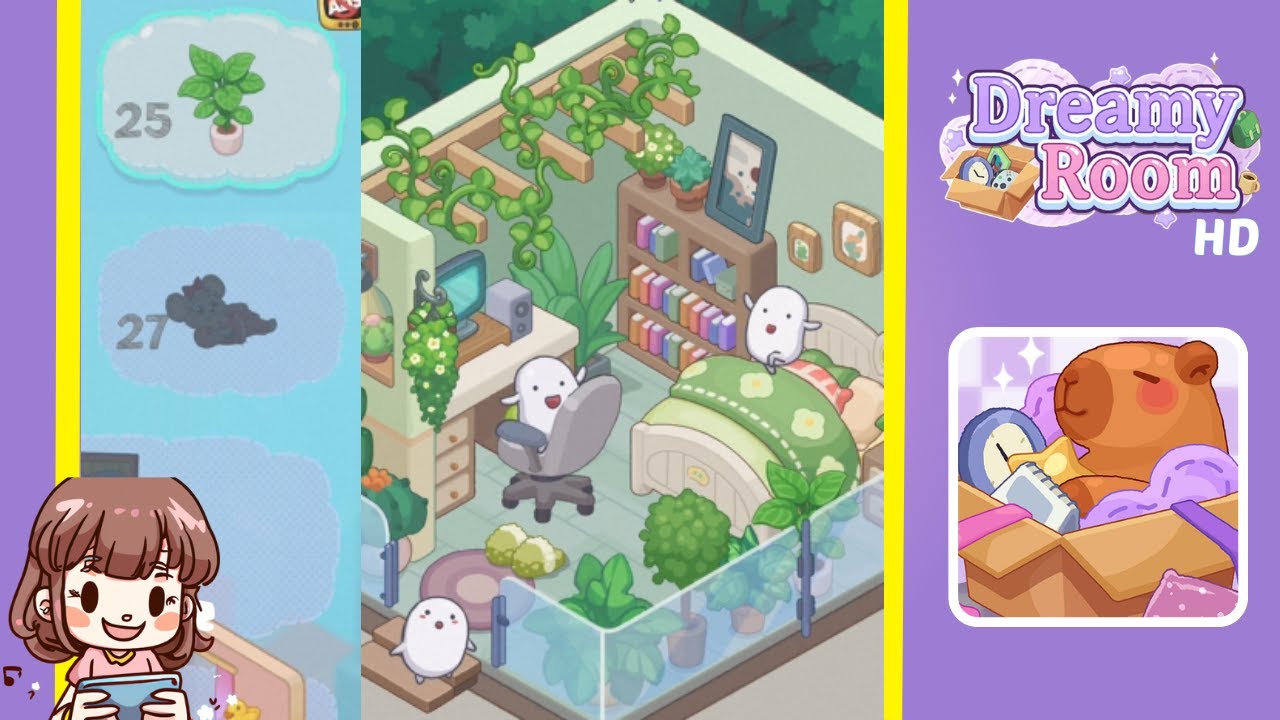
Welcome to Dreamy Room Level 31, one of the most charming stages in the game! In this level, you’ll decorate a tranquil bedroom with lush greenery, a comfortable workspace, and adorable ghost-like plushies. The main challenge is figuring out the perfect placement of each item. Let’s get started!
Step-by-Step Guide
- Place the bed in the back-right corner, ensuring the headboard is flush against the wall with the foot facing slightly toward the room's center.
- Position the desk in the back-left corner, parallel to the bed, to provide a balanced layout and ensure easy movement.
- Add the desk chair directly in front of the desk for easy interaction with the computer, forming a functional workspace.
- Hang a wall lamp above the desk to illuminate the workspace while avoiding harsh shadows on the monitor.
- Attach a large trailing vine on the ceiling near the back wall, allowing it to drape above the desk and bed, enhancing the room's natural vibe.
- Place a bookshelf behind the bed against the back wall, ensuring it doesn't overlap the headboard, and fill it with colorful books.
- Arrange three framed pictures on the right wall above the bed's pillows to add visual interest and unify the room's theme.
- Add cacti and potted plants throughout the room, placing small cacti near the bed, a trailing plant on the desk, and a larger plant to the desk's left.
- Install a glass railing at the front edge of the room to define the boundary while maintaining a clear view of the interior.
- Add adorable ghost-like plushies: one on the bed, one near the glass railing, and one perched on the ceiling vine for a playful touch.
Notes & Precautions
- Ensure each item is snapped into the correct spot; incorrect placement can block other items.
- Watch out for overlapping objects; adjust their positions if necessary.
- The ceiling vine can be tricky; ensure it doesn’t collide with the bookshelf or wall lamp.
Tips & Tricks
- Start with the largest pieces (bed, desk, bookshelf) before moving on to smaller items.
- Use the in-game zoom function to fine-tune the placement of plants and framed pictures.
- Grouping plants in corners maximizes space and gives the room a balanced look.
- Rotate objects if they seem out of place; a slight turn can make a difference.