Level walkthrough
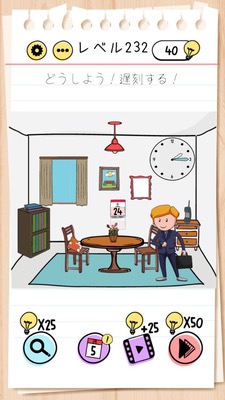
Brain Test Level 232 Walkthrough: Swipe the Calendar to Make it Saturday
Brain Test Level 232 Walkthrough: Swipe the Calendar to Make it Saturday
Complete Guide, Step-by-Step Explanation, Common Mistakes
🧩 Level Information
- Level Number: 232
- Prompt: Swipe the calendar to make it Saturday
- Difficulty: Easy
🎯 Objective
Swipe the calendar on the screen with your finger to align the displayed day to "Saturday".
📝 Step-by-Step Solution
- Carefully observe the calendar section and confirm that nothing happens when you tap it.
- Swipe the entire calendar or the section where the dates are listed with one finger as if dragging it.
- Try swiping upwards or downwards (or side to side) to check if the displayed day changes.
- Repeat the swipe until the calendar moves to the position where "Saturday" is displayed.
- Once the day shows "Saturday", release your hand to clear the level.
💡 Hints
- Simply tapping on a date or day will not change anything.
- Try to see if you can move the entire calendar.
- Swipe with your finger to make other days and dates visible.
- Swipe multiple times until "Saturday" is displayed.
🧠 Explanation & Key Points
This level appears to be just a plain calendar at first glance, but it tests if you can notice that it is, in fact, a scrollable object. Players often first think they should directly tap or hold a specific date or day to change it to Saturday. However, the prompt itself almost reveals the answer as it states to "Swipe the calendar to make it Saturday," emphasizing the key insight of simply swiping the screen as instructed. In Brain Test, many challenges involve swiping or dragging elements on the screen to reveal hidden parts or change states. This level is part of such a series, designed to prompt players to realize 'even UI elements that appear fixed can potentially be moved.'
🔍 Common Mistakes
- Persistently tapping the date or day text.
- Trying to find a Saturday box and giving up by only viewing the visible part.
- Attempting to fiddle with the smartphone's calendar notifications or date settings.
- Trying to pinch in or pinch out the screen to zoom in or out.
- Assuming holding down or double tapping will change the day.
🎉 Advice After Clearing
You managed to swipe the calendar to make it Saturday! In this level, you should have learned that parts of the interface that appear fixed can sometimes be swiped to move them. In the future, whenever you encounter suspicious parts, try dragging or swiping them.