Level walkthrough
Brain Test Level 228 Walkthrough: Turn the smartphone upside down to make 16=8+8
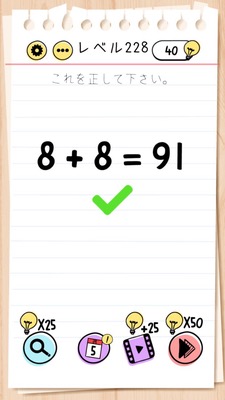
Brain Test Level 228 Walkthrough: Turn the smartphone upside down to make 16=8+8
Complete guide, step-by-step explanation, common mistakes
🧩 Level Information
- Level Number:228
- Question:Turn the smartphone upside down to make 16=8+8
- Difficulty:easy
🎯 Objective
Physically turn the smartphone (device) upside down to make the equation on the screen appear as "16 = 8 + 8".
📝 Steps to Solve
- The game screen does not display '16=8+8', but an equation with numbers appearing upside down (e.g. '91=8+8'). First, observe without touching the screen.
- Notice that dragging or tapping the numbers or symbols does not make the equation correct.
- Observe that the instruction 'Turn the smartphone upside down to make 16=8+8' directly indicates the operation method.
- Instead of within the app, take your actual smartphone (tablet) and slowly rotate it 180 degrees to turn it upside down.
- When the device is completely upside down, the appearance of numbers on the screen changes, allowing the equation to be read as "16 = 8 + 8".
- If that state continues for a few seconds, it will automatically be considered correct, and the level will be cleared.
💡 Hints
- If the numbers can't be changed, consider changing the "viewing angle."
- Don't just fiddle with the screen; try moving the smartphone itself.
- Rotate the smartphone 180 degrees to make the equation look like '16=8+8'.
🧠 Explanation & Key Points
This problem is a "device operation" trick issue where you change the direction of the device itself instead of operating objects on the screen. Starting from a state where numbers do not appear correctly, players typically try to rearrange and change numbers by dragging them or tapping them. However, since nothing changes at all, realizing "why nothing happens" becomes crucial.\n\nThe text says "Turn the smartphone upside down," so the sentence itself serves as both a hint and the answer. In this level, gyro sensors and accelerometers are used to detect the angle of the device, and it is designed such that a "correct" solution is triggered when it is tilted beyond a certain angle.\n\nIn Brain Test, problems requiring operations outside the screen, such as shaking, tilting, turning the device upside down, or pressing the volume button, frequently appear. This is one representative example, aiming to teach players that "reading the question straightforwardly" and "considering external controls as part of the puzzle" is essential.
🔍 Common Mistakes
- Trying to rearrange numbers or '=' and '+' symbols by dragging them.
- Attempting to change numbers by long pressing or double tapping them.
- Trying to solve the problem through multitap operations like zooming in and out.
- Continuing to search for solutions that are resolved only within the screen, without reading the hints text.
- Only slightly tilting the device and stopping, not fully turning it upside down (180-degree rotation).
🎉 Advice After Clearing
You should have understood that the orientation of the smartphone itself is part of the puzzle, not just what's on the screen. Let's continue with the thinking that it is important to "move the device according to the question text" in the future.