Level walkthrough
Brain Test Level 210 Walkthrough: Create a Platform with the Central Cloud
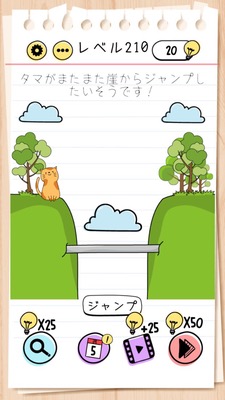
Brain Test Level 210 Walkthrough: Create a Platform with the Central Cloud
Complete Walkthrough, Step-by-Step Explanation, Common Mistakes
🧩 Level Information
- Level Number: 210
- Puzzle Description: Swipe the central cloud down and press jump
- Difficulty: Medium
🎯 Objective
Move the central cloud to create a platform, and make the character jump on it to clear the stage.
📝 Steps to Solve
- Focus on the cloud in the center of the screen.
- Tap the central cloud with your finger, then swipe it down to lower the cloud.
- Ensure the cloud is lower near the character (around the feet area) and is at a height on which it can serve as a platform.
- When ready, tap the "Jump" button on the screen.
- If the character jumps onto the lowered cloud, the stage is cleared.
💡 Hints
- Read the instruction 'Swipe the central cloud down and press jump' without doubting it.
- The cloud might not just be for decoration—it might be a movable object. Try touching it.
- Especially try dragging the cloud in the center up and down with your finger.
- Be sure to swipe the central cloud down to create a platform before pressing the jump button.
🧠 Analysis & Key Points
This level is a type of puzzle where the puzzle description itself is the answer. Since it says “Swipe the central cloud down and press jump,” many players skim over it as merely an explanation. However, in reality, following that sentence is the condition for clearing. The key is to break the assumption that the cloud is a movable object and to view the text as a 'manual' rather than a hint. By lowering the central cloud to create a platform, the character can move safely onto it by pressing the jump button. It's simple, but it tests your observation skills and ability to change your perspective.
🔍 Common Mistakes
- Repeatedly pressing the jump button, attempting to make the character jump high on its own.
- Trying to swipe the character itself to make it jump.
- Attempting to move only the clouds or other objects on the sides without touching the central cloud.
- Swiping the central cloud upward, making it more distant.
- Not lowering the cloud enough before jumping, then beginning to look for another solution.
🎉 Advice After Clearing
It turns out executing the puzzle description was the correct solution. It’s quite tricky that clouds can be used as platforms. In the next level, remember to try touching things that don't seem movable.