Level walkthrough
Brain Test Level 202 Guide: Swipe the pedestrian crossing to the road
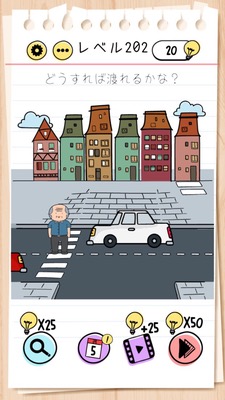
Brain Test Level 202 Guide: Swipe the pedestrian crossing to the road
Complete Guide, Step-by-Step Explanation, Common Mistakes
🧩 Level Information
- Level Number: 202
- Problem Statement: Swipe the pedestrian crossing to the road
- Difficulty: Easy to Moderate
🎯 Objective
Drag and swipe the black-and-white pedestrian crossing on the screen with your finger to the road side, swapping the position of the road.
📝 Steps to Solve
- Check the 'pedestrian crossing' around the center of the screen. The part with black and white stripes is the pedestrian crossing.
- Try to touch and drag the pedestrian crossing itself (the stripe part) as if you are long-tapping a single object, without releasing your finger.
- Slide (swipe) your finger to the right or left towards the 'road'. Note that the position of the road may vary depending on the stage structure, so move in the direction where the road is drawn.
- When you place the pedestrian crossing overlapping with the road, it will automatically clear the stage.
- The key point is to not just swipe across the screen, thinking it can't move, but to "grab and move the pedestrian crossing picture itself".
💡 Hints
- Hint 1: Instead of moving cars or people, try touching the pedestrian crossing itself.
- Hint 2: The pedestrian crossing is not just a background but an object that can be dragged. Try sliding after a long press.
- Hint 3: Drag the pedestrian crossing towards the road side and overlap it on the road to clear it. Be sure not to swipe the wrong target.
🧠 Explanation & Points
This level is a typical trick where 'the problem statement itself is the answer'. Players usually think about tapping or swiping cars or people to solve it, but the actual part to move is the pedestrian crossing, which looks like part of the background. In Brain Test, the pattern of 'objects that look like the background actually move' is often repeated, and this serves as a kind of review to confirm that learning. The operation is simply to drag the pedestrian crossing toward the direction of the road, but the key is whether you notice that the pedestrian crossing responds as a single object.
🔍 Common Mistakes
- Trying to swipe the cars or repeatedly tapping them.
- Swiping the whole screen but getting no response, misunderstanding the 'swipe' instructions.
- Trying to move other objects like people or traffic lights and not touching the pedestrian crossing.
- Moving the pedestrian crossing only a short distance, returning it near its original position, and not overlapping it properly over the road.
🎉 Post-Clear Advice
Once the pedestrian crossing is moved and placed correctly over the road, the stage is cleared with a performance indicating characters can cross safely. Developing a habit of suspecting background objects will be helpful in future stages.