Level walkthrough
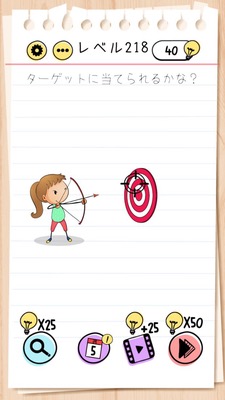
Brain Test Level 218 Walkthrough: Aim!
Brain Test Level 218 Walkthrough: Aim!
Complete Strategy Guide - Step by Step Instructions - Common Mistakes
🧩 Level Info
- Level Number:218
- Problem Statement: Move the target from front to back or reverse, and tap when the crosshair hits the target.
- Difficulty:normal
🎯 Objective
Move the target back and forth and tap the screen when it perfectly overlaps with the center of the crosshair.
📝 Solution Steps
- First, check the crosshair (cross mark) displayed near the center of the screen. Usually, it is fixed and cannot be moved.
- Check if you can drag the target mark on the screen by pressing and holding it with your finger.
- Try sliding the target from the front (near) to the back (far) direction or vice versa, and find a position where the center of the crosshair perfectly overlaps with the center of the target.
- Adjust the position of the target little by little and determine the moment when the crosshair's crossline and the center of the target perfectly overlap.
- When the crosshair and the target are perfectly aligned, immediately tap the screen to fire (or confirm).
- If a hit effect appears, you clear the stage. If you miss, try moving the target back and forth again, align them more accurately, and then tap.
💡 Hints
- Think that it is not the crosshair but the 'target' that you can move.
- Instead of left-right or up-down, the phrase 'from front to back' suggests that you can drag the target in the depth direction (back and forth).
- The correct point is where the crosshair's crossline and the center of the target completely overlap. You need to tap at that moment.
- It's more about 'alignment' than timing. Don't rush; carefully overlap them before tapping.
🧠 Explanation & Key Points
This stage may visually resemble a shooting or reflex game where you need to align targets, but the key trick is not 'quick reaction' but the concept of 'moving the target'. Many players try to move the crosshair or shoot at the right timing, but the crosshair is fixed, and only the target can move. By carefully reading the hint 'move it from front to back', players can realize the solution involves dragging the target to align it. Since you only need to tap when the crosshair and target overlap, the difficulty isn't high once you understand the mechanic.
🔍 Common Mistakes
- Trying to drag and move the crosshair, causing confusion because it won't move at all.
- Mistaking it for a timing game and trying to tap reflexively when the target moves automatically.
- Focusing on moving left-right or up-down, not realizing you can drag in the depth direction from the wording 'from front to back'.
- Insistently tapping, expecting to hit, but never clearing because the alignment is off.
🎉 Post-Clear Advice
Once you realize the trick of moving the target yourself to align it with the crosshair, this level should feel easy. In the next levels, try innovative operations like dragging things that seem immovable to avoid being constrained by fixed notions.