Level walkthrough
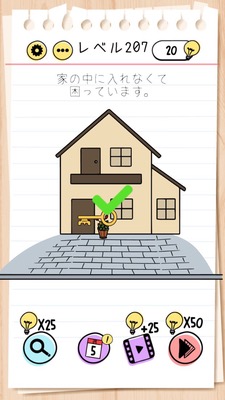
Brain Test Level 207 Walkthrough: Zoom the House and Use the Key
Brain Test Level 207 Walkthrough: Zoom the House and Use the Key
Complete Walkthrough・Step-by-step Guide・Common Mistakes
🧩 Level Info
- Level Number: 207
- Objective: Zoom in on the house and use the key on the door
- Difficulty: normal
🎯 Objective
Use the key on the door of the house to get inside.
📝 Steps to Solve
- First, identify the small house near the center of the screen.
- Use two fingers to tap on the position of the house.
- While touching, spread your two fingers outwards to zoom in and enlarge the entire house.
- Once the house is sufficiently enlarged, the door will become clearly visible and larger.
- Locate the key either on the screen or within the inventory.
- Press and hold or drag the key to the keyhole area on the door of the enlarged house.
- Overlap the key with the door, release your finger, and insert and use the key.
- If an animation of the door opening or a clear display appears, the stage is cleared.
💡 Hints
- Even if you carefully observe the house, a normal tap might not trigger any action. Try a different gesture.
- Remember smartphone-like actions to make objects on the screen bigger or smaller.
- When you zoom in to enlarge the house, the door becomes clear; use the key there.
🧠 Analysis and Key Points
This stage requires a simple key usage on the door, but it also demands that the player "enlarges the house" before using the key, which is the key point. Players might attempt to use the key directly on the small house's door but find it unresponsive, causing confusion. By integrating pinch-in/pinch-out smartphone-specific gestures as part of the puzzle, it encourages the idea of changing the object's size. By zooming out and enlarging the house, the door becomes larger, allowing the key to be correctly used. This showcases the signature Brain Test design where 'what you see isn't everything' and 'alter the target size before correctly using tools'. It challenges whether players have developed the habit of trying gesture operations on screen objects as part of their strategy.
🔍 Common Mistakes
- Dragging the key directly onto the small house's door (causes unresponsive failure).
- Repetitively tapping the house trying to open the door.
- Attempting to use the key on other places on the screen (like windows or roof).
- Pinching in to make the house even smaller, making it more difficult to manipulate.
- Trying to enlarge the key rather than the house with a pinch gesture, then giving up when it doesn’t work.
🎉 Advice After Clearing
Remember the flow of zooming in on the house before using the key. In Brain Test, simply using items isn’t enough; expect ideas like 'changing the target's size or position' and 'considering the entire screen as subject to manipulation', common in future stages. If stuck, getting accustomed to trying gesture operations (pinch, swipe, drag, long press) can lead to a smoother walkthrough.