Level walkthrough
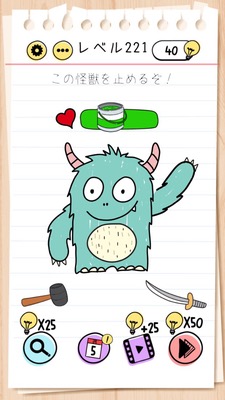
Brain Test Level 221 Walkthrough: Restore HP with the Green Can
Brain Test Level 221 Walkthrough: Restore HP with the Green Can
Complete Strategy, Step-by-Step Explanation, Common Mistakes
🧩 Level Information
- Level Number: 221
- Challenge: Swipe the green can to the HP gauge
- Difficulty: Normal
🎯 Objective
Drag the green can and swipe to overlap it on the HP gauge at the top (or within the screen), restoring the HP gauge.
📝 Steps to Solve
- Find the 'green can' on the screen. It's usually near the character or placed with other cans.
- Confirm that you can long-press and drag the green can.
- Without releasing your finger, swipe the green can toward the HP gauge (life gauge/health bar).
- Move the green can up to the HP gauge and overlap it so that it touches the gauge.
- If the green can seems to be absorbed into the HP gauge or an animation of the HP gauge recovering occurs, you have cleared the level.
💡 Hints
- Instead of 'tap to use', the operation requires 'swiping and overlapping'.
- Do not use the green can directly on the character; use it on the 'HP gauge' itself.
- Observe the area near the HP gauge carefully and try positioning the can in different areas on the gauge.
- If nothing happens, try changing the position slightly and swipe over the HP gauge.
🧠 Analysis & Points
This stage is a puzzle that plays on the preconception that 'items are used on the character'. Many players tend to drag the green can to the character's mouth or body, but what is actually needed is a shift in perspective to use it directly on the abstract UI element, the 'HP gauge'. In the Brain Test series, there are many stages where you interact with the UI on the screen (gauges, numbers, buttons, etc.). This level is a typical example, designed to make players aware of the boundary between game UI and in-world objects.
🔍 Common Mistakes
- Trying to drag the green can to the character's mouth or hands to make them drink it.
- Simply tapping the green can and waiting for something to happen automatically.
- Bringing the can close to the HP gauge but not overlapping it properly before releasing your finger.
- Swiping cans or items other than the green one to the HP gauge, mistaking the lack of response.
🎉 Advice After Clearing
The HP gauge is restored, marking the stage clear. By now, you should be getting used to Brain Test's trick of using items on the UI itself, which will be useful in future levels where you'll need to interact with the gauge or numbers instead of the character.