Level walkthrough
Brain Test Level 239 Walkthrough: Let's Repair the Car
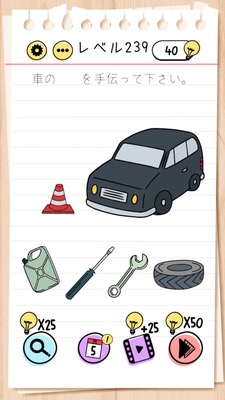
Brain Test Level 239 Walkthrough: Let's Repair the Car
Complete Solution, Step-by-step Explanation, Common Mistakes
🧩 Level Information
- Level Number: 239
- Problem Statement: Swipe the characters of "repair" over to the car
- Difficulty: Normal
🎯 Objective
Use your finger to drag the word "repair" and swipe it over to the car on the screen to repair it.
📝 Steps to Solve
- Find the word "repair" near the center of the screen.
- Press and hold the word "repair" with one finger to grab it.
- Without lifting your finger, swipe (drag) the word towards the car.
- Once the word "repair" is directly over the car, release your finger.
- If the word gets absorbed into the car and repairs it, the level is cleared.
💡 Hints
- The problem statement "Swipe the characters of 'repair' over to the car" is itself a hint about the controls.
- Instead of tapping on the car or tools, try moving the word "repair" itself first.
- Drag "repair" over the car to overlap it, then the car will be fixed.
🧠 Explanation & Key Points
This stage is a simple puzzle that tests whether you can interpret the text as an instruction for operation. Many players attempt to solve it by tapping or tapping rapidly on the broken car or nearby objects, but in reality, the text on the UI is a draggable object. The phrase "Swipe the characters of 'repair' over to the car" has a double meaning of instructing you to swipe (drag and drop) the word "repair" towards the car, making it essential to read the sentence straightforwardly rather than relying on intuition. It is a common Brain Test trick where a part of the problem statement turns out to be a puzzle piece.
🔍 Common Mistakes
- Tapping repeatedly on the car itself, expecting it to repair automatically.
- Trying to swipe the car to move it.
- Tapping on other objects on the screen (like people or background) to see if anything happens.
- Just tapping on the word "repair" waiting for a reaction (without trying to hold or drag it).
- Attempting to zoom in or out with pinch gestures.
🎉 Advice After Clearing
An animation of the word "repair" overlapping with the car and making the car shiny and repaired will appear, clearing the stage. You can proceed to the next level.