Level walkthrough
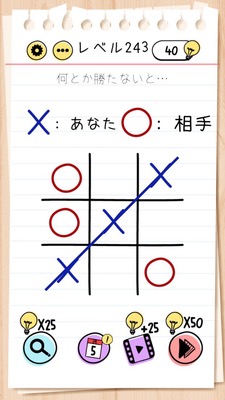
Brain Test Level 243 Walkthrough: Let's Put a X in the Top Right Corner
Brain Test Level 243 Walkthrough: Let's Put a X in the Top Right Corner
Complete Guide, Step-by-Step Instructions, Common Mistakes
🧩 Level Info
- Level Number: 243
- Problem Description: Swipe the circle in the top right corner and draw an X there by tapping
- Difficulty: Normal
🎯 Objective
Swipe the round button in the top right of the screen and tap on that place to make the X mark (×) appear.
📝 Steps to Solve
- Find the small round button (round mark) at the top right of the screen.
- Press and hold the circle with your finger and swipe it to the left or downwards, moving it to a position a bit away from the top right corner.
- Once you have moved the circle, tap once on the now empty 'top right corner' position.
- When you tap, an X mark (×) will appear there, completing the stage.
💡 Hints
- First, try swiping the 'top right circle' in various directions to see if you can move it.
- Consider the circle not as a button, but as a 'movable object.'
- After moving the circle away from the top right corner, carefully observe the now empty spot.
- If you tap the 'empty top right corner,' a mechanism is set that will make an X mark appear.
🧠 Explanation & Key Points
This is a type of trick stage where the answer is explicitly given in the problem description. Players tend to try directly interacting with the circle itself, such as 'tapping the top right circle' or 'swiping to draw an X over the circle,' but in reality, the circle is simply an object to be moved, and the real trick is to tap the 'empty top right corner' after moving the circle. In Brain Test, patterns like 'tapping an empty space causes something to appear' or 'removing objects reveals the correct answer' are commonly used. This stage also fits that pattern, and carefully reading the instructions within the problem statement, not just relying on what's displayed on the screen, is the key to solving it.
🔍 Common Mistakes
- Tapping the top right circle repeatedly results in nothing happening.
- Attempting to trace an 'X mark' shape over the circle with one's finger.
- Drawing an X mark over the entire screen, mistaking it for a gesture-based solution.
- Tapping somewhere other than the top right, like closer to the center of the screen.
- Partially dragging the circle away and letting go, failing to fully clear the top right corner.
🎉 Advice After Clearing
This stage emphasized the importance of straightforwardly reading the text, as the solution was solely to tap the space after moving the top right circle away. In the future, similar patterns like 'removing an object reveals the correct answer' and 'tapping an empty space' will appear, so be mindful of the screen's corners and blank areas.