Level walkthrough
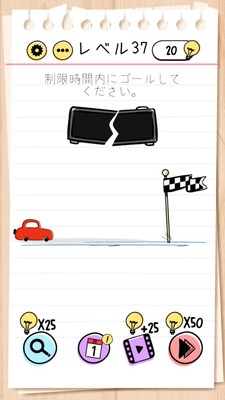
Brain Test Level 37 Walkthrough: Split Time and Stop the Car
Brain Test Level 37 Walkthrough: Split Time and Stop the Car
Complete Walkthrough, Step-by-Step Guide, Common Mistakes
🧩 Level Information
- Level Number:37
- Puzzle:Tap the time several times to break it and tap the car
- Difficulty:normal
🎯 Objective
Tap the 'time' icon (clock or timer icon) on the screen repeatedly until it breaks, then tap the car to clear the level.
📝 Steps to Solve
- Find the object representing 'time' (clock icon, timer, hourglass, etc.) on the screen. Usually, it is an icon with numbers or a clock illustration.
- Quickly tap the 'time' icon repeatedly, not just once—keep tapping until it breaks.
- After a certain number of taps, the 'time' icon will crack and eventually break and disappear or appear damaged.
- After breaking (smashing) the time, tap the car icon (car itself).
- By tapping the car, the time restriction will be lifted, and you can clear the level.
💡 Hints
- First, look for text labeled 'time' or icons resembling clocks or timers.
- If tapping once doesn't trigger any response, don't give up—keep tapping the same spot repeatedly.
- The keyword for this stage is 'break the time.' It's important to destroy what represents time.
- Only after the time is broken (smashed) will tapping the car trigger a response. Don't mix up the order.
🧠 Analysis & Key Points
This level is a type of riddle puzzle where the sentence itself is the solution. You need to directly follow the instruction, "Tap the time several times to break it, then tap the car." Players tend to try moving the car directly or dragging other objects, but the essence is to repeatedly tap and break the 'time' icon, which represents a clock or timer.\n\nIn Brain Test, hidden actions like "tap repeatedly to break," "change size," or "reveal hidden objects" are common. This stage is a classic example, where the time icon appears to be just a decoration but is actually the main gimmick. By breaking the time, the invisible constraint on the car (such as a time limit or stopping condition) is lifted, allowing you to tap the car and trigger the clear condition.
🔍 Common Mistakes
- Continuing to tap only the car from the start and mistakenly thinking it is a bug because nothing happens.
- Deciding that the time (clock or timer) icon is unrelated because tapping once or twice doesn't cause a reaction.
- Attempting to drag or swipe the time but failing to realize that repeated tapping is necessary.
- Trying various other objects on the screen (signs, background, etc.) while missing the crucial 'time.'
- After breaking the time, forgetting to tap the car as the final step and trying other actions instead.
🎉 Advice After Clearing
You've likely become accustomed to the wordplay of 'breaking the time' and the hidden action of tapping icons repeatedly to break them. In the future, remember that objects appearing decorative on the screen might often be gimmicks; therefore, it's helpful to keep in mind the idea of repeatedly tapping anything suspicious.