Level walkthrough
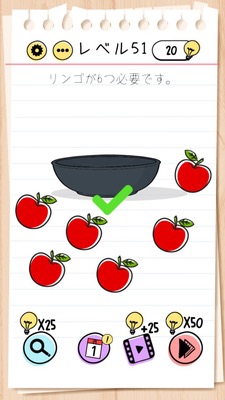
Brain Test Level 51 Walkthrough: Make the Number of Apples 6
Brain Test Level 51 Walkthrough: Make the Number of Apples 6
Complete Guide, Steps Explained, Common Mistakes
🧩 Level Information
- Level Number: 51
- Problem Statement: Swipe the number 9, flip it over, and make it 6
- Difficulty: Medium
🎯 Objective
Swipe the number "9" displayed on the screen, flip it over, change it to "6" to make the apple count correct.
📝 Steps to Solve
- Confirm that apples are lined up on the screen and the number "9" is displayed nearby.
- Tap on the displayed number "9" and place your finger to grab it.
- Without lifting your finger, swipe (drag) on the screen as if to rotate the "9".
- Rotate until the number fully spins and "9" becomes "6".
- Once "9" becomes "6", the correct apple count is recognized, and the stage is cleared.
💡 Hints
- Simply counting the apples won't clear the level. Consider whether you can manipulate the number itself.
- The number "9" turns into another number when flipped upside down. Try moving the number instead of rotating the screen.
- Press and hold or drag the "9" and try rotating it in a circle. It's recognized as "6" at the moment it turns upside down.
🧠 Explanation & Points
This stage is not about "finding a counting error", but a puzzle that requires the idea of "transforming the number itself". Players realize that the apple count and the displayed '9' do not match, but the answer is not to delete or add apples, but to physically rotate the number to change '9' to '6'. It's a problem testing whether you understand the Brain Test's unique rule of being able to freely drag and rotate objects on the screen, and the key is to think of manipulating the UI itself without being bound by common sense.
🔍 Common Mistakes
- Trying to tap on the apples themselves to delete them.
- Attempting to drag apples somewhere to change the count.
- Swiping left, right, up, or down, thinking apples might appear from off-screen.
- Physically inverting the smartphone or tablet to make the number look like 6. You need to rotate the number in-game.
- Assuming something happens just by tapping the number 9 without trying to press and hold or drag it.
🎉 Advice After Clear
This stage taught the tricky idea of flipping a number. In the future, methods such as "moving displayed numbers or symbols" will appear, so instead of merely counting, keep in mind that you might be able to manipulate the UI itself for easier clearing.