Level walkthrough
Brain Test Level 36 Walkthrough: Swipe the lightbulb from the top right to turn on the light
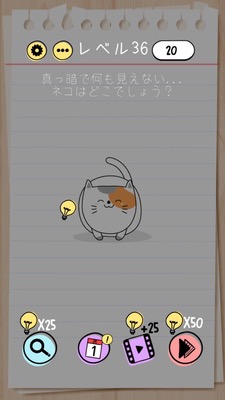
Brain Test Level 36 Walkthrough: Swipe the lightbulb from the top right to turn on the light
Complete Walkthrough, Step-by-Step Explanation, Common Mistakes
🧩 Level Information
- Level Number: 36
- Question: Swipe the lightbulb next to the 20 at the top right of the screen to turn on the light
- Difficulty: Slightly difficult
🎯 Objective
Swipe the lightbulb that is outside of the screen to bring it inside the screen and turn on the light.
📝 Steps to Solve
- Carefully examine the area near the score display “20” at the top right of the screen. You can see a small lightbulb icon next to the number.
- That lightbulb is mostly outside the screen and will not respond if tapped, so press and hold the lightbulb with your finger.
- While holding, swipe the lightbulb downwards (towards the center of the screen) to drag it into the screen.
- Once the lightbulb is brought into the screen, it will automatically light up and you will clear the stage.
💡 Hints
- Pay attention not only to what's on the screen but also to the edges and outside of the screen.
- Try to find if there's anything almost hidden near the score “20” at the top right.
- Instead of tapping on the small lightbulb, try to swipe it into the screen to move it.
🧠 Analysis & Key Points
This stage is a puzzle that breaks the assumption that “only the things visible on the screen are subject to operation.” There is a lightbulb almost hidden off the screen beside the score at the top right, and you need to have the idea to drag it onto the screen. Changing the direction of the tap or the swipe doesn’t result in anything, and it’s easy to overlook the objects on the edges, but the trick inherent to Brain Test is that even what you might think is a part of the "UI (score display)" can actually be controllable. The pattern of bringing objects in from outside the screen often appears in other levels, so getting used to it in this stage will make future challenges easier.
🔍 Common Mistakes
- Pressing and holding or swiping an empty spot in the center of the screen to try and find a hidden switch.
- Trying to physically "brighten" the screen by increasing the brightness settings on the smartphone itself.
- Giving up because the lightbulb icon does not respond to tapping, missing the fact that it can be moved.
- Presuming that other objects (scores, UI) are not to be touched and not trying near the numbers at the top right.
🎉 Advice After Clearing
You were able to notice the objects hidden outside the screen. From now on, if you develop a habit of touching and moving anything including decorations that look like UI, solving puzzles will become smoother.