Level walkthrough
Brain Test Level 69 Walkthrough: Move the Clock Hands Back
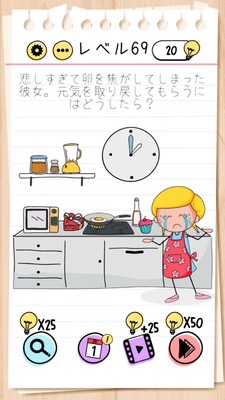
Brain Test Level 69 Walkthrough: Move the Clock Hands Back
Complete Walkthrough · Step-by-Step Guide · Common Mistakes
🧩 Level Information
- Level Number: 69
- Puzzle: Move the Clock Hands Back
- Difficulty: Medium
🎯 Objective
Drag the actual hands of the clock displayed on the screen with your finger to move the time back.
📝 Steps to Solve
- Carefully observe the clock in the center of the screen. Focus on the long and short hands, not the numbers or buttons.
- Place your finger on either the long or short hand of the clock and keep it firmly tapped.
- Without lifting your finger, drag the hand 'counterclockwise (leftward)'.
- The hand will move in the reverse direction, and the stage will be cleared when the time goes back.
💡 Hints
- Are you looking for a hidden button to change the time? Consider things other than buttons.
- Try directly moving the "hands themselves" of the clock.
- Grab the hands with your finger and drag them 'counterclockwise', not clockwise, to move the clock's hands back.
🧠 Analysis & Key Points
Both the puzzle and the answer are 'move the clock hands back,' making it a straightforward directive trick problem. Many players tend to search for buttons or setting icons on the screen, or suspect the phone's system time settings and rotation. However, the clock illustration itself is an interactive element. The key is realizing you need to touch and drag the hands directly to reverse the time. Perceiving it as a 'movable object' rather than just a 'picture of a clock' will make it easier to solve similar puzzles.
🔍 Common Mistakes
- Believing a 'reset' button is hidden somewhere on the screen and aimlessly tapping everywhere.
- Misunderstanding that altering the phone's time settings will affect the puzzle and trying to change the system clock.
- Tapping only around the numbers or the clock's surroundings, ignoring the essential 'hands'.
- Holding the hand but only rotating it clockwise (in the forward direction) and misunderstanding that it doesn't work.
🎉 Advice After Clearing
The clock was not a button, but an object with movable hands. Developing the habit of 'touching even the parts that look like drawings' will immensely ease solving future levels.