Dreamy Room Level 270 Walkthrough
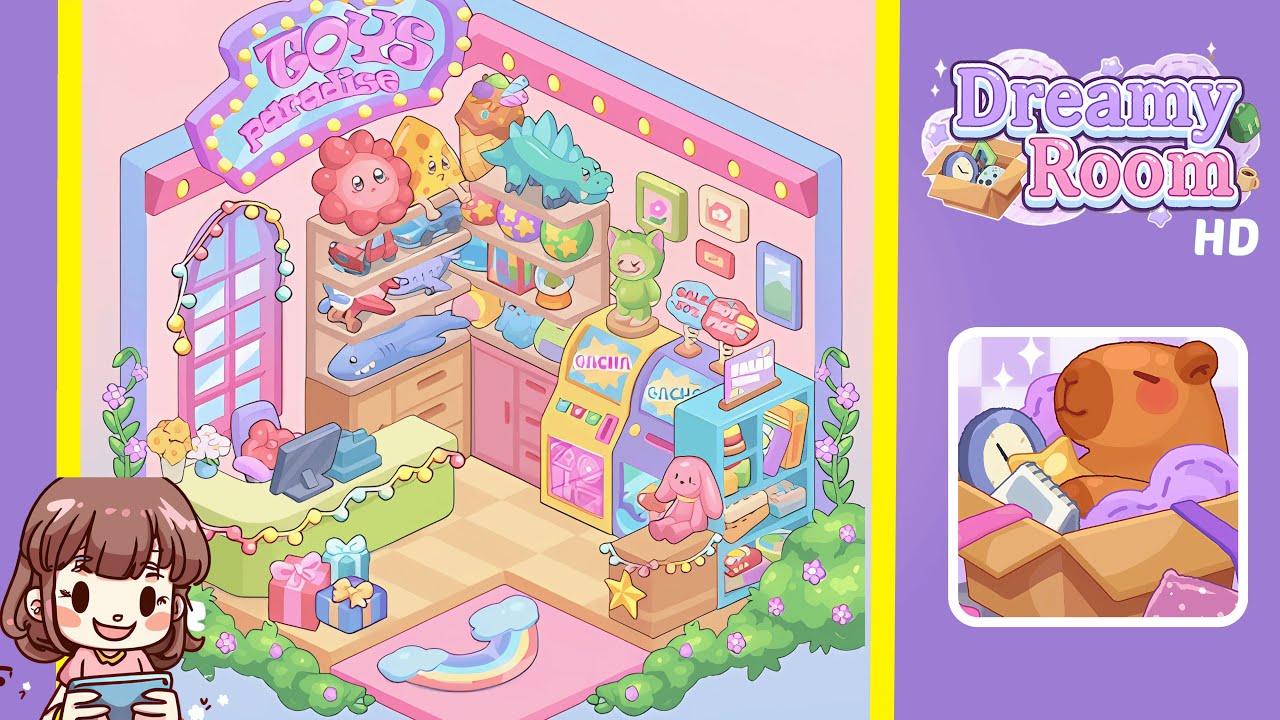
Welcome to the magical world of Dreamy Room Level 270, where you'll transform a simple space into a lively toy wonderland. Follow this guide to position every element perfectly and achieve the room's whimsical atmosphere.
Step-by-Step Guide
- Begin by placing the rainbow welcome mat with fluffy clouds on the pink platform at the entrance. Next, add blue, pink, and purple gift boxes near the entrance corner, below the checkout counter area. Ensure the rainbow mat is aligned perfectly with the entrance, and cluster the gifts neatly.
- Next, focus on the checkout area by placing a pastel green counter on the left side, beneath the arched window. Position the cash register on the counter, along with two stacked gift boxes. Add a comfy chair behind the counter with a plush flower toy, and string colorful fairy lights along the top edge of the counter.
- Enhance the left wall by adding a tall arched window with pastel string lights. Align it with the wall corner to the left of the checkout counter. Place two potted flower plants beneath the window and loop fairy lights smoothly around the frame.
- On the right side, place a large shelf unit and position vibrant plush toys: a pink flower character, a slice of pizza, a blue shark, a small dinosaur, and an ice cream-shaped toy. Larger toys should be on the middle and upper shelves, smaller ones neatly on top. Finish by adding framed pastel art pieces above the shelves.
- Create an interactive play corner by placing yellow and pink Gacha machines beneath the shelves. Add "Hot Pick" and "Sale 50%" signs above them. Install a blue board game rack in the corner, add a seated pink bunny plush on its ledge, with a golden star beneath it.
- Finalize the room by positioning a "Toys Paradise" neon sign above the counter to the top-left. Add framed pictures on the right wall and outdoor greenery around the entrance, including lush vines and purple flowers.
Notes & Precautions
- Objects require precise placement to lock into place correctly. Misalignment can cause items to float awkwardly.
- Start setting up from the floor and move upward to avoid blocking alignment spots for lower items.
- Be mindful of the pastel color palette to avoid confusing objects such as shelves, counters, and signs.
- Some plushies cannot be rotated, requiring exact placement as intended by the game.
- Install structural items before adding lights to prevent overlap issues.
Tips & Tricks
- Group gifts and plushies for balance, as the game rewards symmetry.
- Utilize walls as anchors to ensure shelves, counters, and signs sit flush against them.
- Don't rush, as careful decorating prevents alignment penalties.
- Place the "Toys Paradise" sign last to avoid blocking your view when arranging shelves.
- Rotate the room camera to check that objects like the rainbow mat and vines are correctly placed, avoiding hidden misplacements.