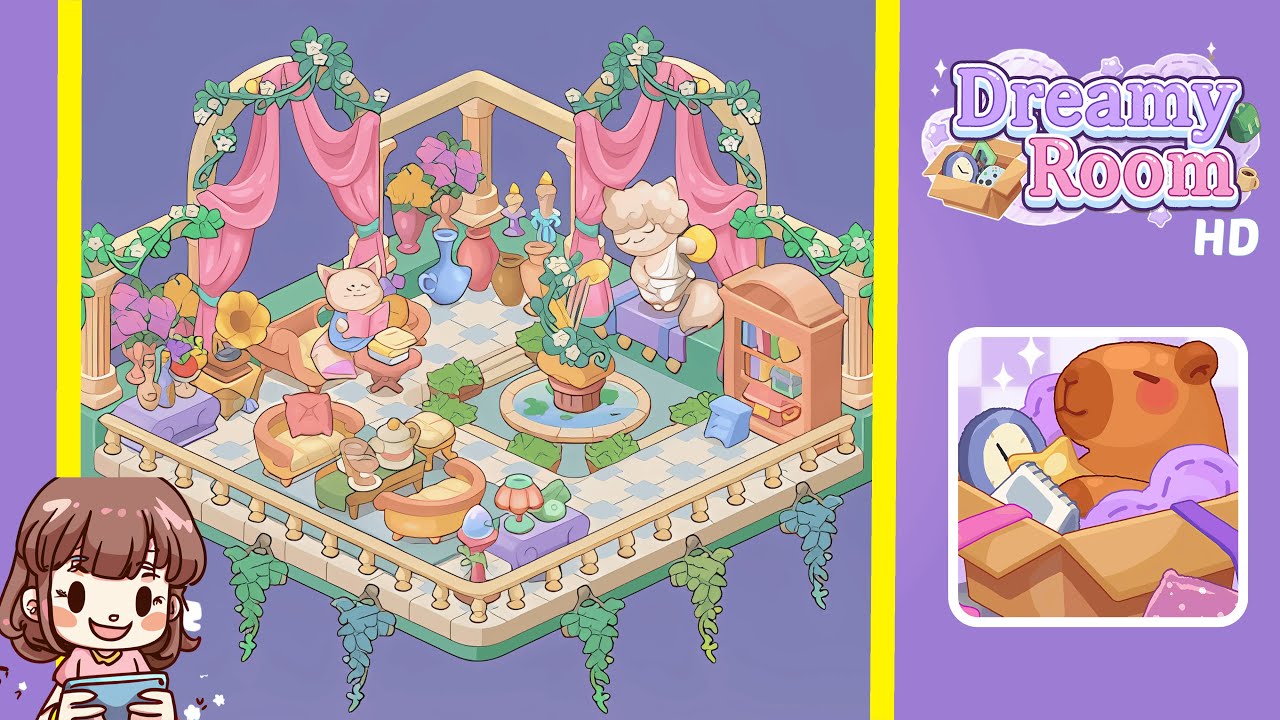
Dreamy Room Level 344 Walkthrough
Embark on the journey to create the perfect Dreamy Room in Level 344, where precision in placement transforms a simple space into a serene sanctuary. This guide will lead you through the exact steps needed to achieve this ethereal design.
Step-by-Step Guide
- Place the mint-green low wall and checkered tiles, ensuring alignment to set the room's foundation and grid.
- Install the balustrade and hanging vines for a foreground frame, paying attention to spacing and vine lengths.
- Position the back arched columns and pink draperies to create a theatrical architectural backdrop.
- Add the cozy left-side vignette with a gramophone, peach armchair, and side table stack focused on a reading cat.
- Arrange the central-left seating set and tea service with sofas forming a gentle U-shape around a coffee table.
- Build the fountain island off-center with surrounding greenery, ensuring symmetry with the checked tiles.
- Position the right-side elements: cherub statue, lavender bench, bookshelf, and step-stool for a balanced vignette.
- Finish with lamps, low accent plants, and tiny accessories to enhance the room's polished yet lived-in feel.
Notes & Precautions
- Focus on precision: align objects with the checked tiles to maintain balance.
- Avoid tight overlaps; each item requires space for proper display and shadowing.
- Nudge large anchors gradually if adjustments are needed to respect tile patterns.
- Save your progress frequently to secure a fallback layout for any misalignments.
Tips & Tricks
- Begin with architectural anchors to establish a solid foundation.
- Group similar items for a cohesive look, making placement easier.
- Use the tile grid as a measuring tool to maintain precise offsets.
- Experiment with minor rotations and vertical shifts to solve alignment issues.
- Prioritize placing large items first, then fill in smaller accents for efficiency.