Level walkthrough
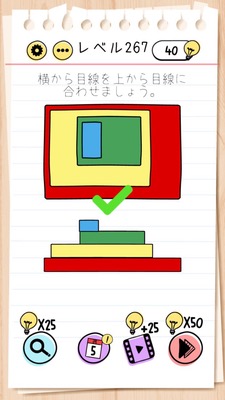
Brain Test Level 267 Walkthrough: Match the Top Image
Brain Test Level 267 Walkthrough: Match the Top Image
Complete Solution, Step-by-Step Guide, Common Mistakes
🧩 Level Information
- Level Number: 267
- Objective: Match the top image
- Difficulty: normal
🎯 Objective
Instead of messing with the bottom image, move the "top image" itself to perfectly overlap with the specified image.
📝 Steps to Solve
- Observe the screen carefully and confirm that tapping or moving the bottom image does not align the shapes.
- Try long-pressing the part of the 'top image' that seems fixed.
- If you realize that the 'top image' can be dragged, slide it downward without releasing your finger.
- Carefully drag the top image to perfectly overlap it with the bottom image.
- When the contours and patterns align correctly, the level will clear automatically.
💡 Hints
- Are you trying to only manipulate the bottom image? Are you sure the 'top image' can't be moved?
- In puzzles, images or UI elements that you assume are "samples" might actually be draggable. Try long-press or drag.
- The solution is simple. Instead of matching the bottom image, drag the top image to overlap with the bottom one.
🧠 Analysis & Key Points
This level is a classic trick puzzle that uses "fixed ideas". Players naturally interpret the instruction to "match the top image" as making the bottom image match the sample above. However, the actual solution requires a reversal of this approach by moving the "sample" side of the 'top image'. In Brain Test, it is common for normally immovable objects like score displays, text, and sample images to be movable. This level tests understanding of that concept, focusing more on "insight" and "challenging assumptions" rather than logic.
🔍 Common Mistakes
- Persistently dragging the bottom image, trying to make it take the same shape.
- Assuming the pieces can rotate and trying to rotate them with gestures like two-finger rotation or double-tap.
- Doubting the settings button or other UI elements and excessively tapping unrelated parts.
- Assuming the 'top image' is a sample and immovable, hence not trying to touch it at all.
🎉 Post-Clear Advice
If you realize the trick of moving the top image itself, you can clear the stage in an instant. In the future, discard preconceived notions such as "it's a sample," "it's decorative," or "it can't move because it's UI" and consider every element on the screen, making it easier to handle Brain Test's tricky mechanisms.