Dreamy Room Level 213 Walkthrough & Guide
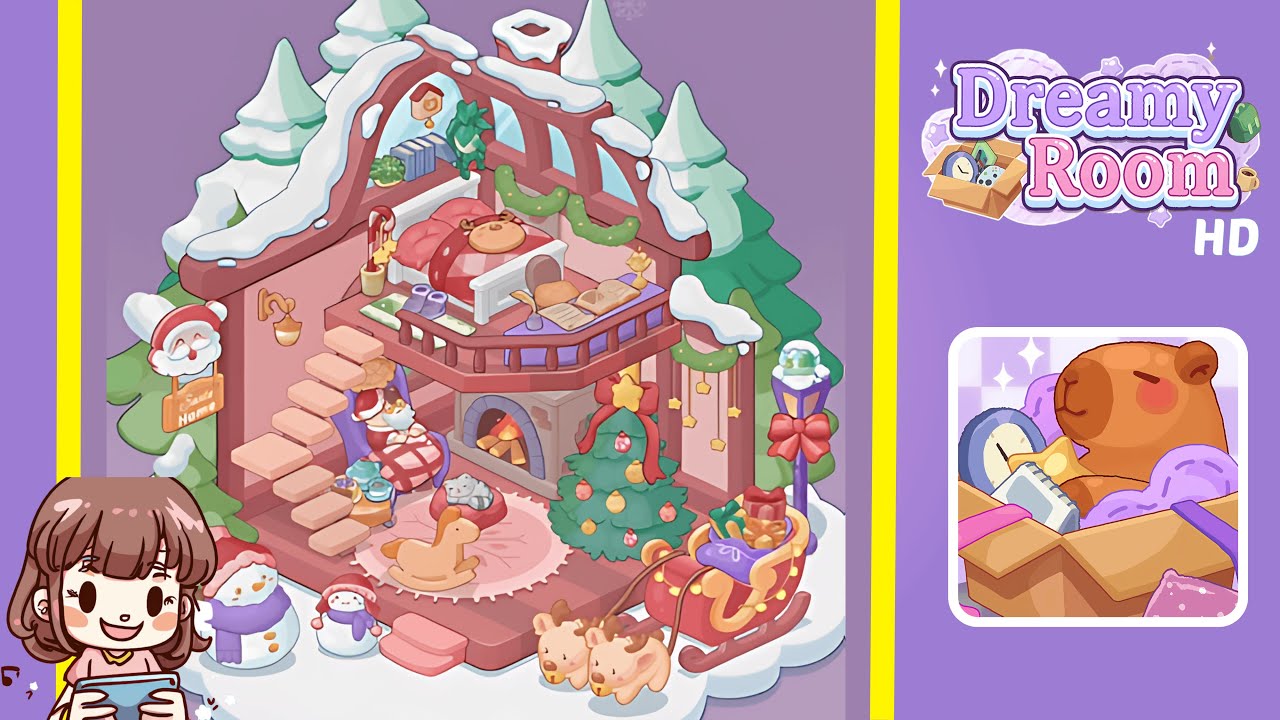
Welcome to Dreamy Room Level 213! This guide will lead you through a step-by-step process to create a festive and cozy winter wonderland, inside and out. Ensure precision in placing each item to achieve the perfect holiday ambiance.
Step-by-Step Guide
- Place the core room shell on the snowy cloud base. Carefully center the isometric shell so that the edges align with the cloud base, and ensure the roof beams sit perfectly against the top of the walls.
- Place the bed in the center of the top floor. Position the wooden bed frame in the loft area, ensuring the reindeer-themed pillow and striped duvet are correctly arranged.
- Place the shelf and wall accessories on the back wall. Add the white shelf to the rear wall, organize the books, plants, and mount the cuckoo clock centrally above the shelf.
- Place the balcony railing and accessory table on the ledge. Secure the wooden railing around the balcony and position the purple side table and its decorations, ensuring alignment with the railing.
- Place the floating staircase along the left wall. Set the wooden steps from the base to the balcony, ensuring smooth ascent and no interference with other items.
- Place the cozy corner under the staircase. Arrange the rocking chair, Santa plush, rug, rocking horse, tea set, and gray cat plush to create an inviting atmosphere.
- Place the Christmas tree and green garlands on the walls. Position the tree on the lower platform, ensuring decorations are visible, and hang the garlands symmetrically.
- Place the outdoor decorations around the snowy base. Arrange snowmen, the Santa Home sign, a lamp post, and a sleigh with gifts for an enchanting exterior setup.
- Place the snow details and finishing touches. Add snow accents to the roof and chimney, swirl snow beneath trees, and make final adjustments for a realistic winter scene.
Notes & Precautions
- Objects snap to grid points; use slow drags for precise alignment.
- Zoom in to better manage the isometric perspective.
- Leave gaps for items like the staircase and railing to avoid overlap.
- Watch out for placement errors caused by overlapping decorations.
- Monitor inventory limits to avoid placing duplicate items.
- Save your progress regularly, as there is no auto-save feature.
- Avoid rotating items excessively from their intended alignment.
Tips & Tricks
- Group decorations by zones to prevent overlapping errors.
- Use the shift key for multi-select to move adjacent items faster.
- Rotate objects in 15° increments for better alignment.
- Utilize preview mode to catch any misalignment issues.
- Screenshot layouts mid-process to remember placement patterns.
- Exercise patience, as rushing may lead to misplacements.