Dreamy Room Level 230 Walkthrough
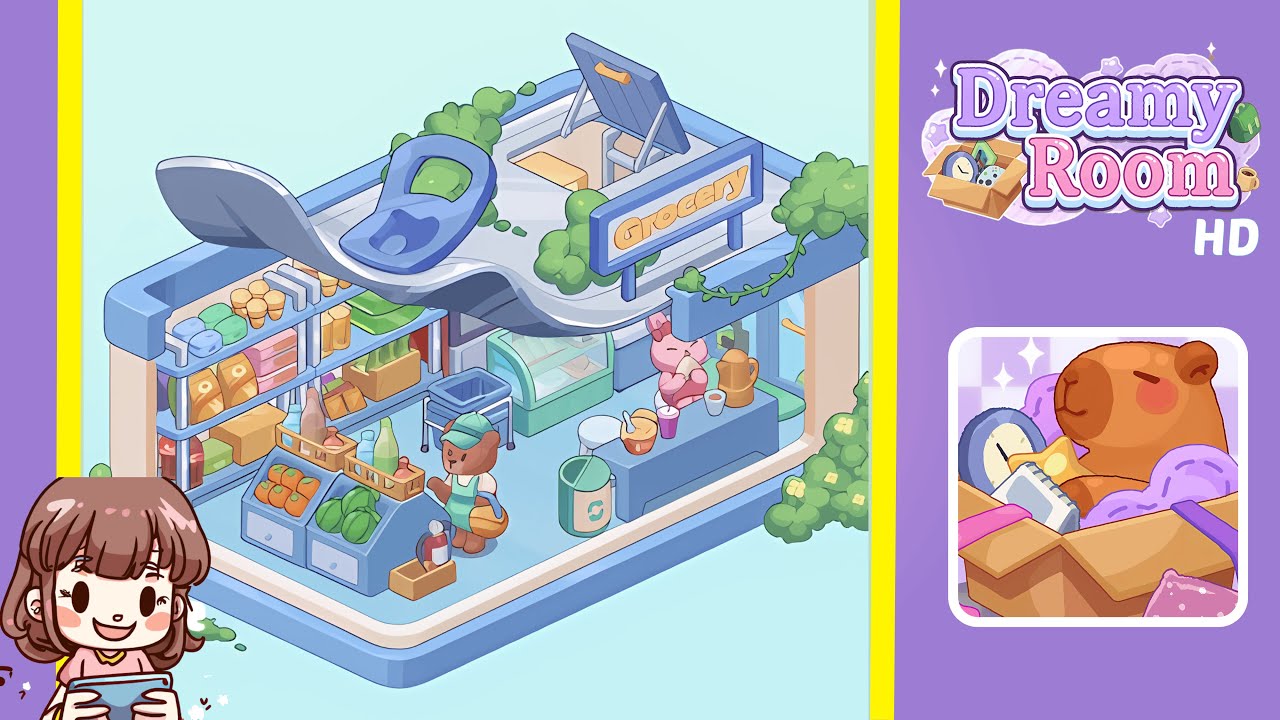
Transform the bare room into a bustling grocery scene in Dreamy Room Level 230. This step-by-step guide will provide precise placement instructions for all furniture and items to achieve the perfect layout.
Step-by-Step Guide
- Place the blue metal shelving rack on the left wall. Drag it from the item selection menu and align it flush against the left interior wall. Ensure the bottom sits directly on the floor.
- Place the ice cream cones and blue cylinder containers on the top shelf. Arrange four stacks of cones on the left and the pair of containers on the right.
- Stock the second shelf with snack packages and green bags. Position the golden snack bar boxes on the left and the pastel pink boxes on the right, adding the green bags at the end.
- Populate the bottom shelf with cans and packaged snack boxes. Place the red soda cans on the left, followed by the green and orange packages, and the yellow snack cartons.
- Place the wooden produce stand at the front left corner. Align it parallel to the shelving rack, allowing a narrow aisle for character movement.
- Fill the produce stand with tomatoes, lettuce, peppers, and beverage bottles. Arrange tomatoes in the left drawer, lettuce in the right, peppers on top, and beverage bottles in front.
- Position the small wooden fire extinguisher box and the blue rolling shopping cart beside the produce stand. Ensure visibility and proper orientation.
- Add the bear vendor and their orange basket at the room center. Offset slightly toward the produce stand with the basket aligned with the paw.
- Install the glass freezer display and counter stool behind the service counter area. Ensure the freezer aligns with the shelving rack and angle the stool slightly towards the counter.
- Place the sales counter, food and drink items, pink bunny character, recycling bin, sign, and rooftop details. Arrange the items on the counter and complete with the "Grocery" sign and vines.
Notes & Precautions
- Ensure all items do not overlap with walls or floors to prevent misplacement.
- Use the game's fine-tune controls for precise placement.
- Preview each major placement to check lighting, shadows, and collision.
- Plan your moves carefully to avoid using up your undo actions.
Tips & Tricks
- Memorize the room's layout before placing items to save time.
- Group similar items into favorites for quick access.
- Utilize rotation and fine-tune keys for precise adjustments.
- Use the undo buffer strategically to clear placement bugs.