Dreamy Room Level 281 Walkthrough
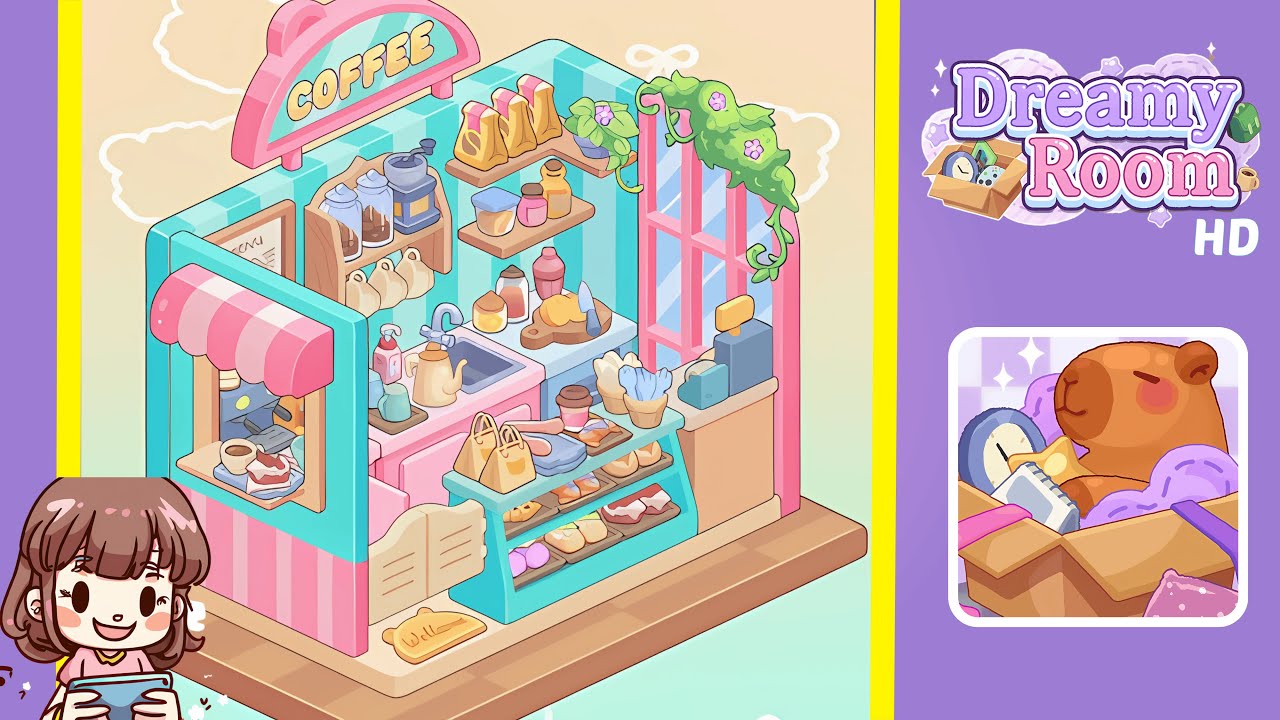
This guide provides a detailed walkthrough of Dreamy Room Level 281. Follow each step carefully to ensure precise placement of all elements within the level.
Step-by-Step Guide
- Place the striped turquoise wall at the back-right on the platform. Secure it flush against the back-right edge, ensuring the rounded top-right corner faces outward.
- Place the left service window with pink-and-white awning at the front-left, aligning its base with the previous wall tile row. Ensure the interior opening is visible from the front.
- Position the back countertop unit with sink, kettle, grinder, and shelves centered against the wall. Maintain a narrow corridor for service, and ensure spacing for the grinder.
- Place the pastry display case and trays in the front-center, organizing pastries in three rows. Make sure the case is flush with the platform edge.
- Position the right window, hanging plant, menu board, and accessories along the right wall. Ensure all items sit within the counter boundary and are slightly inset from the platform edge.
- Finish with the COFFEE sign, cash register, and welcome mat. Ensure all final elements are aligned correctly to complete the scene.
Notes & Precautions
- Use grid snap and rotate tools sparingly to avoid overlaps flagged as collisions.
- Ensure alignment with hidden peg points for shelves and signposts.
- Avoid stacking tall jars directly behind shorter ones to prevent misplacement flags.
- Save before making major rearrangements for easy reversion if rejected.
Tips & Tricks
- Begin with large structural pieces and work back-to-front to prevent obstruction.
- Use item preview ghost mode to test rotations before placement.
- Group similar items in inventory for consistent spacing during placement.
- Zoom in for pixel-perfect alignment and make micro-adjustments.
- Maintain symmetry to reduce off-center errors and enhance visual balance.