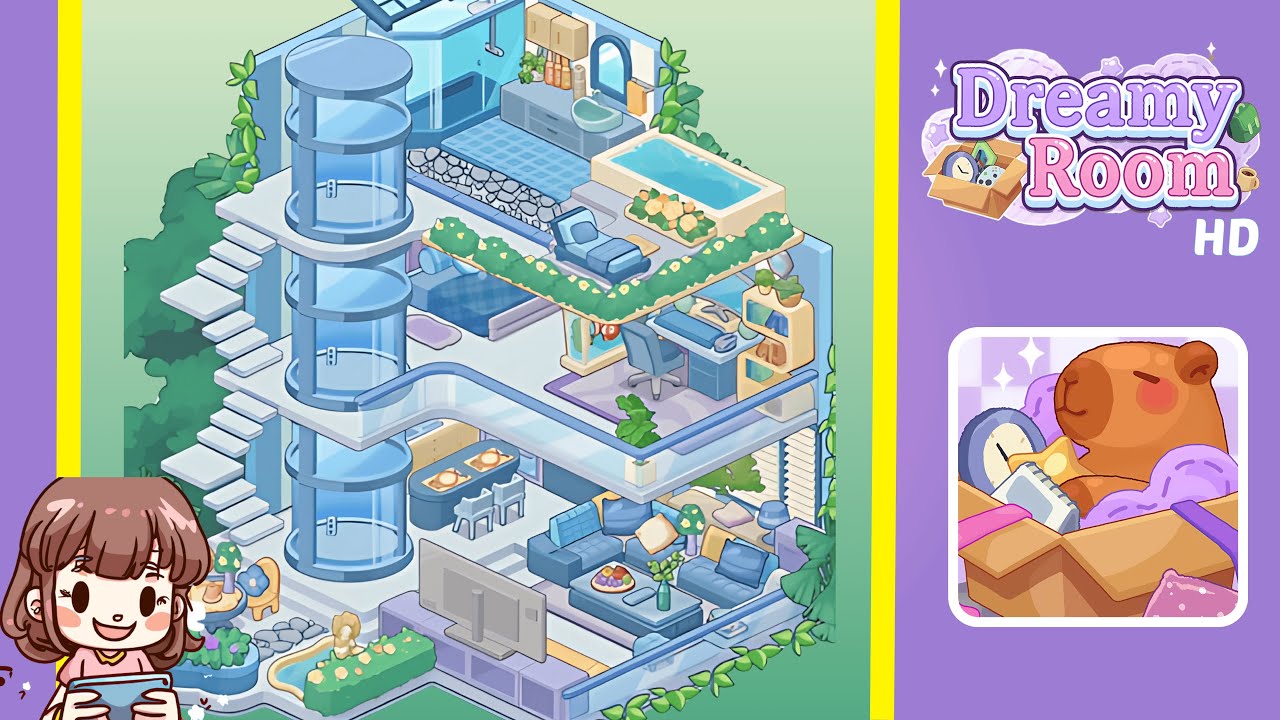
Dreamy Room Level 245 Walkthrough
Welcome to your ultimate guide for transforming the empty blueprint into a breathtaking completed space in Dreamy Room Level 245. The blank stage features a pale platform with two gently arcing, vertically striped blue-and-white walls waiting for your personal touch. Each carefully placed object unlocks a piece of cozy storytelling. Follow these detailed steps to master this level and bring every corner of your dreamy domain to life.
Step-by-Step Guide
- Place the Living Room Seating on the Lower Level by positioning the plush sky-blue sofas to form a "U" shape around the coffee table. Ensure they sit about two inches from the platform’s edge and are centered beneath the striped walls.
- Add the TV Console and Decorative Accents by sliding the pastel-blue TV console opposite the sofa arrangement. Place the TV on top and the potted fern and purple table lamp to complete the living area.
- Install the Floating Staircase and Cylindrical Elevator alongside the left wall. Ensure even spacing for the steps, and position the elevator adjacent to the staircase's mid-landing.
- Create the Dining Nook and Outdoor Terrace by setting a black dining table aligned parallel to the staircase, then position a curved planter and tea table for the outdoor space.
- Assemble the Bedroom Suite on the Middle Level by centering the bed frame against the right wall, arranging the rug, side table, and potted plant to maintain symmetry.
- Build the Home Office Overlook by positioning a gray desk against the right wall and installing a mini bookshelf with décor above it.
- Outfit the Bathroom and Spa Retreat with a corner shower aligned with the walls, a pebble-stone mosaic, and a jacuzzi tub accompanied by blooming planters.
- Add Solar Panels, Greenery, and Final Touches by positioning solar panels on the roof edge, placing ivy along the walls, and setting decorative elements such as a mini statue and water fountain within flower beds.
Notes & Precautions
- Balance and Symmetry: Uneven spacing or misaligned items can disrupt flow; use grid guides to maintain balance.
- Layer Management: Beware of objects on hidden layers and toggle visibility carefully.
- Snap-to-Grid: This feature helps with precise placement, particularly for smaller items.
- Undo and Redo: Use the undo and redo functions to correct errors without losing progress.
- Patience with Fine Adjustments: Zoom in for micro-adjustments, as tiny shifts can make a big difference.
Tips & Tricks
- Preset Favorites: Save most-used items in a “Favorites” panel to reduce search time.
- Mirror Placement: Use the mirror-placement trick to achieve perfect symmetry.
- Layer Locking: Lock completed sections to prevent accidental shifts.
- Color Swaps: Test alternate color schemes by temporarily swapping palettes.
- Camera Angles: Rotate your viewpoint to spot misaligned pieces from different perspectives.