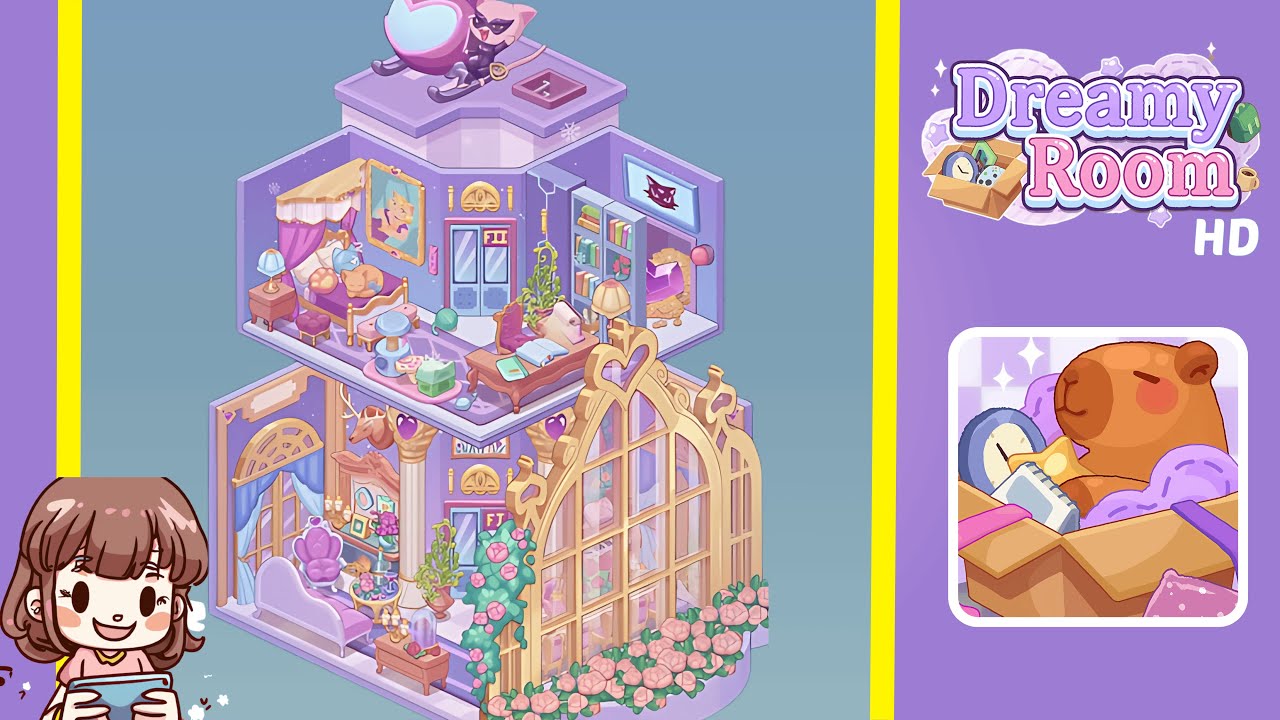
Dreamy Room Level 231 Walkthrough
Welcome to the Dreamy Room Level 231 walkthrough. In this guide, you'll transform the space into a breathtaking scene with each step, paying close attention to details that enhance the beauty and coherence of the room.
Step-by-Step Guide
- Construct the Base Platform and Backdrop Walls. Place the hexagonal floor platform centrally, aligning the lavender and pale pink checkered pattern with the camera. Attach the three backdrop walls coated in a purple gradient with speckles. Ensure seamless alignment to form a stable framework.
- Place the Cat-Themed Helicopter on the Roof. Position the pink cat-shaped helicopter on the roof ledge. Align the propeller disc and tail rotor accordingly, and ensure the cockpit windshield and golden key charm face forward. Adjust angles for correct shadow casting.
- Furnish the Bottom Entryway and Lounge. Center the double doors labeled “FI” with two Corinthian-style golden columns. On the left, position a lavender chaise lounge, a purple heart-backed armchair, and a side table with grapes and a wine glass. Align all pieces to the isometric grid.
- Create the Bottom Greenhouse Corner. On the right, install the golden-framed glass window and align the panes. Drape the rose vine along the arch and place a bench with a table and glass cloche. Perfect the arrangement for a realistic garden feel.
- Set Up the Mid-Level Bedroom Suite. Position the canopy bed in the far left corner with symmetrical drapes. Arrange the bedside table and lamp, and add the ottoman seat and scratching post to enhance the cozy atmosphere.
- Arrange the Mid-Level Workspace and Entertainment Zone. Install the double doors labeled “FII” centrally with a gold pediment. Position the desk and chair with accessories, and mount a bookcase with decorative items on the right. Finalize with precise placement for coherence.
Notes & Precautions
- Check isometric grid alignment and shadows to avoid object overlap or floating appearances.
- Ensure proper rotation angles for walls and floors to maintain perspective.
- Avoid rushing through steps as misplacement may cause backtracking.
- Watch for correct item selection from the inventory to prevent completion issues.
- Rotate the camera to find hidden snap points for secure placement.
Tips & Tricks
- Use the multi-select feature to rotate groups of objects uniformly, like columns and heart accents.
- Memorize snap points for easy alignment of items like the canopy bed and bedside table.
- Enter free camera mode for the greenhouse window to access hidden snap guides.
- Place decorative elements sequentially for speed runs without resetting the view.
- If placement issues occur, reintroduce stubborn items off-screen for correction.