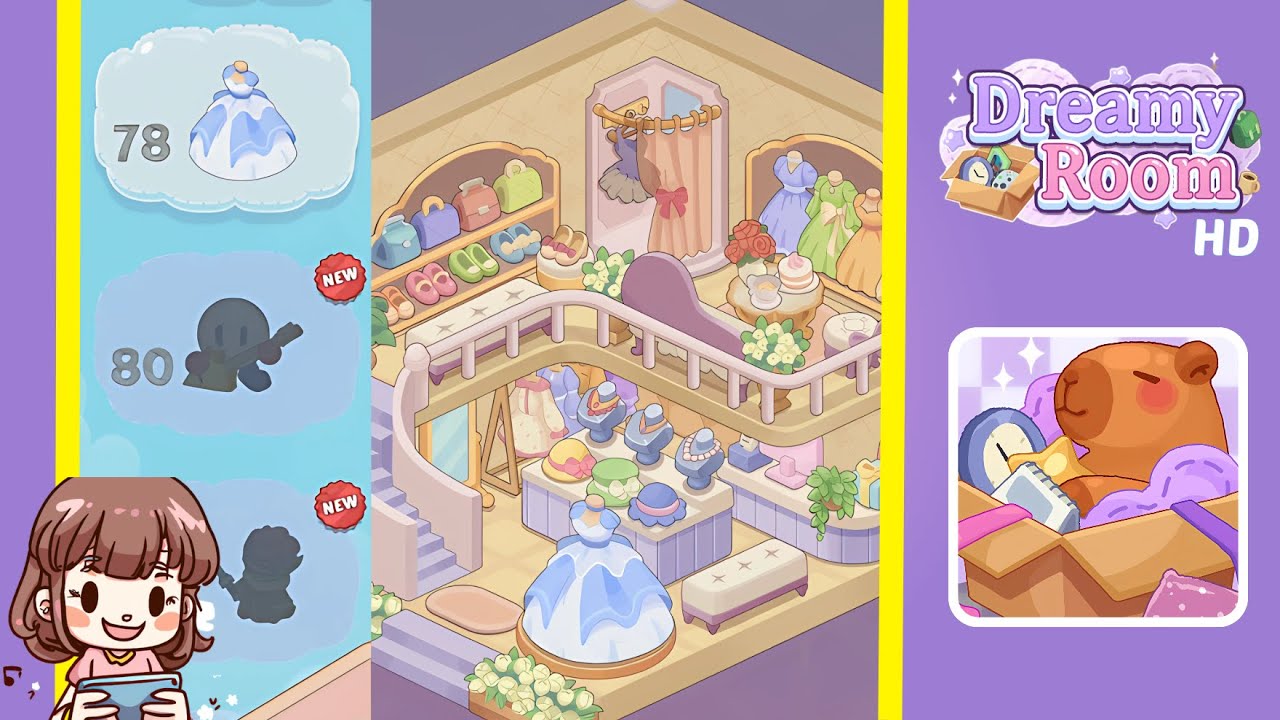
Dreamy Room Level 78 Walkthrough & Guide
Welcome to the complete guide for Dreamy Room Level 78! In this level, you'll transform an empty hexagonal space into a charming pastel boutique by finding the perfect placement for each delightful object. This walkthrough breaks down every placement step by step so you can enjoy the satisfying calm of Dreamy Room Level 78 gameplay without the guesswork.
Step-by-Step Guide
- Place the staircase against the left-side wall support post. The curved stairs on the lower-left form the entrance to your upper display area.
- Position the twin floor flower planters at the front corners of the room. These white floral planters flank the entrance to add a welcoming touch.
- Set the large potted green plant beside the base of the staircase. This leafy plant anchors the staircase visually and adds life to the corner.
- Install the purse-and-shoe display shelf against the left back wall and arrange the three colorful purses and three pairs of shoes on its tiers. The pastel purses and matching shoes complete this stylish wall feature.
- Place the rectangular hat display table at the center-left of the floor and arrange eight hat-lined stands neatly. The hat collection pops in shades of yellow, green, and pink.
- Position the round platform in the center of the floor and set the blue-and-white dress mannequin atop it. The signature gown takes center stage on its circular pedestal.
- Place the long tufted bench on the lower right side of the room. This cushioned seating faces the centerpiece display.
- Add the right-side display counter against the wall, arrange pastel gift bags on its shelves, and drape the trailing vine plant over the edge. This counter balances the left-side shelving.
- Position the jewelry display table under the mezzanine’s center, then arrange six busts with necklaces and add the small jewelry box. This glimmering collection invites players to notice the details.
- Attach the curved balcony railing along the back walls from left post to right post. The mezzanine railing creates a cozy upper-level space.
- Place the pink chaise lounge on the mezzanine floor near the left railing. This lounge invites virtual customers to relax.
- Set the small round tufted ottoman beside the chaise lounge. The ottoman completes the seating arrangement.
- Position the round tea table next to the chaise lounge and set the tea set, cake, and rose bouquet atop it. These elements add a charming tea-time vignette.
- Add the two white flower planters on either side of the balcony railing. These mirror the lower-floor planters for symmetry.
- Install the hexagonal curtain rod above the back-center alcove and hang the pink curtain with a bow. This creates the dressing room entrance.
- Place the matching hexagonal mirror inside the alcove. The dimensional mirror reflects your styling success.
- Hang the dark blue dress on the internal rod behind the curtain. This garment adds depth to the dressing area.
- Set the five pastel-colored dress mannequins across the right back shelf. These dresses in green, yellow, and peach complete the boutique vibe.
Notes & Precautions
- No timer: There’s no timer, so take your time to test placements before settling.
- Alignment matters: Watch out for misaligned items—objects not snapped properly can overlap walls and block other placements.
- Grid snapping: Make sure each item fully snaps to the grid; precise alignment is rewarded for the final layout.
Tips & Tricks
- Rotate-and-snap shortcut: Use the rotate-and-snap shortcut by holding the rotate key while placing to speed up alignment.
- Outline mode preview: Preview each furniture placement by toggling the outline mode to avoid accidental overlaps.
- Group similar items: Group plants and dress forms in your inventory to quickly cycle through objects in the UI.