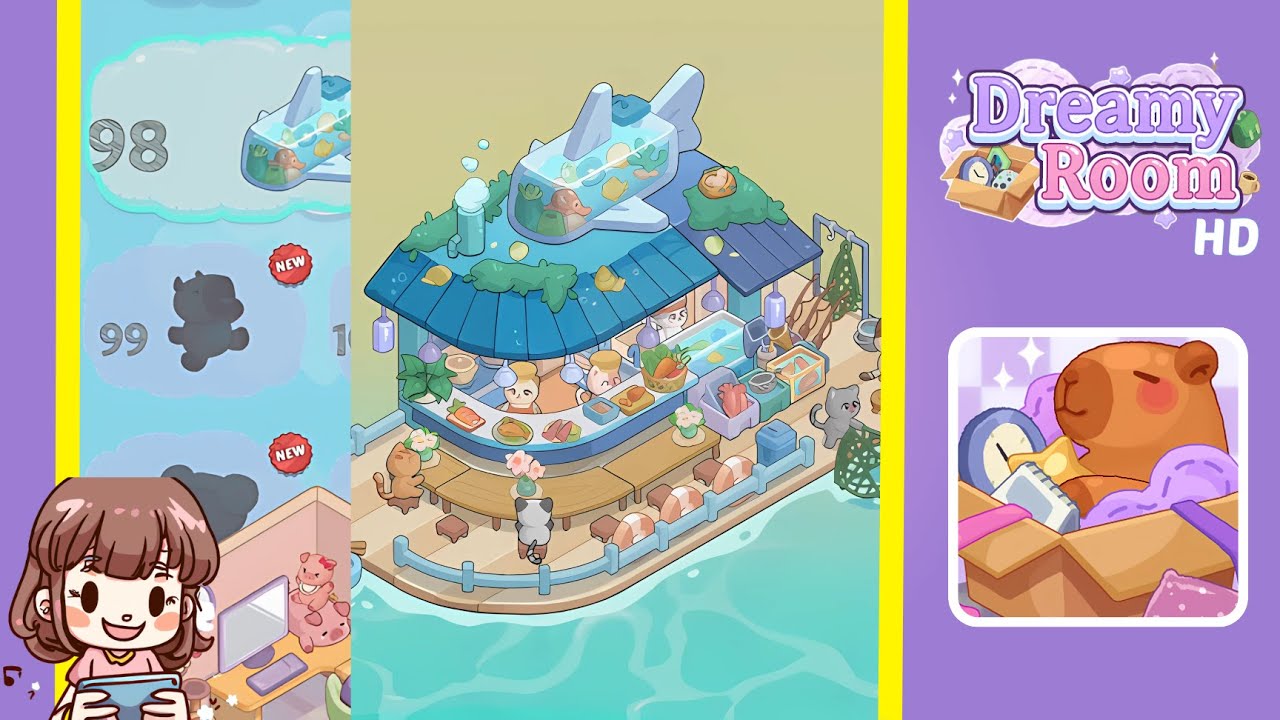
Dreamy Room Level 99 Walkthrough
Welcome to the guide for Dreamy Room Level 99. This walkthrough will provide you with a detailed, step-by-step process to transform the space into a serene seaside sushi café. Follow the instructions carefully for the best results.
Step-by-Step Guide
- Place the floating wooden platform in the center of the room, ensuring the longer edge is flush with the bottom wall and the shorter edge aligns with the right-hand wall. Ensure no part of the platform floats above the water or exceeds room boundaries.
- Position the central sushi bar with the blue-tiled roof in the back-left corner. Align it flush with the left and right interior walls, ensuring the roof peak is slightly below the top edge of the walls.
- Add the airplane-shaped fish tank on the roof ridge, two-thirds towards the back corner. Fill it with miniature tropical fish and coral, ensuring balanced visibility.
- Install the sushi bar counter with the curved, white-trimmed piece at the front edge of the building. Then, place the transparent fish display tank on the right end of the counter, ensuring proper alignment.
- Furnish the area with curved wooden benches, small backless stools, and life ring cushions in front of the sushi bar counter. Align appropriately to avoid overlaps.
- Hang soft purple lanterns evenly along the roof’s overhang and arrange seaweed patches and decorative shells on the roof and walls. Ensure alignment with valid points to avoid floating artifacts.
- Install the cat chef signpost at the front-left corner of the platform; place a small wooden rowboat on the adjacent water with oars angled diagonally.
- Arrange the fish drying rack, fishing net, bucket, and rod on the right side near the back-right corner, maintaining a natural appearance.
- Arrange food display items and ingredient baskets on the counter in a visually pleasing fan pattern, ensuring no overlap occurs.
- Place cat characters around the sushi bar and fishing area to bring the scene to life. Position them in their designated roles to enhance the immersive atmosphere.
Notes & Precautions
- Ensure precise grid alignment for platforms, buildings, and benches to avoid overlaps or floating elements.
- Always check in preview mode, using camera rotations to spot hidden clipping issues.
- Make sure decorative elements rest on valid placements to prevent floating or clipping through textures.
- Confirm clear views within the airplane fish tank and transparent fish display, ensuring interactive elements are visible.
- Save frequently to allow easy undoing or fine-tuning of misplaced elements.
Tips & Tricks
- Use the grid-snapping feature by holding the Shift key to maintain perfect alignment of key structures.
- Pre-place all decorative accents before adding characters to avoid overlap issues.
- Toggle collision preview overlay to spot problematic areas where props may clip against adjacent objects.
- Use the multi-select tool to group smaller items for easier arrangement and placement.