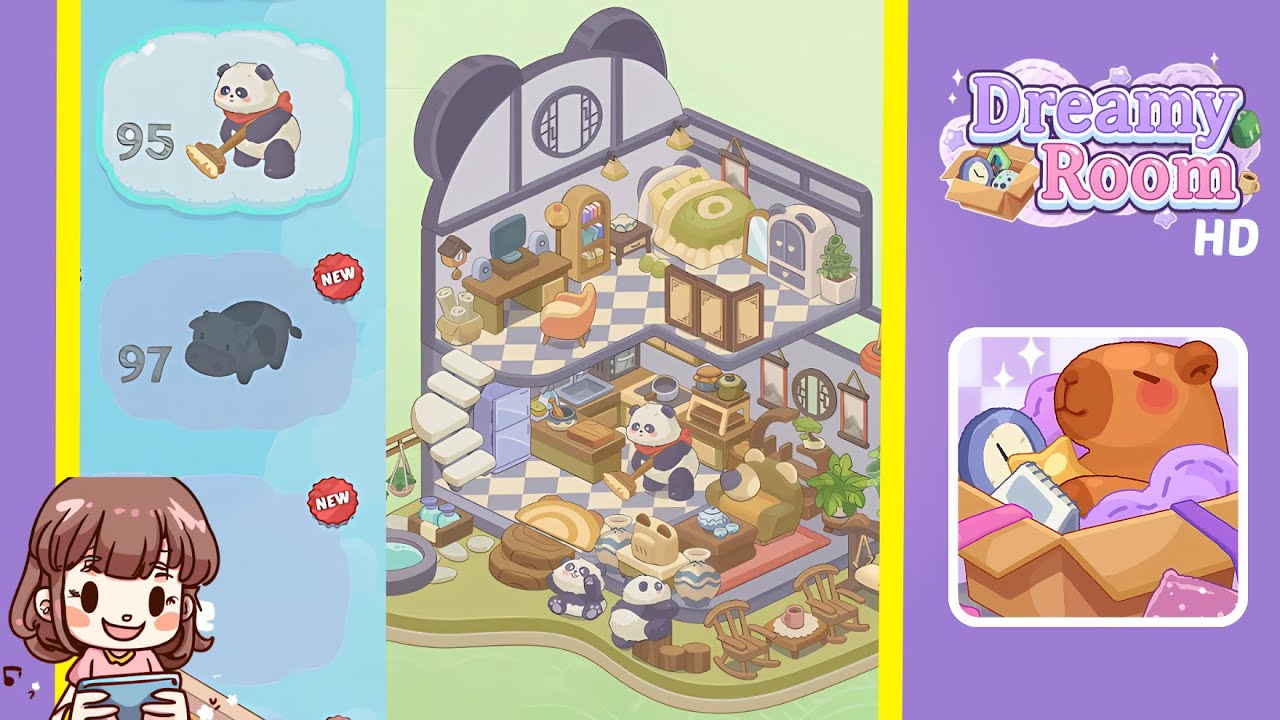
Dreamy Room Level 96 Walkthrough & Guide
Transform the empty corner cutaway into a cozy three-tiered panda-themed haven! This Dreamy Room Level 96 walkthrough will guide you through precise placement of every item—floor tiles, walls, furniture, pandas, and plants—emphasizing that Dreamy Room Level 96’s core challenge is discovering the correct spot for each cherished object. Let’s dive in.
Step-by-Step Guide
- Lay the checkered floor tile and erect the panda-ear walls. Begin by placing the purple-and-cream checkered floor tile flush against the back-left corner of the top level. Carefully align the tile until it snaps perfectly. Next, select the two tall light-gray corner wall panels shaped with panda-ear arches and position them on the left and right edges of that floor tile, ensuring symmetry.
- Install the floating white staircase on the left. Drag each of the seven white stone steps to the left wall cutaway. Adjust each step consistently using the rotate tool and slide it down until it “clicks,” ensuring a smooth diagonal ascent.
- Position the green ruffled bed and side table. On the top tier, place the green bed against the right wall, centering it beneath the arch of the panda-ear roof. Add the dark-wood side table to the left of the bed and place the white porcelain dumpling bowl on it.
- Hang the pendant lamps and scroll painting. Select the trio of yellow conical pendant lamps and hang them, evenly spaced, above the bed. Then hang the vertical scroll painting with a crimson frame on the right wall next to the bed.
- Arrange the wooden desk, computer, and accent chair. Place the wooden desk against the left wall and center it. Position the speakers symmetrically and place the pagoda lantern desk lamp in the corner. Finally, adjust the orange accent chair to face the screen.
- Add the bookshelf, decorative clock, and scroll rack. Position the arched bookshelf to the right of the desk. Mount the cuckoo-style wall clock on the left wall and place the scroll rack beside the bookshelf.
- Insert the folding screen, wardrobe, and potted plant. Deploy the folding screen at the top level's front edge, ensuring proper alignment. Place the panda-face wardrobe next to the scroll painting and position the topiary beside it.
- Fit the refrigerator, sink, stove, and kitchen island. Place the pale-blue refrigerator, sink, and stove on the middle tier in sequence. Center the kitchen island in front of the sink and arrange the cutting board and ceramic bowl on the island.
- Add cookware, tea station, and panda chef character. Set the cooking pot on the stove's front burner and position the wooden tea tray beside it. Introduce the panda chef character, ensuring it stands naturally in the kitchen.
- Decorate the ground veranda with pond, pandas, and seating. Place the stone water basin on the base level. Hang the plant rack beside the basin, arrange the ceramic jars and stepping stones, and set the panda cub figurines on the grassy patch. Then, arrange the swing bench and rocking chairs with the low table and pink tea mug.
Notes & Precautions
- Patience with Placement: Dreamy Room Level 96 hinges on exact grid alignment. If an item refuses to snap, zoom in and adjust by quarter-tile increments.
- Layer Awareness: Always check you’re on the correct tier before placing items.
- Rotation Sensitivity: Many curved or angled items require slight rotations; use the rotation handle gently.
- Undo & Reset: Reset individual items rather than the entire room to save time and frustration.
Tips & Tricks
- Snap-to-Grid Mastery: Toggle grid visibility to align items faster.
- Item Preview: Hover over an item to view its footprint and prevent accidents.
- Hotspot Sequencing: Follow the order: walls, floor, stairs, main furniture, décor accents, characters.
- Save Positions: Use the “favorite placement” feature for easy recall of decorative items.