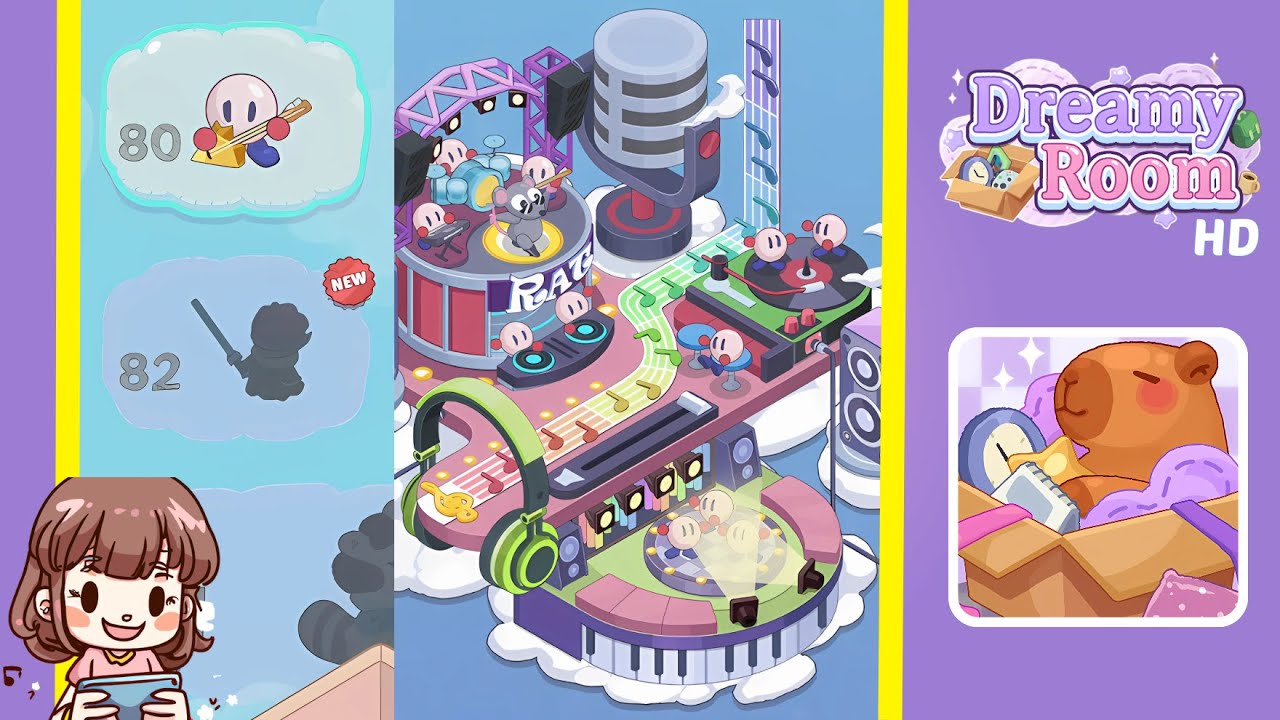
Dreamy Room Level 80 Walkthrough & Guide
Welcome to the comprehensive guide for Dreamy Room Level 80. In this level, you'll transform an empty floating platform into a vibrant musical stage. The key challenge is finding the exact spot for each item. Follow these steps carefully to complete the level.
Step-by-Step Guide
- Place the pink base platform with a bulb-lined rim on the cloud bed. Begin by selecting the large L-shaped pink platform and positioning it centrally on the white clouds. Ensure the row of yellow bulbs around the edge faces outward.
- Place the circular drum stage with a purple truss at the top-left. Pick up the round red stage encircled by a lavender metal truss with spotlights and snap it into the upper-left corner of the pink base.
- Place the blue drum kit on the drum stage. Drag the glossy blue drum set onto the drum platform, aligning the bass drum, snare, and cymbals so they sit perfectly at the center.
- Place the keyboard instrument behind the drum kit on the stage. Add the small electronic keyboard behind the drums, matching its position to the background performers in the reference image.
- Place the dancing mouse figurine on the yellow center disk of the drum stage. Select the grey mouse dancer and place it on the glowing yellow circle at the center of the drum platform.
- Place the giant microphone sculpture at the back-center of the platform. Position the oversized vintage microphone prop directly behind the drum stage in the middle of the pink base.
- Place the vertical rainbow music staff at the top-right. Slot the tall panel featuring a rainbow-striped staff and floating notes into the right corner of the platform.
- Place the left DJ turntables on the mid-left section. Move the pair of black turntables with glowing blue accents onto the mid-left edge of the pink base.
- Place the rainbow note pathway across the center of the platform. Lay the curving floor strip of multicolored musical notes from the drum stage toward the right side to create a continuous path.
- Place the green headphones prop on the left edge of the rainbow pathway. Hook the oversized neon green headphones onto the side of the rainbow path, letting one earpiece dangle off the platform.
- Place the vinyl record crates and circular disco platform at the front-center. Under the center of the walkway, insert the row of purple record storage boxes, then place the round disco floor with tiny dancing characters above them.
- Place the piano keyboard trim along the front underside of the pink platform. Attach the black-and-white piano key border under the front edge, ensuring each key aligns flush with the platform.
- Place the large purple speakers on clouds at the left and right sides. Drag the tall twin speakers onto separate cloud patches at either side of the base, mirroring their positions in the reference.
- Place extra small cloud accents around the edges of the scene. Finally, scatter the remaining white cloud puffs around the platform's perimeter to complete the cozy sky setting.
Notes & Precautions
- Always ensure each piece snaps fully into place; the level will not accept partial placements.
- If two items overlap incorrectly, revert one and try repositioning it carefully to avoid blocking snap points.
- Some props can rotate; use the rotation tool sparingly to match the exact orientation.
- Manually save your progress after major placements to prevent loss if the auto-save feature is disabled.
Tips & Tricks
- Memorize the final layout before starting to speed up placement.
- Use the "Auto-align" feature for rough placement, then fine-tune each item manually.
- Begin with larger objects first to clear space and reduce visual clutter.
- Zoom in on close-up views for precise alignment of small decorations like the dancing mouse.
- The ultimate satisfaction comes from uncovering the perfect spot for every object. Good luck completing the level!