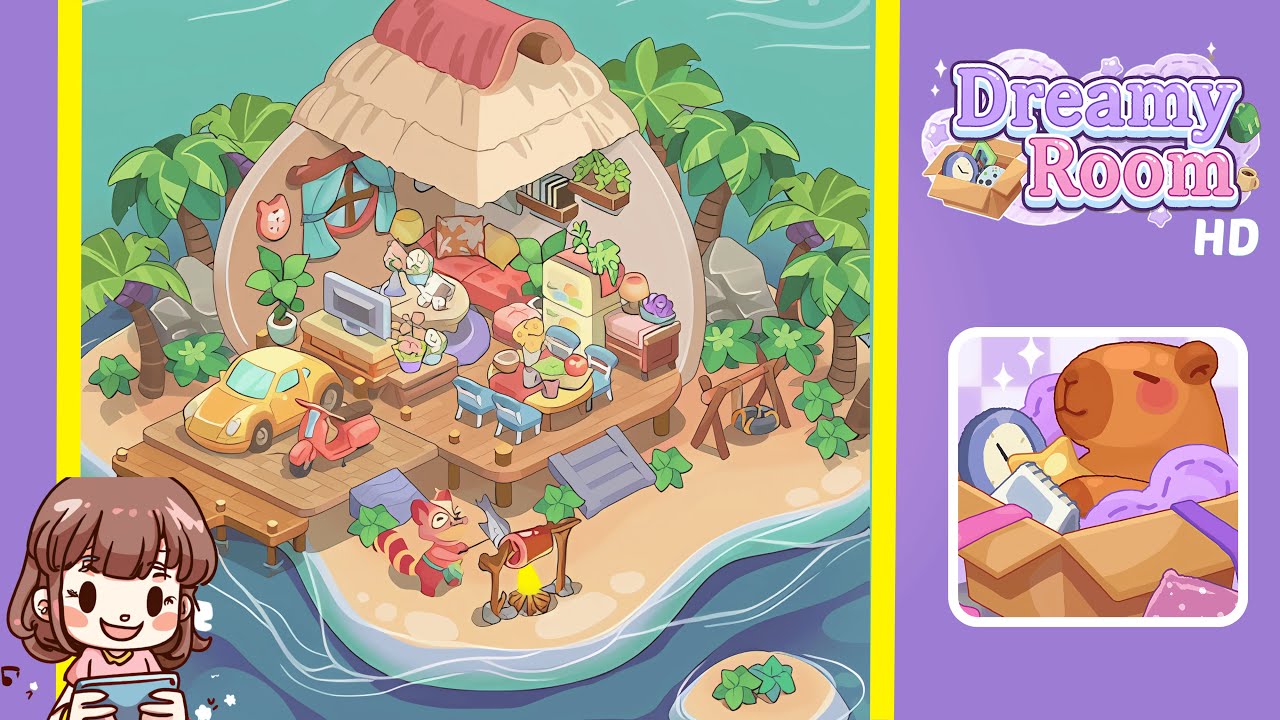
Dreamy Room Level 214 Walkthrough
Welcome to the Dreamy Room Level 214 walkthrough, where you'll craft a stunning island escape. Follow these steps to successfully create your paradise.
Step-by-Step Guide
-
Place the Deck Foundation: Begin by laying down the deck foundation. Use the wooden plank platform, aligning it with the shell's bottom edge. Position the six golden stump posts evenly along the front and sides, spacing them four planks apart.
-
Install the Shell House and Thatched Roof: Drag the half-shell walls to the deck’s rear corners to form a dome shape. Add the beige thatched roof panel, topped with a red cloth element, ensuring proper alignment.
-
Add Wall Details and the Purple Rug: Attach the round window with blue curtains to the left shell wall. Mount the cat-face plaque and the floating wooden bookshelf, then place the circular purple rug on the floor for balance.
-
Position the Seating and Coffee Table: Place the floral sofa against the back wall, with throw pillows. Center the low wooden bench two planks in front of the sofa, and add a small round coffee table on the purple rug.
-
Set Up Entertainment and Storage: Place the flat-screen TV on the bench and position the pastel green fridge to its right. Add a small potted plant and grapes on the fridge, with a nightstand and lamp beside it.
-
Arrange Dining and Outdoor Spaces: Position the round yellow dining table and surround it with chairs. Add the yellow car and red scooter, and set up the swing frame and rustic cooking spit.
Notes & Precautions
- Alignment Matters: Ensure precise placement using the grid overlay.
- Collision Checks: Preview item placement to avoid overlap.
- Layer Order: Place background elements before decorations.
- Undo Function: Use sparingly to prevent resetting placements.
- Save Often: Manually save due to possible autosave lag.
Tips & Tricks
- Snap to Grid: Use for perfect alignment of deck planks and corner posts.
- Use Preview Mode: Check for overlapping issues before placing items.
- Group Selections: Multi-select similar items for simultaneous placement.
- Color-Match Palette: Open the color wheel for matching hues.
- Reference Completed Layout: Use screenshots to catch misplacements early.