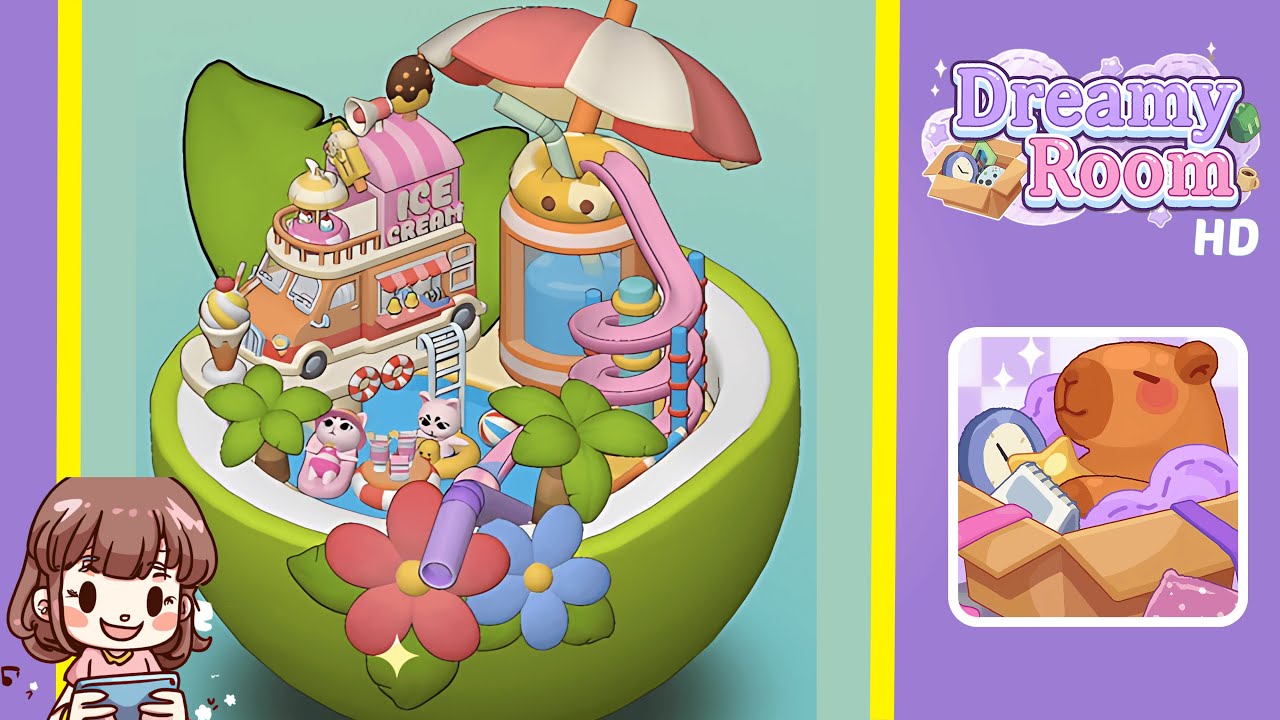
Dreamy Room Level 200 Walkthrough
Welcome to the Dreamy Room Level 200 walkthrough, providing a detailed guide to successfully complete this spatial puzzle by precisely placing each item in the right spot to create a harmonious scene.
Step-by-Step Guide
- Fill the Bowl with Pool Water. Begin by pouring the pool water into the lime-green half-bowl container until it is just below the white inner rim. Ensure it is perfectly level for subsequent steps by using the “fine adjust” feature, and check from multiple angles for uniformity.
- Position the Ice Cream Truck on the Left Rim. Place the pastel orange ice cream truck on the left inner rim of the bowl, angling it so the front bumper aligns with the curve. Adjust until stable with the vanilla swirl cone clear of the rim.
- Place the Ladder and Life Rings at the Pool Edge. Attach the white ladder at the left side, ensuring it stands upright, and position the life rings—one beneath the ladder and one near the truck—parallel to the waterline.
- Pour in and Level the Central Table with Drinks. Position the small life-ring table with pastel drink cups in the center of the pool. Adjust the spacing of the cups to avoid overlap, ensuring the table floats evenly without tilting.
- Add the Beach Ball and Cat-Faced Drink Jar with Umbrella. Place the beach ball to the right of the floating table. Position the oversized drink jar with a cat-face rim on the right inner rim, angled correctly along with the straw and umbrella to avoid clipping.
- Attach the Pink Spiral Slide to the Drink Jar. Snap the pink spiral slide to the rim beside the drink jar, allowing it to coil neatly around the jar while ensuring no parts intersect.
- Arrange the Palm Trees Around the Pool Edge. Position the tallest tree behind the ice cream truck and the two smaller ones beside the slide, ensuring even spacing and natural shadow falls.
- Position the Cat Characters on Floating Props. Place the pink cat on the pink lounger and the white cat in the yellow duck ring, aligning them carefully for balance and proper direction.
- Decorate the Front with Large Flowers. Place the red and blue flowers at the front of the bowl, overlapping slightly, ensuring petals do not clip through the bowl's wall.
Notes & Precautions
- Balance Is Key: Achieve perfect balance and avoid clipping by checking from multiple angles.
- Use Fine Adjustments: Utilize fine-tweak controls for precise movements to maintain alignment.
- Layer Order Matters: Ensure correct draw order to avoid occlusion of objects like trees hiding slides or cats.
- Snap Settings: Use snap-to-grid sparingly to maintain organic placement.
- Camera Angles: Rotate your viewpoint to reveal hidden intersections and ensure no props extend outside the bowl boundaries.
Tips & Tricks
- Pre-Plan Your Layout: Sketch the scene before executing to minimize trial-and-error.
- Group Similar Props: Use grouping tools to move objects like the ice cream truck and life rings for efficient alignment.
- Shortcut Keys: Memorize rotate-and-nudge shortcuts for quick placement adjustments.
- Shadow Testing: Enable dynamic shadows to see lighting interactions with each prop and adjust heights accordingly.
- Use Preset Viewpoints: Save custom camera angles to quickly alternate between views for fast inspections.