Dreamy Room Level 198 Walkthrough
Dreamy Room Level 198 builds on the relaxing gameplay described in the official Dreamy Room instructions.
Step-by-Step Guide
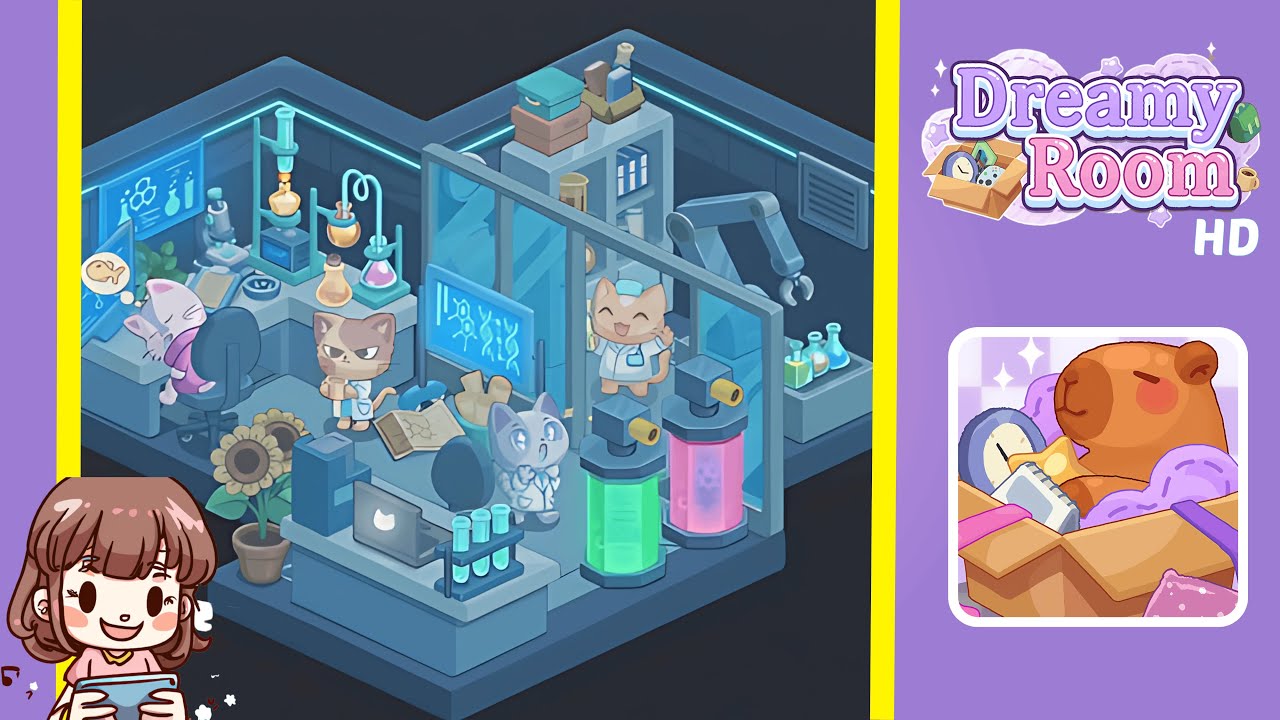
- Place the primary workstation desk in the left corner. Begin by dragging the large modular laboratory desk into the far-left corner of the room, flush against both adjacent walls. Ensure the desk's back edge aligns perfectly with the vertical wall panels, and snap it into place squarely. Then, orient the rolling chair to face the player's viewpoint at a slight angle. Position the sleek computer monitor to display a glowing blue molecular schematic on the left side of the desk, and set the black-and-silver microscope on the tabletop to its right. Finally, place the trio of round-bottom flasks—one yellow, one pink, one orange—on their stands along the desk’s rear ledge. Mastering this arrangement is critical to progress.
- Add the potted sunflower and central laptop station on the front platform. Start with dragging the bright potted sunflower onto the lower front extension of the platform, slightly left of center. Position the slim silver laptop in the front-center of the platform, with its lid closed and logo visible. Set the test-tube rack with three turquoise tubes immediately to the right of the laptop, ensuring the rack sits level. Ensure the plant’s pot does not obscure the laptop’s logo for visual balance.
- Set the blueprint and excited lab assistant cat near the center. Lay the open blueprint sheet on the central platform, aligning its diagrams to face the back wall. Place the light-gray cat with wide eyes to the right of the blueprint, standing upright and looking toward the sky, ensuring its paws rest comfortably without clipping into the blueprint.
- Position the neon-lit chemical tanks and robotic arm. Drag the green-lit tank onto the right side of the central platform, aligning its base with the floor edge. Place the pink-lit cylinder immediately to its right, maintaining a consistent gap between them. Attach the metallic robotic arm to the ceiling track above the tanks, positioning it over the green cylinder. Rotate the arm to mirror the poised position shown in the game, ensuring no overlaps.
- Install the back wall glass partition, storage shelf, and lab supervisor cat. Slide the transparent glass partition into the rear-right section, snapping it against the wall. Place the gray storage shelf behind the glass, resting its feet on the floor platform. Stack three storage boxes on top, with the teal box at the top, pink beneath, and a tan tray to the side. Add two blue binders on the middle shelf and three reagent jars on the right shelf slot. Position the cheerful orange cat behind the glass door, with paws raised.
Notes & Precautions
- Collision Detection: The game’s main challenge is determining the correct placement for each object. Any overlap will prevent completion.
- Snap Guides: Use the snap grid to align edges perfectly. Disabling it gives finer control but increases misalignment risk.
- Rotation Limits: Some objects rotate at 45° increments. Rotate slowly and wait for rotation icons before confirming placement.
- Undo vs. Reset: Undo the last move if needed; a full reset clears all objects. Use it sparingly to avoid redoing arrangements.
- Visual Reference: Keep the completed image visible on a second device, as there are no in-game hints.
Tips & Tricks
- Work from the Back Out: Place back wall elements first to establish fixed boundaries before adding movable decor.
- Use Zoom: Zoom in for small items like test tubes or lenses to ensure pixel-perfect alignment.
- Leverage Edge Snapping: Turn on edge snapping to align objects automatically to walls and floor seams.
- Color-Match Check: Ensure glowing elements match the reference image exactly, as color discrepancies can prevent level completion.
- Save Before Finalizing: If available, save the layout before placing the last object to avoid repeating the sequence.