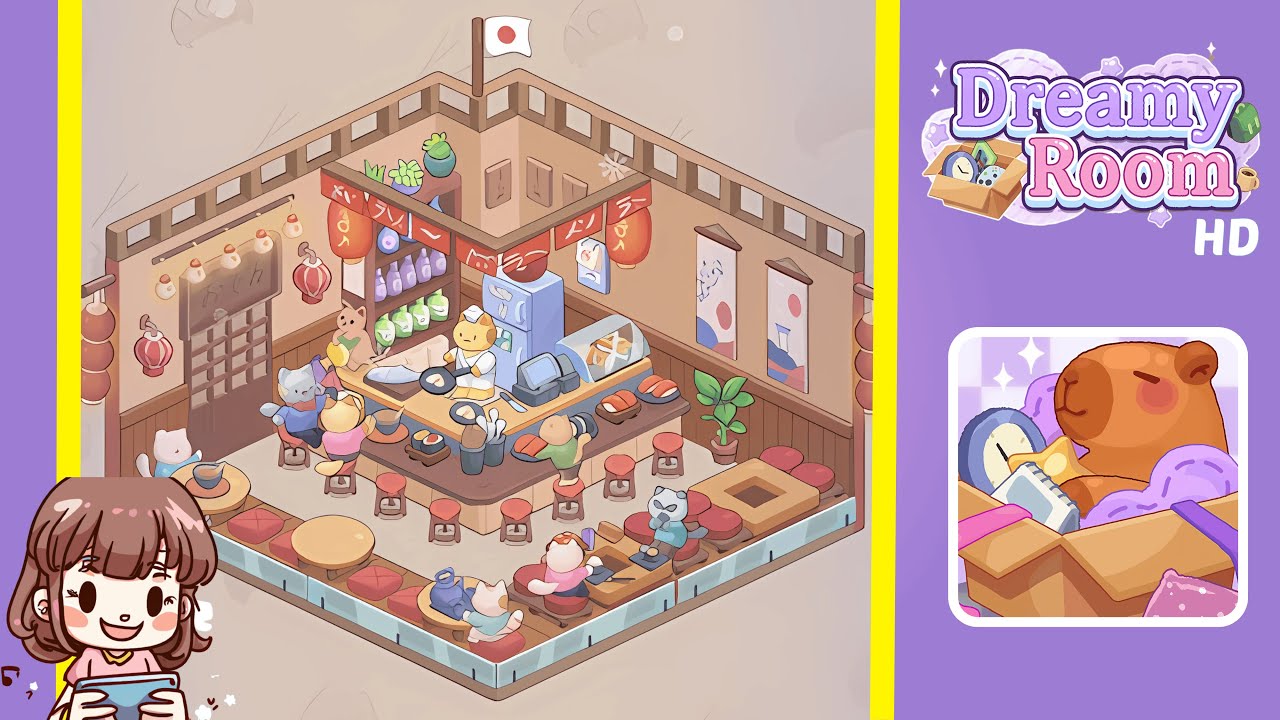
Dreamy Room Level 191 Walkthrough
Welcome to the Dreamy Room Level 191, where you'll transform the setting into a cozy ramen café with delightful feline guests. This walkthrough will guide you through the precise arrangement of furniture and objects to ensure a complete and harmonious décor.
Step-by-Step Guide
- Place the sliding wooden lattice door on the left wall. Ensure it aligns with the wooden wainscoting and center it within the left panel. Add a wooden signboard above it and finish with five paper lanterns and two ornamental lanterns.
- Place a three-tier wooden shelving unit in the back corner. Top it with succulents, arrange purple sake bottles and green jars, and affix three menu boards. Position the national flag atop the adjoining corner pole.
- Decorate the right wall with two vertical scroll paintings and place a potted plant. Align the paintings and the plant for a seamless look.
- Position the light blue refrigerator against the rear wall. Add a paper calendar and hang red Noren banners. Secure a large red paper lantern beneath the center beam.
- Add a glass sushi display case and two cash registers to the counter. Ensure proper spacing and alignment for accessibility.
- Introduce the chef cat figurine and cooking utensils on the counter. Position the yellow chef cat and arrange two frying pans as described.
- Arrange sushi platters and utensil containers on the counter. Ensure the presentation and accessibility of sushi and utensils.
- Set up seating with five stools and place cat diners as instructed. Add walkway tables with appropriate items and feline guests.
Notes & Precautions
- Achieve a polished layout by following precise placement rules and avoiding overlapping objects.
- Check for z-order conflicts to prevent smaller items from being obscured by larger ones.
- Ensure all seating and tables are configured, as completion requires every dining spot to be set.
- Avoid blocking window overlays to allow snowflake animations to be visible.
Tips & Tricks
- Use the copy-and-paste tool for easy duplication of items like stools or sushi platters for perfect spacing.
- Enable the 1° rotation feature for subtle adjustments along walls and symmetry.
- Pre-stage sushi plates on one side of the counter to reduce placement errors.
- Adjust the camera angle to reveal hidden gaps for flawless alignment.