Brain Test Level 375 Walkthrough: Pinch out the iron ball on the left to make it bigger
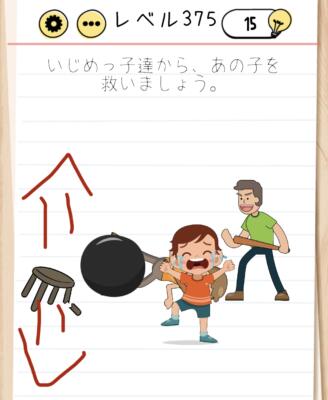
Brain Test Level 375 Walkthrough: Pinch out the iron ball on the left to make it bigger
Complete Walkthrough, Step-by-Step Explanation, and Common Mistakes
🧩 Level Info
- Level Number: 375
- Question: Pinch out the iron ball on the left to make it bigger
- Difficulty: Easy
🎯 Objective
Use two fingers to pinch out the small iron ball on the left to make it larger.
📝 Steps to Solve
- Check the small iron ball on the left side of the screen.
- Gently place two fingers on the iron ball (multi-touch).
- Like enlarging a photo on your smartphone, slide your two fingers outward to pinch out.
- Repeat the pinch-out motion several times until the iron ball gradually becomes larger.
- Once it becomes sufficiently large, the stage will be cleared.
💡 Hints
- Instead of moving the iron ball itself, think about changing its 'size'.
- Recall the operation used to enlarge images or maps on a smartphone screen.
- Place two fingers on the iron ball on the left and try a pinch-out gesture to spread them outward.
🧠 Explanation and Points
This stage is a trick problem that directly uses the 'pinch out (expand gesture with two fingers)' on the object. Players often try to drag the iron ball or look for other gimmicks, but there isn’t anything else movable on the screen, so the point is whether they can notice the smartphone-specific 'enlarge/reduce' operation. In the Brain Test series, there are several problems that use pinching in and out to change the size of objects, and this level serves as an application and review. No special order or timing is required, and the iron ball will naturally grow larger if you pinch out correctly, resulting in a clear.
🔍 Common Mistakes
- Trying to move the iron ball by dragging with one finger.
- Attempting to enlarge the iron ball by tapping repeatedly.
- Swiping left, right, up, or down to see if the ball rolls or grows larger.
- Pinching out on other parts of the screen (such as the background) and assuming the ball doesn’t change.
- Suspecting UI buttons, such as the settings or hint buttons.
🎉 Advice After Clearing
If you realized the idea of directly 'enlarging' the iron ball, well done. There are similar pinch-in and pinch-out tricks in other stages, so remembering this will benefit you in future stages.