Brain Test Level 357 Walkthrough: Make Snow Fall from Color-Changing Clouds
Brain Test Level 357 Walkthrough: Make Snow Fall from Color-Changing Clouds
Complete Guide, Step-by-Step Explanation, Common Mistakes
🧩 Level Info
- Level Number:357
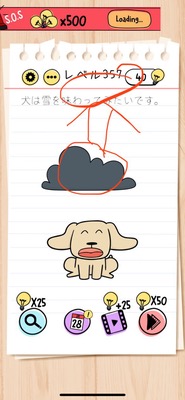
- Objective:Swipe upwards on clouds; when their color changes, tap to make it snow
- Difficulty:Easy
🎯 Objective
Operate the clouds correctly to make it snow.
📝 Steps to Solve
- Locate the cloud near the center of the screen.
- Grab the cloud with your finger and slowly swipe it upwards.
- While moving the cloud upwards, pay attention to the change in cloud color.
- As soon as the cloud color changes, release your finger and tap the cloud immediately.
- Successfully tapping at the right timing will cause snow to fall from the cloud and clear the stage.
💡 Hints
- First, consider the cloud as a "movable object".
- Try swiping the cloud upwards instead of left or right.
- Observe not just movement but watch for "color change" as a cue.
- Once the color changes, quickly tap the cloud at that moment.
🧠 Analysis & Key Points
This stage is a timing-based puzzle that requires an unusual action (swipe + timing tap) for the on-screen object. Players are not supposed to just tap the cloud, but first need to change its position with a swipe, then confirm the visual hint of the "cloud color change". When the color changes, it indicates that "it's the right time now", and tapping it in that moment triggers snowfall. In Brain Test, patterns where moving the object is followed by requiring another action are common, and this level applies that concept. It tests your observance and slight reflexes to timing taps.
🔍 Common Mistakes
- Only tapping the cloud without swiping, waiting for snow without doing anything.
- Swiping the cloud left or right or down, and mistakenly thinking nothing happens.
- Failing to notice the color change after swiping the cloud upwards and leaving it idle.
- Being slow to tap after the color change and missing the timing.
- Considering other objects on the screen (like the sun or mountains) as clues and trying to manipulate them.
🎉 Post-Clear Advice
You successfully operated the cloud to make it snow. Getting used to sensing color changes and timing will be beneficial in future levels. In the next stage, also pay attention to whether visual changes or movements are 'signals'.